
1. Introduction
This manual provides comprehensive instructions for the assembly, operation, and maintenance of your CaDA C61001 2-in-1 Set American M1A2 SEP Abrams Remote Control Tank. This advanced building set allows you to construct two distinct models: a tank with a smooth pipe cannon (Model A) or an air force vehicle (Model B). Both models are fully remote-controlled and motorized, offering an engaging building and play experience.
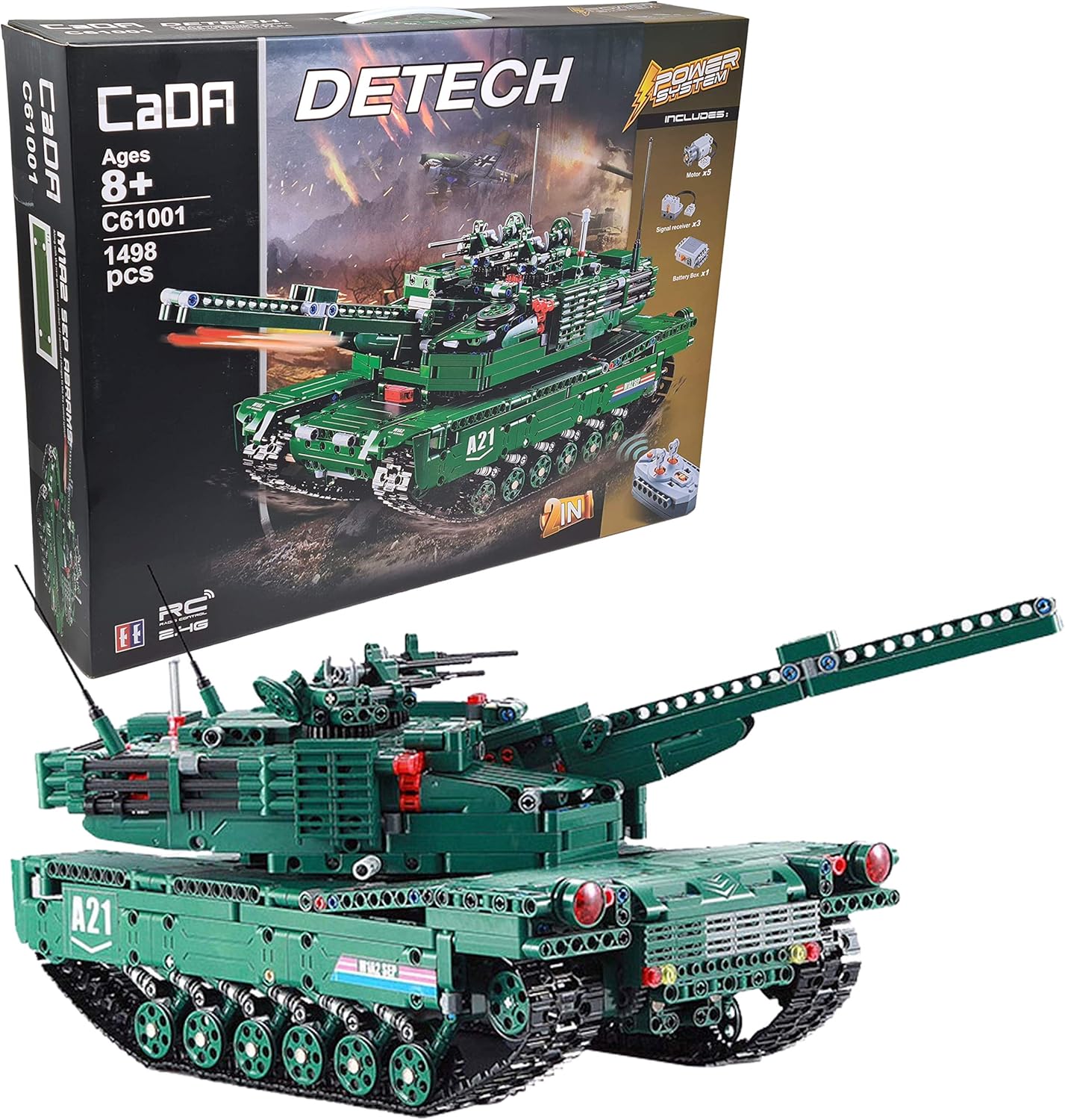
Image 1.1: The CaDA C61001 2-in-1 Set, showing the product packaging and the assembled M1A2 SEP Abrams tank model.
2. Safety Information
Attention: This product contains small parts and is a toy. Adult supervision is recommended, especially during assembly and operation, to prevent choking hazards or misuse.
- Keep small parts away from children under 3 years of age.
- Do not ingest any components.
- Ensure batteries are inserted with correct polarity.
- Do not mix old and new batteries, or different types of batteries.
- Remove batteries if the product will not be used for an extended period.
3. Package Contents
Verify that all components are present before beginning assembly:
- 1498 building pieces
- Printed instruction manual (331 pages) for both Model A and Model B
- 1 Battery Box
- 3 Signal Receivers
- 5 Motors
- 1 Remote Control (2.4 GHz)
- 112 chain links (35mm wide)
- 16 wheels (30mm)
- 1 sticker set (7 stickers)
- 1 AA battery (for initial setup, additional batteries required)

Image 3.1: The back of the product box, illustrating the included power system components: battery box, signal receivers, and motors.

Image 3.2: The comprehensive instruction manuals and the included sticker sheet for detailing the models.
4. Product Features
- 2-in-1 Set: Build either Model A (Tank with smooth pipe cannon) or Model B (Air Force vehicle).
- Fully Remote Controlled: Control movement, turret rotation, cannon tube alignment, and projectile firing.
- Motorized Functions: Equipped with 5 motors and 3 signal receivers for dynamic operation.
- Projectile Firing: Cannon can fire up to 6 projectiles in a row (Model A).
- Chain Drive System: Realistic tank movement with left and right chain drives.
- Compatibility: Compatible with LEGO Technic building blocks and elements.
- Educational Value: Promotes construction skills, engineering skills, logical thinking, motor skills, and problem-solving.
5. Assembly and Setup
5.1. Assembly Process
Follow the detailed, printed instructions provided in the box. The manual is 331 pages long and guides you through the construction of both Model A and Model B. You will first build a common chassis platform, after which you can choose which model to complete.
5.2. Battery Installation
The product requires batteries for its motorized and remote control functions.
- Battery Box: Requires 6 x AA batteries (not included). Open the battery compartment on the battery box, insert batteries according to polarity markings, and close securely.
- Remote Control: Requires 2 x AA batteries (not included). Open the battery compartment on the remote control, insert batteries according to polarity markings, and close securely.
- An initial AA battery is included, but additional batteries are required for full operation.
Ensure all power system components (battery box, signal receivers, motors) are correctly connected as per the assembly instructions.
6. Operating Instructions
Once assembled and batteries are installed, you can operate your CaDA C61001 model using the 2.4 GHz remote control.
6.1. Pairing the Remote Control
Turn on the battery box on the model and the remote control. The devices should automatically pair. If not, refer to the specific pairing instructions in the printed manual.
6.2. Control Functions (Model A: Tank)

Image 6.1: The CaDA C61001 Tank (Model A) with its remote control, ready for operation.
- Forward/Backward: Use the designated joystick/buttons on the remote control to move the tank forward or backward.
- Turn Left/Right: Control the individual chain drives to steer the tank.
- Turret Rotation: Use the remote control to rotate the tank's turret 360 degrees.
- Cannon Tube Alignment: Adjust the elevation of the cannon tube.
- Fire Projectiles: Press the fire button to launch up to 6 projectiles in sequence.
6.3. Control Functions (Model B: Air Force Vehicle)
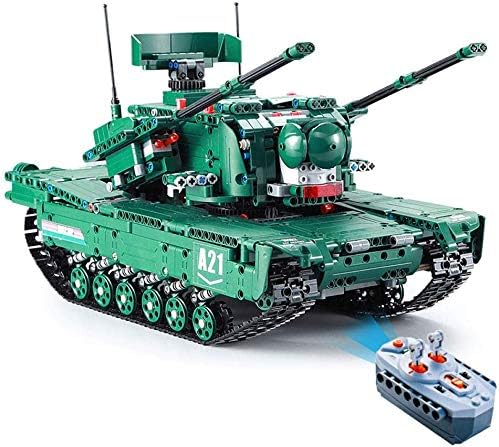
Image 6.2: The CaDA C61001 Air Force Vehicle (Model B) with its remote control, showcasing its alternative configuration.
- Specific control functions for Model B will be detailed in the printed instruction manual, typically involving movement and any unique features of this configuration.
7. Maintenance
To ensure the longevity and optimal performance of your CaDA C61001 set:
- Cleaning: Wipe the model gently with a dry, soft cloth to remove dust. Do not use water or chemical cleaners.
- Storage: Store the model in a cool, dry place away from direct sunlight and extreme temperatures.
- Battery Care: Remove batteries from the battery box and remote control if the model will not be used for an extended period to prevent leakage.
- Component Check: Periodically check for any loose or damaged parts and reattach or replace as necessary.
8. Troubleshooting
| Problem | Possible Cause | Solution |
|---|---|---|
| Model does not respond to remote control. |
|
|
| Motors are weak or not moving. |
|
|
| Cannon does not fire projectiles. |
|
|
9. Specifications
| Attribute | Detail |
|---|---|
| Model Name | C61001 |
| Item Model Number | C61001W |
| Brand | CaDA |
| Number of Pieces | 1498 |
| Product Dimensions (L x W x H) | 56 x 43 x 11 cm |
| Product Weight | 3.7 kg |
| Material Type | Acrylonitrile Butadiene Styrene (ABS) |
| Color | Green |
| Remote Control Type | 2.4GHz |
| Battery Requirements (Model) | 6 x AA batteries (not included) |
| Battery Requirements (Remote) | 2 x AA batteries (not included) |
| Manufacturer Recommended Age | 12 years and up (Manufacturer Minimum Age: 144 months) |
| Educational Objectives | Construction Skills, Engineering Skills, Logical Thinking, Motor Skills, Problem Solving Skills |
| Release Date | 1 Aug. 2019 |
10. Warranty and Support
Specific warranty information for the CaDA C61001 set is typically provided within the product packaging or on the manufacturer's official website. Please refer to these resources for details regarding warranty coverage and terms.
For technical support, missing parts, or further assistance, please contact CaDA customer service through their official channels. Contact information can usually be found on the product packaging or their website.