
1. Introduction
Thank you for choosing the KDK M40MS Wall Fan. This manual provides essential information for the safe and efficient installation, operation, and maintenance of your new wall fan. Please read these instructions thoroughly before use and retain them for future reference.
The KDK M40MS is a 16-inch wall-mounted fan featuring a wireless remote control, 3-speed settings, oscillation control, and an advanced air filter with Super Aller-Buster, green tea catching, and anti-bacteria enzyme functions for improved air quality.
2. Safety Precautions
To ensure safe operation, always adhere to the following safety guidelines:
- Ensure the power supply voltage (220 Volts) matches the fan's requirements before connecting.
- Do not insert fingers or any objects into the fan grille while the fan is operating.
- Keep the fan away from water or excessive moisture.
- Do not operate the fan with a damaged power cord or plug.
- Always unplug the fan before cleaning or performing any maintenance.
- Ensure the fan is securely mounted to the wall to prevent it from falling.
- This appliance is not intended for use by persons (including children) with reduced physical, sensory or mental capabilities, or lack of experience and knowledge, unless they have been given supervision or instruction concerning use of the appliance by a person responsible for their safety.
3. Package Contents
Verify that all components are present in the package:
- 1 x KDK M40MS Wall Fan Unit
- 1 x Wireless Remote Control
- Instruction Manual (this document)
4. Setup and Installation
Follow these steps for proper installation of your KDK M40MS Wall Fan:
- Choose a Location: Select a suitable wall location that is sturdy enough to support the fan's weight and allows for proper air circulation. Ensure it is within reach of a 220V power outlet. Refer to the dimensions diagram for space planning.
- Mounting the Bracket: Securely attach the wall mounting bracket (not explicitly listed but implied for wall fans) to the chosen location using appropriate screws and anchors for your wall type. Ensure it is level and firmly fixed.
- Attaching the Fan Unit: Carefully lift the fan unit and attach it to the wall mounting bracket according to the specific design of your fan. Ensure it clicks or locks into place securely.
- Connect Power: Plug the fan's power cord into a 220V electrical outlet.

Figure 4.1: KDK M40MS Wall Fan securely mounted on a wall.

Figure 4.2: Dimensional diagram of the KDK M40MS Wall Fan (Diameter Ø 458mm, Height 536mm, Base Width 101mm).
5. Operating Instructions
Your KDK M40MS Wall Fan can be operated using the control panel on the fan unit or the wireless remote control.
5.1. Fan Unit Control Panel
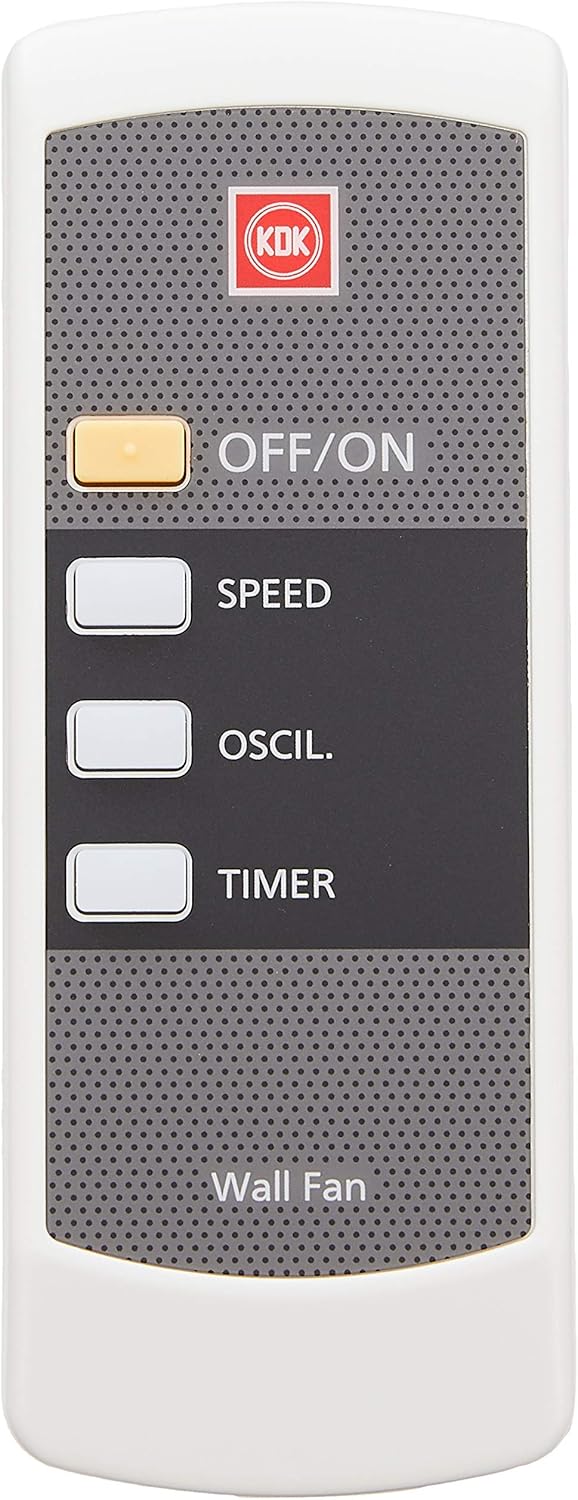
Figure 5.1: Fan Unit Control Panel.
- OFF/SPEED Button: Press to cycle through fan speeds (Speed I, II, III) and to turn the fan off.
- OSCIL. Button: Press to activate or deactivate the oscillation function. When active, the fan head will sweep from side to side.
- TIMER Buttons (1, 3, 6h): Press the desired button to set the fan to operate for 1, 3, or 6 hours before automatically turning off.
5.2. Wireless Remote Control
The remote control provides convenient operation from a distance.

Figure 5.2: Wireless Remote Control.
- OFF/ON Button: Press to turn the fan on or off.
- SPEED Button: Press to cycle through the three fan speeds (Low, Medium, High).
- OSCIL. Button: Press to start or stop the oscillation function.
- TIMER Button: Press repeatedly to cycle through the available timer settings (1 hour, 3 hours, 6 hours, Off).
5.3. Angle Adjustment
The fan head's vertical angle can be manually adjusted to direct airflow as desired. Gently tilt the fan head up or down to the preferred position.
6. Maintenance
Regular cleaning and maintenance will ensure optimal performance and longevity of your KDK M40MS Wall Fan.
- Cleaning the Fan: Before cleaning, always unplug the fan from the power outlet. Use a soft, damp cloth to wipe down the exterior surfaces of the fan. Do not use abrasive cleaners or solvents.
- Cleaning the Grille and Blades: The front grille can typically be removed for easier access to the fan blades. Carefully remove the grille and wipe the blades with a soft cloth. Ensure all parts are dry before reassembling.
- Air Filter Maintenance: The KDK M40MS features an air filter with Super Aller-Buster, green tea catching, and anti-bacteria enzyme functions. Periodically remove and clean this filter according to the instructions provided with the filter itself (if separate) or gently vacuum/wipe it to remove accumulated dust.
- Storage: If storing the fan for an extended period, cover it to protect it from dust and store it in a dry place.
7. Troubleshooting
If you encounter issues with your KDK M40MS Wall Fan, refer to the following common problems and solutions:
| Problem | Possible Cause | Solution |
|---|---|---|
| Fan does not turn on. | No power supply. Remote control batteries are dead. | Check if the power cord is securely plugged into a live outlet. Replace the batteries in the remote control. |
| Fan does not oscillate. | Oscillation function is not activated. | Press the 'OSCIL.' button on the fan control panel or remote control. |
| Remote control is not working. | Batteries are dead or incorrectly inserted. Obstruction between remote and fan. | Replace batteries, ensuring correct polarity. Remove any objects blocking the signal path. Ensure you are within range. |
| Fan makes unusual noise. | Loose parts or debris in the fan blades. | Unplug the fan and check for any obstructions or loose components. Clean the blades and grille. |
8. Specifications
| Feature | Description |
|---|---|
| Brand | KDK |
| Model | M40MS |
| Type | Wall-Mounted Fan |
| Diameter | 16 inches (approx. 40 cm) |
| Power Source | Corded Electric |
| Input Voltage | 220 Volts |
| Material | Plastic |
| Color | Black |
| Special Features | Oscillating, 3-Speed, Remote Control, 6-hour Electronic Timer, Air filter with Super Aller-Buster, Green Tea Catching, and Anti-Bacteria Enzyme Function |
| Included Components | 1 x Wall Fan, 1 x Remote Control |
| Certification | CE |
9. Warranty and Support
For warranty information, please refer to the documentation provided at the time of purchase or contact your retailer. If you require technical support or have questions not covered in this manual, please contact the KDK customer service or your authorized dealer.

