1. Introduction
This user manual provides detailed instructions for the Youmile MPPT 5A Solar Charge Controller, Model GR-YM-133. This module is designed for efficient solar power management, featuring Maximum Power Point Tracking (MPPT) to optimize charging of various battery types from solar panels. It is suitable for a wide range of applications including solar street lights, wind turbines, and general battery charging systems.

Figure 1: Youmile MPPT 5A Solar Charge Controller module and included 24 AWG power cable.
2. Key Features
- MPPT Functionality: Advanced Maximum Power Point Tracking for optimal solar energy utilization.
- Wide Input Voltage Range: Supports DC 8-28V input (DC only).
- Adjustable Output Voltage: Continuously adjustable DC 5-26V output.
- High Output Current: Maximum charging current of 5A.
- Intelligent Charging: Three-phase automatic intelligent charging mode with automatic current adjustment.
- Charge Status Indicator: Visual indication for fast charge (red) and full charge (red/blue alternating).
- High Efficiency: Conversion efficiency up to 95%.
- Protection Features: Includes input and output reverse connection protection.
- Low Quiescent Current: Only 3mA no-load current.
- Industrial Grade Temperature: Operates reliably from -40°C to +85°C.
3. Technical Specifications
| Parameter | Value |
|---|---|
| Module Properties | MPPT maximum power point tracking, intelligent automatic charge management |
| Input Voltage | DC 8-28V (DC input only) |
| Output Voltage | DC 5-26V (continuously adjustable) |
| Output Current | 5A max |
| Charge Indicator | Red (fast charge), Red/Blue alternating (full charge), Auto-stop |
| MPPT Function | Yes, adjustable MPPT voltage |
| Minimum Pressure Difference | 1V |
| Operating Temperature | -40°C to +85°C (Industrial grade) |
| Load Regulation | ±1% |
| Voltage Regulation Rate | ±0.5% |
| Conversion Efficiency | Max 93% / Peak 95% (varies with lighting conditions) |
| Charging Method | Three-phase intelligent automatic charging mode |
| No-load Current | 3mA |
| Input Reverse Protection | Yes |
| Output Reverse Protection | Yes |
| Dimensions (approx.) | 12.3 x 7.9 x 2.7 cm (Package dimensions) |
| Weight (approx.) | 40 grams (Package weight) |
4. Package Contents
- 1 x Youmile MPPT 5A Solar Charge Board
- 1 x 30cm 24AWG Power Cable
5. Setup and Connection
Before connecting the module, ensure all power sources are disconnected. Observe polarity carefully to prevent damage, although the module includes reverse connection protection.
5.1. Identifying Terminals
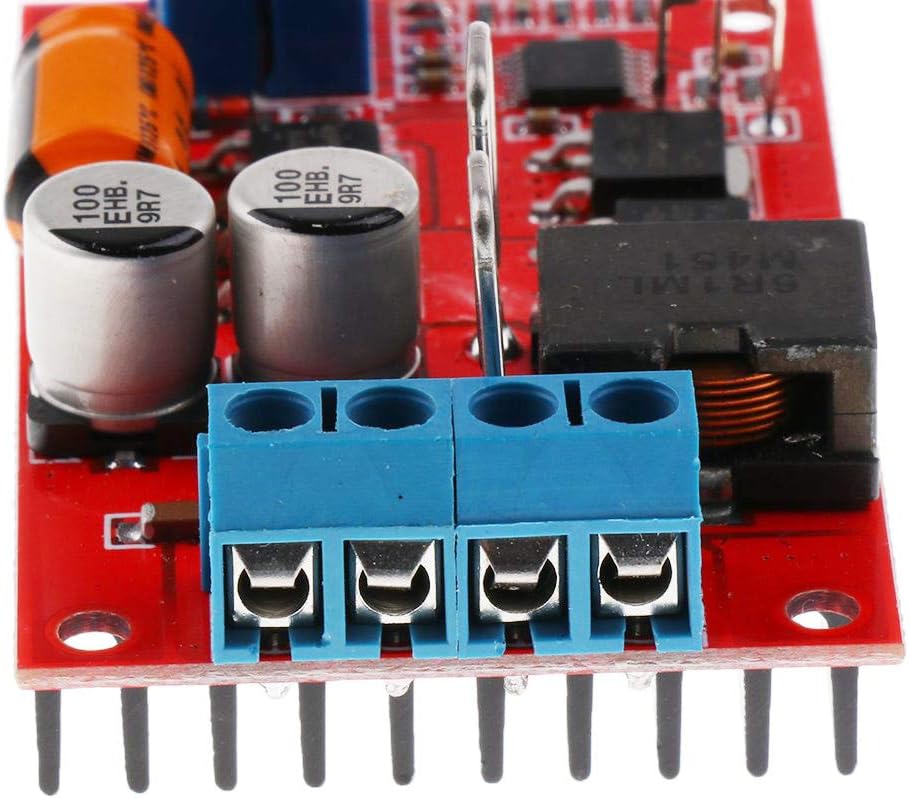
Figure 2: Input and Output Terminals. The blue terminal block has clearly labeled connections.
- VIN+ / GND: Input terminals for the solar panel (DC 8-28V). Connect the positive (+) lead of the solar panel to VIN+ and the negative (-) lead to GND.
- BAT+ / BAT-: Output terminals for the battery. Connect the positive (+) lead of the battery to BAT+ and the negative (-) lead to BAT-.
5.2. Connection Procedure
- Connect Battery: First, connect your battery (e.g., 6V, 12V, 8.4V, 12.6V, 16.8V lithium, etc.) to the BAT+ and BAT- terminals. Ensure correct polarity.
- Connect Solar Panel: Next, connect your solar panel (1W-100W, 9V-28V) to the VIN+ and GND terminals. Ensure correct polarity.
- Initial Adjustment (Important):
- Output Voltage Adjustment: Before connecting the battery, you can adjust the output voltage using the potentiometer labeled V-ADJ (often blue, multi-turn). Turn the potentiometer clockwise to increase voltage, counter-clockwise to decrease. Adjust to the desired charging voltage for your battery type (e.g., 14.4V for a 12V lead-acid battery, 4.2V per cell for lithium-ion).
- MPPT Voltage Adjustment: The potentiometer labeled U-MPPT (often blue, multi-turn) adjusts the Maximum Power Point Tracking voltage. With the solar panel connected and under maximum illumination, adjust this potentiometer to achieve the manufacturer's specified MPPT voltage for your solar panel. This optimizes power transfer from the panel to the battery.
- Observe Indicator: The charge indicator LED will illuminate. A red light indicates fast charging. When the battery is fully charged, the LED will alternate between red and blue, and charging will automatically stop.

Figure 3: Top view of the module, highlighting the V-ADJ and U-MPPT potentiometers for adjustment.
6. Operating Instructions
Once properly connected and adjusted, the Youmile MPPT 5A Solar Charge Controller operates automatically. It continuously tracks the maximum power point of the solar panel to ensure efficient charging.
6.1. Charging Process
- The module employs a three-phase intelligent automatic charging mode (constant current, constant voltage, float charge).
- The solar energy tracking feature dynamically adjusts the charging current based on available solar power and battery state.
- The charge indicator LED provides real-time status:
- Solid Red: Fast charging in progress.
- Alternating Red/Blue: Battery is fully charged. Charging will automatically terminate.
6.2. Compatibility
This controller is versatile and can charge various battery types, including:
- 6V and 12V Lead-Acid Batteries
- Nickel-Cadmium (NiCd) Batteries
- Nickel-Metal Hydride (NiMH) Batteries
- Lithium-Ion (Li-ion) Battery Packs (e.g., 8.4V, 12.6V, 16.8V)
- Lithium Iron Phosphate (LiFePO4) Batteries (2-4 strings)
7. Maintenance
The Youmile MPPT 5A Solar Charge Controller is designed for low maintenance. Follow these guidelines to ensure optimal performance and longevity:
- Keep Clean: Periodically inspect the module for dust or debris accumulation. Gently clean with a soft, dry cloth. Do not use liquids or abrasive cleaners.
- Ventilation: Ensure the module is installed in a location with adequate airflow to allow the heatsink to dissipate heat effectively. Avoid enclosing it in unventilated spaces.
- Connections: Periodically check all wire connections to ensure they are secure and free from corrosion. Loose connections can lead to inefficient operation or damage.
- Environmental Conditions: While designed for industrial temperatures, avoid exposing the module to extreme moisture or direct water contact.
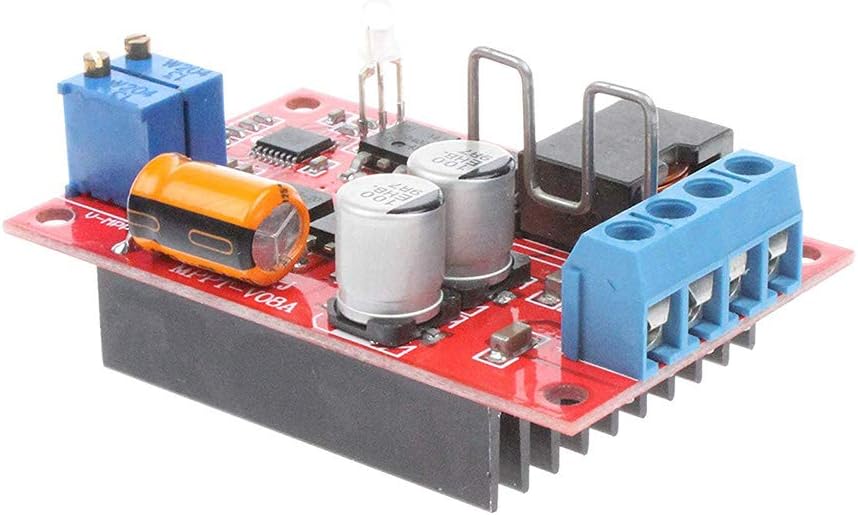
Figure 4: Side view of the module, showing the integrated heatsink for thermal management.
8. Troubleshooting
If you encounter issues with your MPPT charge controller, refer to the following common problems and solutions:
| Problem | Possible Cause | Solution |
|---|---|---|
| No charge indicator light / No output |
|
|
| Battery not charging fully |
|
|
| Module overheating |
|
|
If problems persist after following these steps, please contact customer support.
9. Warranty Information
This product is sold by YoumileDirect and fulfilled by Amazon. For information regarding returns and replacements, please refer to Amazon's standard return policy, which typically allows for returns within 30 days of receipt for most products. Please retain your proof of purchase for any warranty claims or return requests.
For specific warranty details beyond the Amazon return policy, please contact YoumileDirect directly through the Amazon platform.
10. Customer Support
For technical assistance, troubleshooting not covered in this manual, or general inquiries, please contact Youmile customer support.
- Online Support: Visit the Youmile store page on Amazon.com.be or the seller's profile (YoumileDirect) to find contact options.
- User Manual Download: A digital version of this manual may be available for download.
When contacting support, please provide your product model number (GR-YM-133) and a detailed description of the issue.


