
Introduction
The VSN Twin Looper Pedal (Model LTL02) is a versatile stereo guitar effect pedal designed for looping and rhythm accompaniment. It features 11 types of play, 10 minutes of looping time, unlimited overdubs, and undo/redo functionality. This manual provides detailed instructions for setup, operation, and maintenance to ensure optimal performance.
Key Features
- Multi-function: 11 types of play, stereo input and output, with individually adjustable left and right channel volumes. Offers Hi-Fi sound with no noise, true-bypass, analog dry-through, and high-quality audio.
- Long Looping Time: Provides 10 minutes of looping time, unlimited overdubs, and undo/redo function.
- Solid Construction: Features a small size, heavy-duty footswitch, true bypass, and a full metal sturdy case.
- Creative Capabilities: Combines essential looper functionalities, allowing for subtle performances or dynamic shows.
- Simple Operation: Enables playing loops in reverse, speeding them up, or slowing them down.
- USB Interface: Connects to a computer via USB cable for user software operation, supporting WINDOWS/MAC versions for importing/exporting audio. (Note: USB jack is not for power input).
Package Contents
- 1x VSN Twin Looper Pedal
- 1x USB Cable
- 1x User Manual
Note: A 9V DC power adapter (center negative) is not included and must be purchased separately.
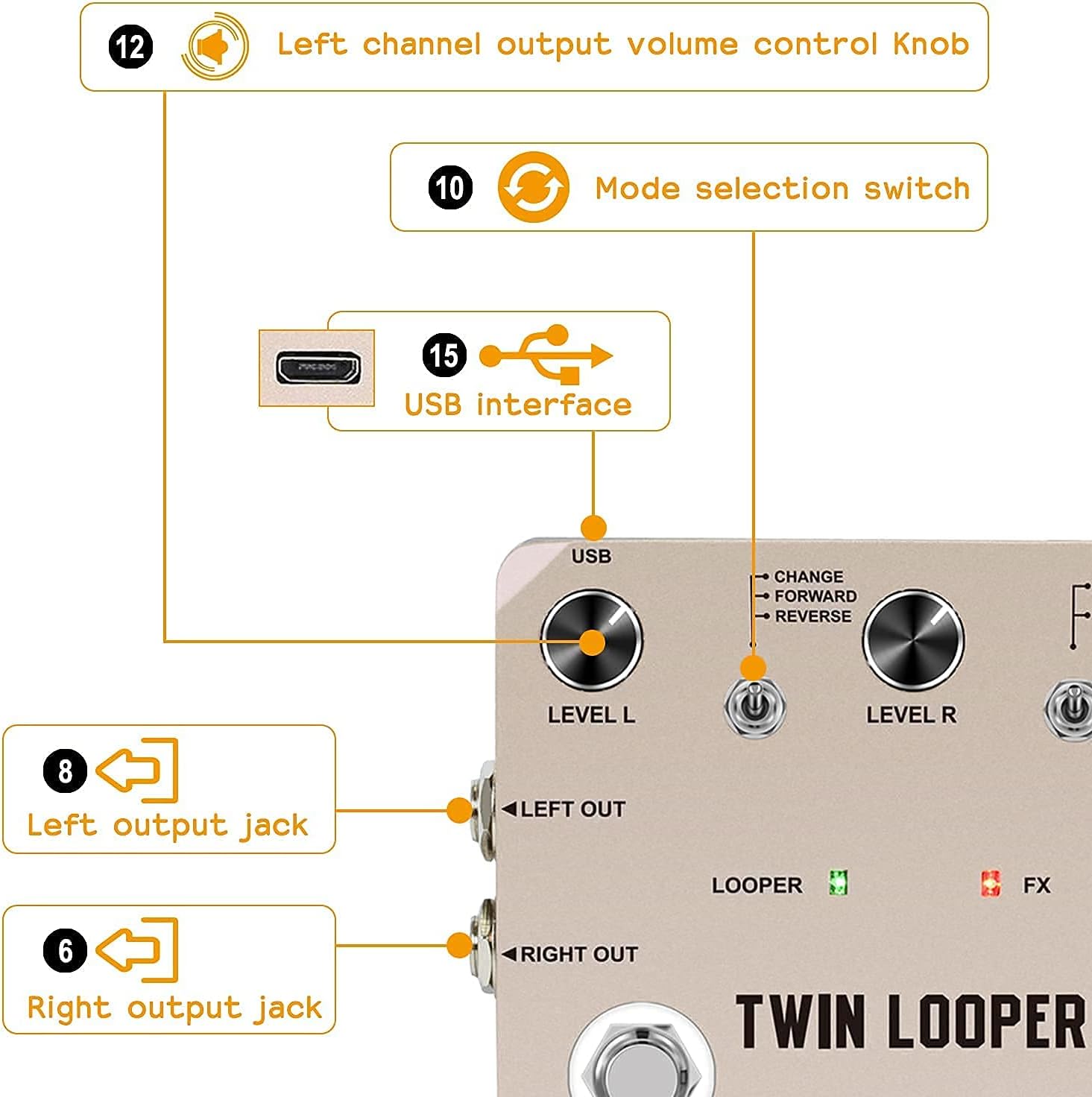
Figure 1: Package contents of the VSN Twin Looper Pedal, showing the pedal, USB cable, and user manual. A separate 9V DC power adapter is required.
Controls and Connections
The VSN Twin Looper Pedal features intuitive controls and versatile connection options.

Figure 2: Overall view of the VSN Twin Looper Pedal.
Front Panel Controls

Figure 3: Front panel controls of the VSN Twin Looper Pedal.
- LEVEL L Knob: Adjusts the output volume of the left channel.
- LEVEL R Knob: Adjusts the output volume of the right channel.
- SPEED Knob: Controls the playback speed of the loop (Fast/Normal/Slow).
- CHANGE/FORWARD/REVERSE Switch: Toggles between changing, forward, and reverse playback modes for the loop.
- STOP/FX Switch: Selects between stopping the loop or activating FX mode.
- LOOPER Footswitch: Initiates recording, playback, and overdubbing. Hold to undo/redo/erase.
- FX Footswitch: Activates or deactivates the selected effect.
- LOOPER LED (Green): Indicates looper status (recording, playing, overdubbing).
- FX LED (Red): Indicates FX status (on/off).
Side Panel Connections

Figure 4: Connection points on the VSN Twin Looper Pedal.
- LEFT IN Jack: Left channel audio input.
- RIGHT IN Jack: Right channel audio input.
- LEFT OUT Jack: Left channel audio output.
- RIGHT OUT Jack: Right channel audio output.
- DC 9V Input: Power input for a 9V DC center-negative adapter (not included).
- USB Port: Connects to a computer for data transfer (import/export audio) and software updates.
Setup
- Power Connection: Connect a 9V DC center-negative power adapter (not included) to the DC 9V input jack.
- Instrument Connection: Connect your instrument(s) to the LEFT IN and/or RIGHT IN jacks using standard 1/4-inch instrument cables.
- Amplifier/Output Connection: Connect the LEFT OUT and/or RIGHT OUT jacks to your amplifier(s) or audio interface.
- USB Connection (Optional): For computer interaction, connect a USB cable from the pedal's USB port to your computer.
Operating Modes
Looping Functionality
The looper allows for recording, playback, and overdubbing of audio.
- Record: Tap the LOOPER footswitch once to start recording. The LOOPER LED will turn red.
- Playback: Tap the LOOPER footswitch again to stop recording and begin playback. The LOOPER LED will turn green.
- Overdub: While playing back, tap the LOOPER footswitch to start overdubbing. The LOOPER LED will blink red/green. Tap again to stop overdubbing and continue playback.
- Undo/Redo: During playback, hold the LOOPER footswitch for 2 seconds to undo the last recorded layer. Hold again for 2 seconds to redo the layer.
- Erase: Double-tap the LOOPER footswitch to stop playback. Then, hold the LOOPER footswitch for 2 seconds to erase the current loop.
- Reverse/Forward Playback: Use the CHANGE/FORWARD/REVERSE switch to alter the playback direction of your loop.
- Speed Adjustment: Use the SPEED knob to adjust the playback speed of the loop (Fast, Normal, Slow).
Drum Machine Functionality
The pedal includes a drum machine with various patterns.
- Activate Drum: Press the FX footswitch to activate the drum machine.
- Select Pattern: Use the SELECT knob (often combined with the BPM knob) to browse through different drum patterns (Rock, Metal, Pop, etc.).
- Adjust BPM: Use the BPM knob to set the tempo of the drum pattern.
- Adjust Drum Volume: Use the VOLUME knob to control the drum machine's output level.
Video 1: Demonstrates how to quickly master the use of the Twin Looper pedal, including basic looping and effects.
Video 2: Shows the Twin Looper Electric Guitar Effect Pedal in action, highlighting its core looping capabilities.
Video 3: Explores the 11 types of play available on the VSN Twin Looper Electric Guitar Effect Pedal.
Video 4: Provides a comprehensive overview of the VSN Twin Looper Electric Guitar Effect Pedal Loop Station's features and functions.
Troubleshooting
- No Power: Ensure a 9V DC center-negative power adapter is correctly connected. Check the power source.
- No Sound: Verify all cables are securely connected. Check instrument and amplifier volume levels. Ensure the pedal is not in bypass mode if an effect is desired.
- Distortion/Noise: Check input levels to prevent clipping. Ensure proper grounding. Use a regulated power supply.
- Loop Not Recording/Playing: Ensure the LOOPER footswitch is pressed correctly to initiate recording or playback. Check memory slots.
- USB Connection Issues: Ensure the correct USB cable is used and drivers (if any) are installed on your computer.
Specifications
| Item | Detail |
|---|---|
| Model | LTL02 |
| Brand | VSN |
| Item Weight | 1.08 pounds |
| Product Dimensions | 3.54 x 1.38 x 4.57 inches |
| Body Material | Aluminum Alloy |
| Power Source | Electric (9V DC, center negative, not included) |
| Looping Time | 10 minutes |
| Audio Quality | 44.1kHz/24Bit |
| Input/Output | Stereo (Left/Right 1/4-inch jacks) |
| Connectivity | USB |
Warranty and Support
For warranty information and technical support, please refer to the manufacturer's official website or contact their customer service.