
Brightech GL-FLM095
Brightech Sky Dome Double LED Floor Lamp
Model: GL-FLM095
1. Important Safety Instructions
Please read all instructions carefully before assembling and using this lamp. Keep this manual for future reference.
- Electrical Safety: Always unplug the lamp from the power outlet before cleaning, changing bulbs, or performing any maintenance. Do not use with a damaged cord or plug. Do not operate in wet locations.
- Stability: Ensure the lamp is placed on a flat, stable surface. The weighted base is designed for stability, but avoid placing it in high-traffic areas where it could be easily knocked over.
- Bulb Type: Use only the specified LED bulb types (E26 base, A19 shape) as indicated in the specifications. Do not exceed the maximum wattage for each socket.
- Heat: LED bulbs produce less heat than traditional bulbs, but always allow bulbs to cool before touching them.
- Children and Pets: Keep the lamp and its cord out of reach of children and pets to prevent accidents.
2. Package Contents
Carefully unpack all components and check against the list below. If any parts are missing or damaged, contact Brightech customer support.
- Lamp Base
- Lower Pole Section
- Middle Pole Section
- Upper Pole Section with Torchiere Head
- 2 x Adjustable Reading Lamp Arms
- 3 x White Plastic Dome Shades (1 large for torchiere, 2 small for reading lamps)
- 3 x LED Bulbs (1 x 16W, 2 x 9.5W)
- Power Cable (pre-attached)

Figure 1: All components included in the package. Please ensure all parts are present before assembly.
3. Setup and Assembly Instructions
Follow these steps to assemble your Brightech Sky Dome Double LED Floor Lamp:
- Attach Base to Lower Pole: Carefully thread the lower pole section into the lamp base. Turn clockwise until securely tightened. Ensure the power cord passes freely through the base.
- Connect Pole Sections: Thread the middle pole section onto the lower pole section, turning clockwise until secure. Then, thread the upper pole section (with the torchiere head and reading lamp arms) onto the middle pole section, ensuring all connections are tight.
- Attach Reading Lamp Shades: Carefully screw the two smaller white plastic dome shades onto the sockets of the adjustable reading lamp arms. Do not overtighten.
- Attach Torchiere Shade: Screw the larger white plastic dome shade onto the top torchiere socket.
- Install LED Bulbs: Screw the provided LED bulbs into their respective sockets. The 16W bulb goes into the top torchiere socket, and the two 9.5W bulbs go into the reading lamp sockets. Turn clockwise until snug.
- Position the Lamp: Place the assembled lamp in your desired location, ensuring it is on a stable, level surface and the power cord can reach an outlet without being strained or creating a tripping hazard.
Video 1: Official Brightech video demonstrating the features and multi-directional lighting of the Sky Dome Double lamp, which can assist with understanding its assembly and functionality.
4. Operating Instructions
Your Brightech Sky Dome Double LED Floor Lamp features independent controls for versatile lighting.
- Power On/Off: Plug the lamp into a standard wall outlet.
- Torchiere Lamp Control: The main upward-facing torchiere lamp is controlled by a rotary dimmer switch located on the upper pole section, just below the large shade. Turn the knob clockwise to turn on and increase brightness, and counter-clockwise to dim and turn off.
- Reading Lamps Control: Each of the two adjustable reading lamps has its own independent rotary switch located on its respective arm, near the shade. Turn the knob clockwise to turn on and increase brightness, and counter-clockwise to dim and turn off.
- Adjusting Reading Lamps: The arms of the reading lamps are flexible. Gently adjust them to direct light where needed for reading or task lighting.

Figure 2: Detail of the rotary dimmer switch used to control the lamp's brightness.
5. Maintenance
- Cleaning: Unplug the lamp before cleaning. Use a soft, dry cloth to wipe down the lamp pole and shades. Do not use abrasive cleaners or solvents, as they may damage the finish.
- Bulb Replacement: Ensure the lamp is unplugged and the bulbs are cool before attempting to replace them. This lamp uses standard E26 base LED bulbs. For optimal performance, replace with A19 shape LED bulbs. Do not exceed 16W for the torchiere and 9.5W for each reading lamp.
6. Troubleshooting
| Problem | Possible Cause | Solution |
|---|---|---|
| Lamp does not turn on. | 1. Lamp not plugged in. 2. Power outlet is not active. 3. Bulb is loose or faulty. 4. Switch is off. | 1. Ensure the power cord is securely plugged into a working outlet. 2. Test the outlet with another device. 3. Tighten the bulb or replace it with a new one. 4. Turn the rotary switch clockwise to activate. |
| Light flickers or is dim. | 1. Bulb is loose or incompatible. 2. Dimmer switch is set too low. | 1. Tighten the bulb. Ensure the bulb is an LED compatible with dimmers. 2. Adjust the dimmer switch to a higher setting. |
7. Specifications
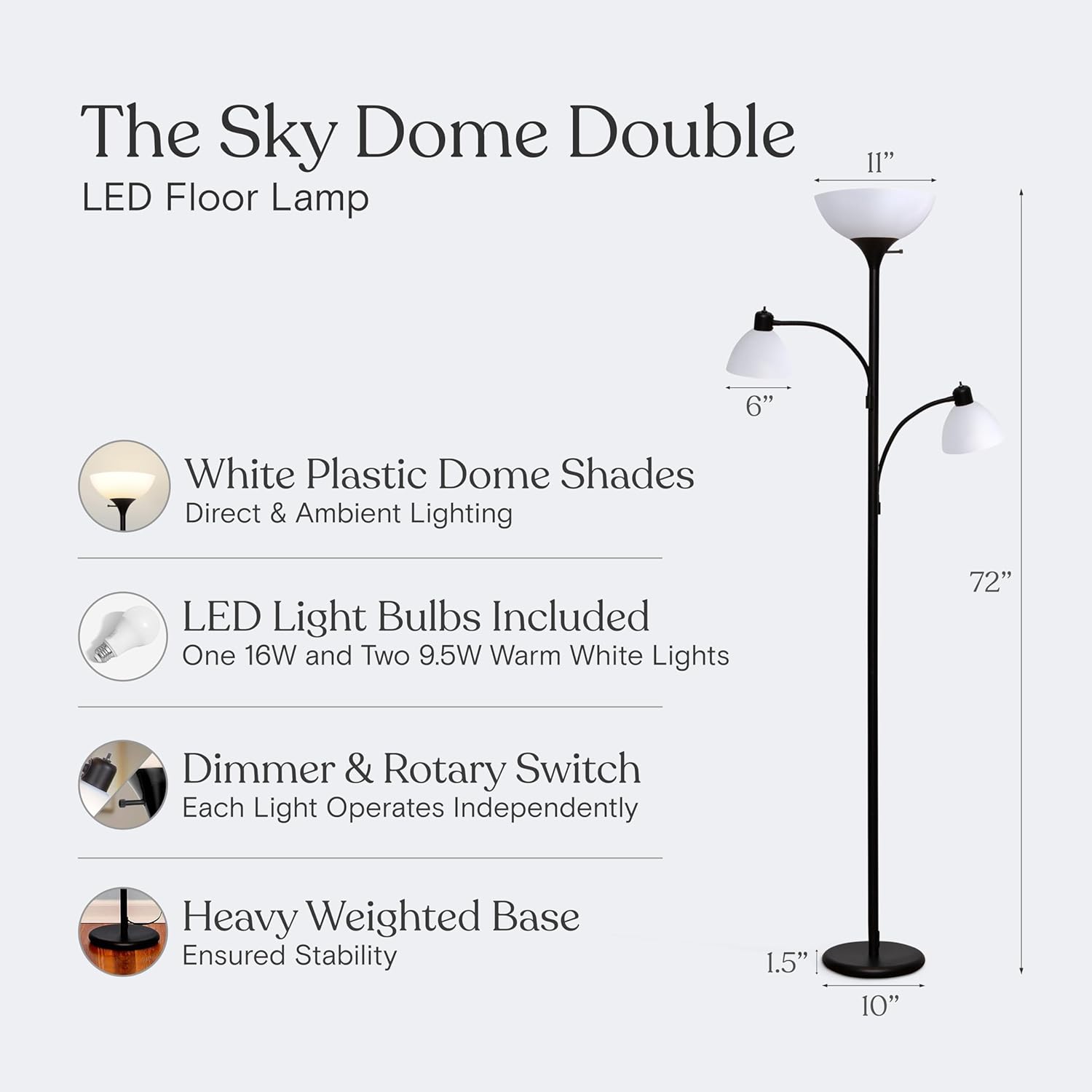
Figure 3: Key dimensions of the Brightech Sky Dome Double LED Floor Lamp.
- Model Number: GL-FLM095
- Dimensions (Overall): 72 inches (Height) x 11 inches (Torchiere Shade Diameter) x 10 inches (Base Diameter)
- Material: Metal (Base, Pole), Plastic (Shades)
- Light Source: LED
- Number of Lights: 3 (1 Torchiere, 2 Reading Lamps)
- Bulb Type: E26 Base, A19 Shape LED (Included)
- Wattage (Torchiere): 16W LED (Equivalent to 100W incandescent)
- Wattage (Reading Lamps): 9.5W LED each (Equivalent to 60W incandescent each)
- Color Temperature: 3000K Warm White
- Switch Type: Rotary Dimmer (Independent for each light)
- Power Source: Corded Electric
- UPC: 850004456972
8. Warranty and Support
Brightech USA offers an industry-leading 3-year warranty covering defects, malfunctions, or sudden failures when purchased directly through Brightech or authorized retailers. This warranty ensures your peace of mind regarding the quality and durability of your lamp.
For warranty claims, technical assistance, or any questions regarding your Brightech Sky Dome Double LED Floor Lamp, please contact our friendly USA-based support team. Refer to your purchase documentation or visit the official Brightech website for contact information.
Ask a question about this manual
Ask about setup, troubleshooting, compatibility, parts, safety, or missing instructions. Manuals+ will review the question and use this page’s manual context to help answer it.