
ACTTO BTK-01
Contents
ACTTO Retro Mini Wireless Bluetooth Keyboard BTK-01 User Manual
Model: BTK-01
1. Introduction
Thank you for purchasing the ACTTO Retro Mini Wireless Bluetooth Keyboard BTK-01. This manual provides detailed instructions on how to set up, operate, and maintain your new keyboard. Designed with a classic retro aesthetic and modern wireless technology, this keyboard offers a comfortable and efficient typing experience across various devices.
The BTK-01 features distinctive round keycaps and a compact design, making it an ideal companion for both productivity and portability. It is compatible with a wide range of operating systems, including iOS, Android, Windows, and Mac.
2. Product Overview and Package Contents
Before you begin, please ensure all components are present in the package.

Figure 2.1: Package Contents and Keyboard Dimensions. The package includes the Retro Mini Bluetooth Keyboard body, two AAA batteries, and a Japanese instruction manual.
2.1. Package Contents
- ACTTO Retro Mini Wireless Bluetooth Keyboard (BTK-01)
- AAA Batteries (x2)
- User Manual (Japanese version included, this document serves as the English guide)
2.2. Keyboard Layout and Features
The keyboard features a classic typewriter-inspired design with distinct round keycaps and a compact layout for comfortable typing.
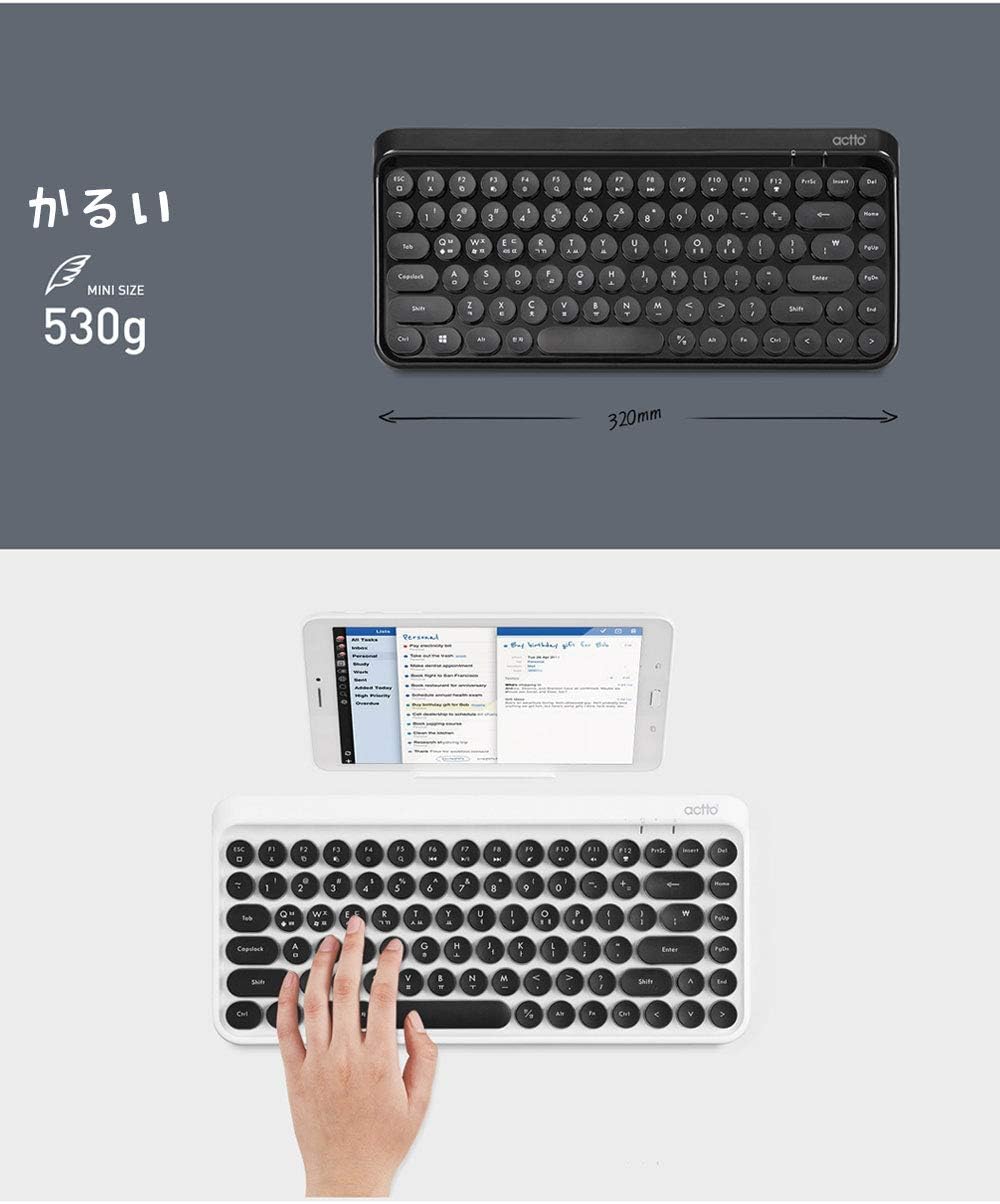
Figure 2.2: Keyboard Layout and Function Keys. The keyboard measures approximately 32cm in width and 14.8cm in height, featuring dedicated function keys for media control and system shortcuts.
Key features include:
- Round Keycaps: Ergonomically designed for a comfortable typing experience reminiscent of vintage typewriters.
- Multimedia Function Keys: Access common functions like volume control, media playback, and screen brightness directly from the keyboard.
- Compact Design: Lightweight and portable, ideal for on-the-go use.
3. Setup
3.1. Battery Installation
- Locate the battery compartment on the underside of the keyboard.
- Open the battery compartment cover.
- Insert two AAA batteries, ensuring correct polarity (+/-).
- Close the battery compartment cover securely.
3.2. Bluetooth Pairing
The ACTTO BTK-01 keyboard uses Bluetooth 3.0 for wireless connectivity.

Figure 3.1: Bluetooth Connectivity. The keyboard connects wirelessly via Bluetooth 3.0, offering freedom from cables.
- Turn on the keyboard using the power switch, usually located on the side or back.
- Press and hold the Bluetooth pairing button (often indicated by a Bluetooth symbol or a specific function key combination, refer to Figure 2.2 for function key layout) until the indicator light starts blinking, signifying it's in pairing mode.
- On your device (smartphone, tablet, computer):
- Go to Settings.
- Select Bluetooth.
- Ensure Bluetooth is turned On.
- Search for available devices. The keyboard should appear as "ACTTO BTK-01" or similar.
- Select the keyboard from the list to initiate pairing.
- If prompted, enter the displayed code on the keyboard and press Enter.
- Once paired, the indicator light on the keyboard will stop blinking and remain solid or turn off, indicating a successful connection.
3.3. Compatibility
The ACTTO BTK-01 keyboard is compatible with the following operating systems:
- Android: Android 7.0 and above
- iOS: iOS 10.4 and above (iPhone, iPad)
- Mac: Mac OS 10.9 and above
- Windows: Windows XP/VISTA/7/8/10

Figure 3.2: Operating System Compatibility. The keyboard supports Android, iOS, Mac, and Windows devices.
4. Operating Instructions
4.1. Basic Typing
Once paired, the keyboard functions like a standard external keyboard. Simply open any text editor or application on your device and begin typing.

Figure 4.1: Typing Experience. The keyboard provides a comfortable and responsive typing experience for various tasks.
4.2. Function Keys (F-Keys)
The top row of keys (F1-F12) often doubles as multimedia or system function keys. To use these functions, you may need to press the Fn key simultaneously with the desired F-key. Refer to Figure 2.2 for specific function key icons.
- F1-F12: Standard function keys.
- Multimedia Controls: Play/Pause, Previous/Next Track, Volume Up/Down, Mute.
- System Shortcuts: Home, Search, Lock Screen, etc. (functionality may vary by OS).
4.3. Keycap Design
The keyboard features unique round keycaps that provide a tactile and nostalgic typing feel, inspired by classic typewriters.

Figure 4.2: Round Keycap Design. The circular keycaps offer a distinct retro feel and comfortable typing.
4.4. Sleeping Mode
To conserve battery life, the keyboard will automatically enter sleep mode after approximately 10 minutes of inactivity. To wake the keyboard, simply press any key. It will automatically reconnect to the last paired device.
Figure 4.3: Automatic Sleep Mode. The keyboard enters sleep mode after 10 minutes of inactivity to save power and wakes up instantly upon key press.
5. Maintenance
5.1. Cleaning
To keep your keyboard clean and functioning optimally:
- Turn off the keyboard before cleaning.
- Use a soft, lint-free cloth slightly dampened with water or a mild cleaning solution to wipe the surface.
- For dust and debris between keys, use compressed air or a soft brush.
- Avoid using harsh chemicals, abrasive cleaners, or excessive moisture.
5.2. Battery Replacement
When the keyboard's performance degrades or the indicator light signals low battery, replace the AAA batteries as described in Section 3.1. Always use fresh, high-quality batteries.
5.3. Storage
When not in use for extended periods, turn off the keyboard to conserve battery life. Store it in a cool, dry place away from direct sunlight and extreme temperatures.
6. Troubleshooting
| Problem | Possible Cause | Solution |
|---|---|---|
| Keyboard does not turn on. | Batteries are dead or incorrectly installed. | Check battery polarity or replace with new AAA batteries. Ensure the power switch is ON. |
| Cannot pair with device. | Bluetooth is off on device; keyboard not in pairing mode; interference. | Ensure Bluetooth is enabled on your device. Put the keyboard into pairing mode (refer to Section 3.2). Move closer to the device and away from other wireless devices. |
| Keys are not responding. | Keyboard is in sleep mode; low battery; connection issue. | Press any key to wake the keyboard. Replace batteries. Re-pair the keyboard with your device. |
| Typing lag or intermittent connection. | Low battery; too far from device; wireless interference. | Replace batteries. Move the keyboard closer to your device. Minimize other wireless device usage nearby. |
7. Specifications
Detailed specifications for the ACTTO Retro Mini Wireless Bluetooth Keyboard BTK-01:
- Model: BTK-01
- Connectivity: Bluetooth 3.0
- Compatible Devices: Smartphones, Tablets
- Compatible OS: Android 7.0+, iOS 10.4+, Mac OS 10.9+, Windows XP/VISTA/7/8/10
- Dimensions: Approximately 33.53 cm (L) x 17.53 cm (W) x 3.56 cm (H)
- Weight: Approximately 700 g (including packaging), keyboard itself is approximately 530g.
- Battery Type: AAA (x2)
- Special Features: Round Keycaps, Automatic Sleep Mode

Figure 7.1: Lightweight Design. The keyboard weighs approximately 530g, making it highly portable.
8. Warranty and Support
ACTTO products are manufactured with high quality standards. This product comes with a standard manufacturer's warranty against defects in materials and workmanship. Please refer to the original purchase documentation for specific warranty terms and duration.
For technical support, troubleshooting assistance, or warranty claims, please contact the retailer or the official ACTTO customer service in your region. Keep your proof of purchase for warranty validation.
This product is certified as a genuine ACTTO product. You can receive A/S benefits from the manufacturer. Unauthorized use of official sales marks and product-related content may result in civil liability.
Documents and downloads
Ask a question about this manual
Ask about setup, troubleshooting, compatibility, parts, safety, or missing instructions. Manuals+ will review the question and use this page’s manual context to help answer it.