
1. Introduction
This manual provides essential instructions for the safe and effective operation of your ASHATA 3-in-1 Emergency Solar Hand Crank Dynamo AM/FM/Weather Radio. This versatile device is designed for emergency situations, offering radio reception, an LED flashlight, and mobile device charging capabilities through multiple power sources.
2. Product Features
- Multi-Band Radio: Receives AM, FM, and NOAA Weather Band broadcasts.
- Integrated LED Flashlight: Features 3 bright LED lights for illumination.
- Emergency Power Bank: Capable of charging mobile phones and other small USB-powered devices.
- Multiple Charging Methods: Supports solar charging, hand-crank dynamo charging, and USB charging.
- Portable Design: Compact and lightweight for easy transport and storage.
3. Package Contents
Please verify that all items are present in your package:
- 1 x ASHATA 3-in-1 Emergency Solar Hand Crank Radio
- 1 x USB Charging Cable
- 1 x User Manual (this document)
4. Component Identification
Familiarize yourself with the various parts of your radio:

Figure 4.1: Front view of the ASHATA 3-in-1 Emergency Solar Hand Crank Radio, showing the main body, flashlight, solar panel, and antenna.
- Telescopic Antenna: Extend for improved radio reception.
- Solar Panel: For charging the internal battery using sunlight.
- LED Flashlight: Provides illumination.
- Hand Crank: Used to manually generate power for charging.
- Tuning Knob: Adjusts radio frequency.
- Volume Knob: Controls audio output level.
- Band Selector Switch: Selects between WB (Weather Band), AM, and FM radio bands.
- Power/OFF Switch: Turns the radio on and off.
- Charging Ports: USB output for charging external devices, Micro USB input for charging the radio.
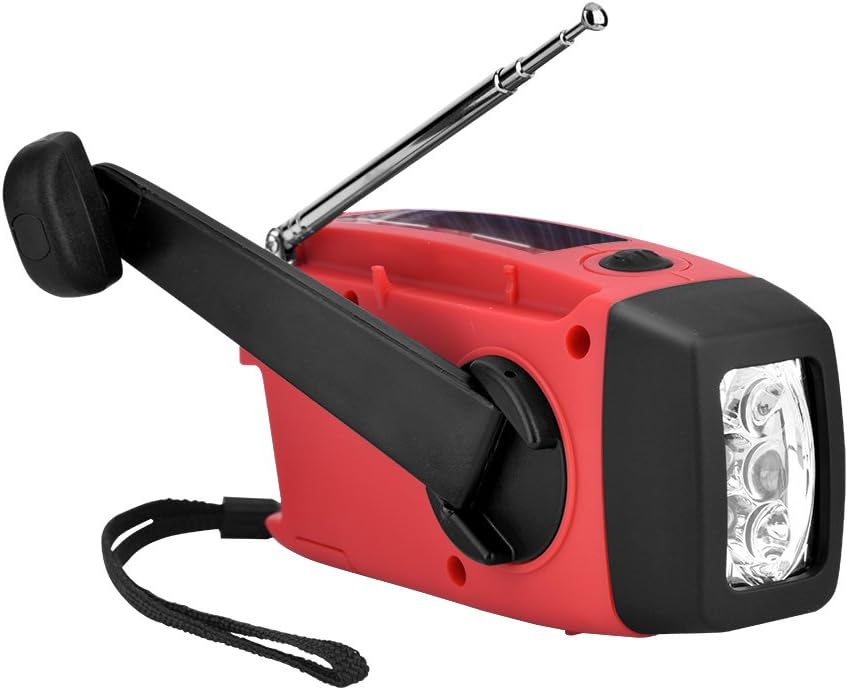
Figure 4.2: Top view highlighting the solar panel, telescopic antenna, tuning knob, volume knob, and band selector switch.
5. Setup
Before initial use, it is recommended to fully charge the internal battery using the USB charging method.
- Initial Charge: Connect the provided USB charging cable to the radio's Micro USB input port and to a standard USB power adapter (not included) or a computer's USB port. The charging indicator light will illuminate. Charge until the indicator light changes or turns off, signifying a full charge.
- Antenna: Extend the telescopic antenna for optimal radio reception.
6. Operating Instructions
6.1. Radio Operation
- Power On: Turn the Power/OFF switch to the desired band (WB, AM, or FM).
- Select Band: Use the Band Selector Switch to choose between WB (Weather Band), AM, or FM.
- Tune Station: Rotate the Tuning Knob to find your desired radio station.
- Adjust Volume: Rotate the Volume Knob to increase or decrease the audio level.
- Power Off: Turn the Power/OFF switch to the "OFF" position when not in use.
6.2. Flashlight Operation

Figure 6.1: The radio with its hand crank extended and the 3-LED flashlight illuminated.
To activate the LED flashlight, locate the flashlight button, typically on the front or side of the unit, and press it. Press again to turn it off.
6.3. Mobile Device Charging

Figure 6.2: The radio connected to a smartphone via a USB cable for emergency charging.
The radio can provide emergency power to charge small mobile devices. Connect your device's USB charging cable to the radio's USB output port. Charging will begin automatically if the radio has sufficient power. Note that this feature is intended for emergency use and may not fully charge all devices.
7. Charging Methods

Figure 7.1: Visual representation of the three primary charging methods: solar, USB, and hand-crank dynamo.
7.1. Solar Charging
Place the radio with its solar panel facing direct sunlight. The solar panel will convert sunlight into electrical energy to charge the internal battery. This method is ideal for maintaining battery life or for slow charging in outdoor environments. Charging speed depends on sunlight intensity.
7.2. Hand-Crank Dynamo Charging

Figure 7.2: A user manually operating the hand crank to generate power for the radio.
Extend the hand crank from the back of the radio. Rotate the crank clockwise or counter-clockwise at a steady pace (approximately 120-150 rotations per minute) to generate power. A few minutes of cranking can provide enough power for a short period of radio use or flashlight operation. This method is crucial when other power sources are unavailable.
7.3. USB Charging

Figure 7.3: The included USB charging cable for connecting the radio to a power source.
For the fastest and most efficient charging, use the provided USB cable. Connect the Micro USB end to the radio's input port and the standard USB end to a USB wall adapter, power bank, or computer USB port. The charging indicator will show the charging status.
8. Maintenance
- Cleaning: Wipe the radio with a soft, damp cloth. Do not use harsh chemicals or abrasive cleaners.
- Storage: Store the radio in a cool, dry place away from direct sunlight and extreme temperatures. If storing for extended periods, ensure the battery is partially charged and recharge it every few months to maintain battery health.
- Water Resistance: This device is not waterproof. Avoid exposure to rain, splashes, or immersion in water.
9. Troubleshooting
| Problem | Possible Cause | Solution |
|---|---|---|
| Radio not turning on | Battery is depleted. | Charge the radio using USB, solar, or hand-crank methods. |
| Poor radio reception | Antenna not extended; weak signal; interference. | Fully extend the telescopic antenna. Reposition the radio to a location with better signal. |
| Flashlight not working | Battery is depleted. | Charge the radio. |
| Mobile device not charging | Radio battery is too low; incorrect cable; device incompatibility. | Ensure the radio has sufficient charge. Use the correct USB cable for your mobile device. Note that some high-power devices may not charge effectively. |
10. Specifications

Figure 10.1: The radio displaying its approximate dimensions: 128mm length, 60mm width, and 45mm height.
| Feature | Specification |
|---|---|
| Radio Functions | AM / FM / NOAA Weather Band |
| Built-in Battery | 3 x AAA / 300 mAh / 3.6V Ni MH |
| Working Voltage | 2.7 - 4.2V |
| Power Output | 0.5W |
| Battery Life Cycle | More than 500 times |
| Flashlight | 3 LED lights |
| LED Life | 100,000 hours |
| Operating Temperature | -10°C to +60°C |
| Radio Frequency Range | FM: 87 ~ 108MHz; AM: 520 ~ 1710KHz; NOAA: 162.450 ~ 162.550 MHz |
| Dimensions | 128 x 60 x 45mm (5.04 x 2.36 x 1.77in) |
| Item Weight | 0.26 Kilograms (9.2 ounces) |
| Connectivity Technology | USB |
| Power Source | Battery Powered, Solar Powered |
11. Safety Information
- Do not expose the radio to extreme temperatures, direct sunlight for prolonged periods (beyond charging), or high humidity.
- Avoid dropping or subjecting the radio to strong impacts.
- Do not disassemble or attempt to repair the unit yourself. This may void the warranty and pose safety risks.
- Keep out of reach of children.
- Dispose of the product and its battery responsibly according to local regulations.
12. Warranty and Support
For warranty information and customer support, please refer to the documentation provided at the time of purchase or contact ASHATA customer service through the retailer where the product was acquired. Please have your purchase details and product model information ready when contacting support.