1. Introduction
This manual provides essential information for setting up, operating, and maintaining your Tracfone Samsung Galaxy A10e smartphone. Please read this guide thoroughly to ensure proper usage and to maximize your device's capabilities.
The Samsung Galaxy A10e is a 4G LTE prepaid smartphone designed for reliable communication and everyday tasks. It features a 5.83-inch Infinity Display, 32GB of internal storage, and an 8MP rear camera.
2. What's in the Box
- Tracfone Samsung Galaxy A10e Smartphone
- Charger
- User Manual (this document)
- SIM Card (pre-installed or included separately)
3. Device Overview
Familiarize yourself with the physical components of your Samsung Galaxy A10e.
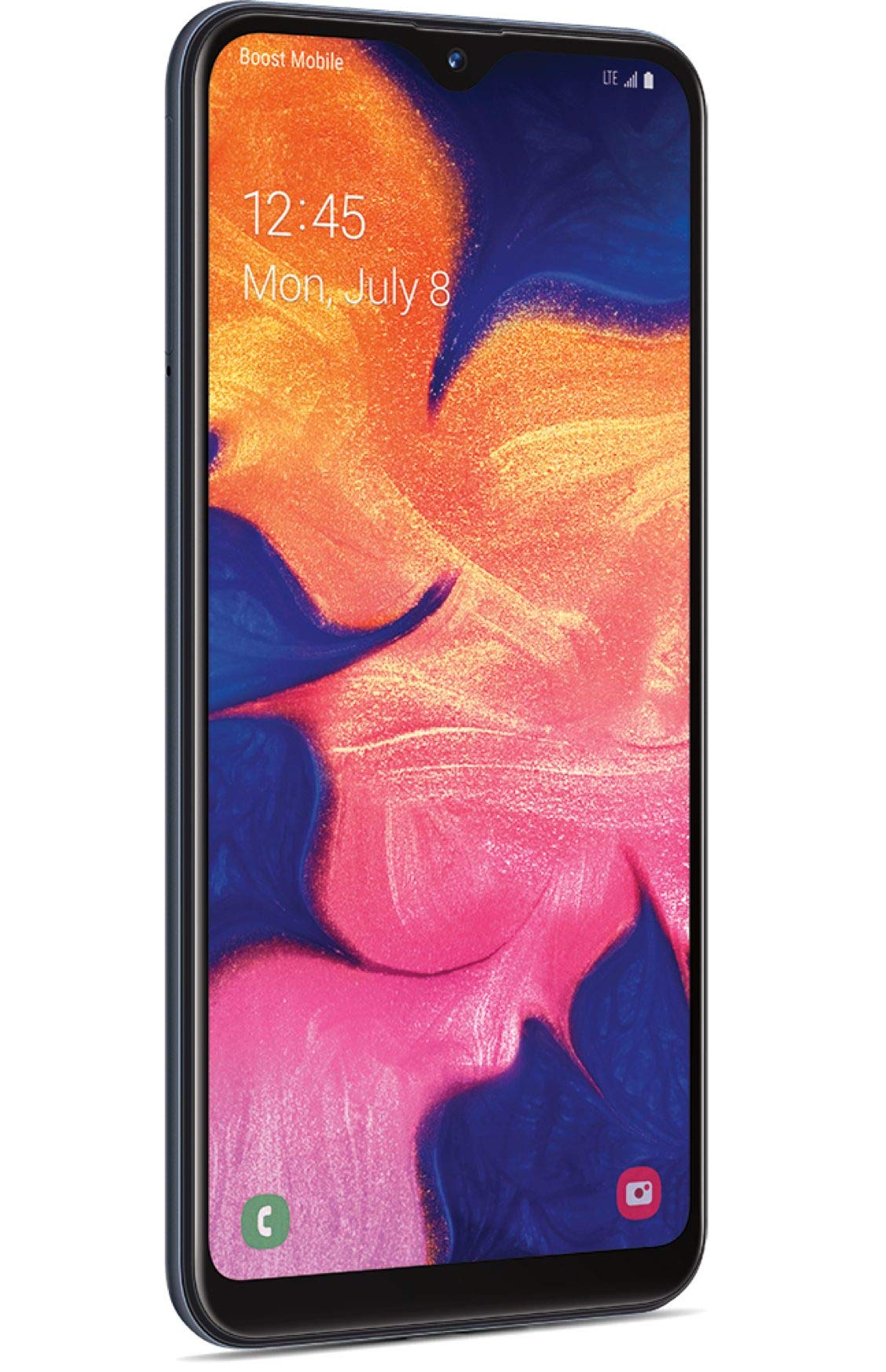
Figure 1: Front view of the Tracfone Samsung Galaxy A10e smartphone.
- Front Camera: Located at the top of the display, used for selfies and video calls.
- Display: 5.83-inch HD+ Infinity Display for clear visuals.
- Volume Buttons: On the side, for adjusting media and call volume.
- Power/Lock Button: On the side, to turn the device on/off or lock/unlock the screen.
- USB-C Port: At the bottom, for charging and data transfer.
- 3.5mm Headphone Jack: At the bottom, for connecting wired headphones.
- Speaker: At the bottom, for audio output.
- Rear Camera: 8MP camera on the back for capturing photos and videos.
- Flash: Next to the rear camera, for low-light photography.
- SIM/MicroSD Card Tray: On the side, for inserting your SIM card and an optional microSD card for expanded storage.
4. Setup
4.1. Inserting the SIM Card and MicroSD Card
- Locate the SIM/microSD card tray on the side of your phone.
- Insert the SIM ejection tool (if provided) into the small hole on the tray to eject it.
- Place your Tracfone SIM card into the SIM slot. Ensure the gold contacts face down and the notched corner aligns with the tray.
- (Optional) If using a microSD card for additional storage, place it into the designated microSD slot on the tray.
- Carefully reinsert the tray into the phone until it clicks into place.
4.2. Charging the Battery
- Connect the USB-C cable to the charging port at the bottom of your phone.
- Plug the other end of the USB-C cable into the provided wall adapter.
- Plug the wall adapter into a power outlet.
- Allow the phone to charge until the battery is full before initial use.
4.3. Initial Power On and Activation
- Press and hold the Power/Lock button until the Samsung logo appears.
- Follow the on-screen prompts to complete the initial setup, including language selection, Wi-Fi connection, and Google account setup.
- For Tracfone service activation, visit tracfone.com/activate or call Tracfone customer service.
5. Operating Your Smartphone
5.1. Basic Navigation
- Home Screen: Swipe left or right to access different home screen panels.
- App Drawer: Swipe up from the home screen to view all installed applications.
- Notifications Panel: Swipe down from the top of the screen to view notifications and quick settings.
- Back Button: Tap the back button (left arrow) to return to the previous screen.
- Home Button: Tap the home button (circle) to return to the home screen.
- Recent Apps Button: Tap the recent apps button (square) to view and switch between recently used applications.
5.2. Making Calls and Sending Messages
- Calls: Open the Phone app, enter the number, and tap the call icon.
- Messages: Open the Messages app, tap the new message icon, enter the recipient's number or select from contacts, and type your message.
5.3. Using the Camera
Your Samsung Galaxy A10e features an 8MP rear camera and a 5MP front camera.
- Open the Camera app.
- Tap the shutter button to take a photo.
- Tap the video icon to record a video.
- Tap the camera switch icon to toggle between the front and rear cameras.
Video 1: An overview of the Tracfone Samsung Galaxy A10e, demonstrating its features and design. This video is provided by Verizon Value, Inc.
6. Maintenance
- Software Updates: Regularly check for and install software updates to ensure optimal performance and security. Go to Settings > Software update.
- Battery Care: To prolong battery life, avoid extreme temperatures and do not leave the phone fully charged or fully discharged for extended periods.
- Cleaning: Use a soft, lint-free cloth to clean the screen and body of the phone. Avoid harsh chemicals.
- Storage Management: Periodically clear unnecessary files and apps to free up storage space. You can expand storage with a microSD card up to 512GB.
7. Troubleshooting
- Phone Not Turning On: Ensure the battery is charged. Connect the charger and wait a few minutes before attempting to power on again.
- Apps Crashing/Freezing: Close the app and reopen it. If the issue persists, restart the phone. Consider clearing the app's cache or reinstalling it.
- Poor Signal/No Service: Check if your SIM card is properly inserted. Ensure you are in an area with network coverage. Restart your phone.
- Battery Draining Quickly: Reduce screen brightness, close unused apps, and disable unnecessary features like Bluetooth or Wi-Fi when not in use.
- Screen Unresponsive: Restart the phone by holding down the Power/Lock button for about 10-15 seconds.
8. Specifications
| Feature | Detail |
|---|---|
| Model Name | Galaxy A10e |
| Display | 5.83 Inches, 720 x 1560 Resolution, 60Hz Refresh Rate |
| Processor | 1.6 GHz Octa-Core (CPU Model: A6-6310) |
| RAM | 2 GB |
| Internal Storage | 32 GB (Expandable up to 512GB with Micro SD) |
| Rear Camera | 8 MP |
| Front Camera | 5 MP |
| Battery Capacity | 3000 mAh |
| Operating System | Android 9.0 |
| Connectivity | 4G LTE, Wi-Fi, Bluetooth 5.0, GPS |
| Audio Jack | 3.5 mm |
| Dimensions | 7.25 x 1.65 x 10.25 inches |
| Weight | 5 ounces |
9. Warranty and Support
For warranty information and customer support, please refer to the documentation included in your product packaging or visit the official Tracfone website. Tracfone utilizes the network with the most first place rankings in RootMetrics® 2H 2022 5G reliability assessments of 125 metros. Results may vary. Not an endorsement. Service must be active and in use within any six-month period.
Tracfone Customer Service: For assistance with activation, plans, or technical support, please contact Tracfone directly.


