
Goodhome GB-5085A
Contents
Goodhome Fitness Stepper with Handles and Ropes, LCD Display, Model GB-5085A User Manual
1. Introduction
This manual provides essential information for the safe and effective use of your Goodhome Fitness Stepper with Handles and Ropes, Model GB-5085A. Please read this manual thoroughly before assembly and operation to ensure proper usage and to maximize your fitness experience. Keep this manual for future reference.
Safety Information
- Consult a physician before starting any new exercise program.
- Ensure the stepper is placed on a flat, stable surface.
- Check all components for damage or wear before each use. Do not use if damaged.
- Maximum user weight capacity is 120 kg. Do not exceed this limit.
- Keep children and pets away from the equipment during use.
- Wear appropriate athletic footwear during exercise.
- Stop exercising immediately if you feel pain, dizziness, or shortness of breath.
2. Package Contents
Verify that all the following components are present in your package:
- Goodhome Fitness Stepper Base Unit
- Handlebars (2 pieces)
- Resistance Ropes (Expanders) with handles (2 pieces)
- LCD Display (pre-installed)
- Assembly Tools (if required)
- User Manual
3. Setup and Assembly
The Goodhome Fitness Stepper GB-5085A requires minimal assembly. Follow these steps:
3.1 Attaching the Handlebars
- Carefully unpack all components from the box.
- Locate the two handlebar posts.
- Insert the bottom end of each handlebar post into the designated slots on the stepper base. Ensure they are securely seated.
- Tighten any securing knobs or bolts provided to fix the handlebars in place. Refer to the included assembly diagram for specific fastener locations.

Image 3.1: Front view of the Goodhome Fitness Stepper with handlebars attached.
3.2 Attaching the Resistance Ropes (Expanders)
- Identify the attachment points for the resistance ropes on the front of the stepper base.
- Clip or hook the resistance ropes securely to these points.
- Ensure the ropes are free from twists or knots before use.

Image 3.2: The stepper with resistance bands attached, ready for use.
4. Operating Instructions
The Goodhome Fitness Stepper GB-5085A offers a comprehensive workout for both lower and upper body.
4.1 Basic Stepping Exercise
- Step onto the non-slip foot pedals one foot at a time. Ensure your balance before beginning.
- Hold onto the handlebars for stability.
- Begin a stepping motion, pushing down on one pedal while the other rises. The stepper utilizes a patented 'twist' system, providing both upward/downward and outward/inward motion for enhanced muscle engagement.
- Maintain a steady rhythm and controlled movements.

Image 4.1: Close-up view of the non-slip foot pedals and the integrated LCD display.
4.2 Using the Resistance Ropes
The included resistance ropes allow for simultaneous upper body training:
- While stepping, grasp the handles of the resistance ropes.
- Perform various upper body exercises such as bicep curls, tricep extensions, or shoulder presses, coordinating with your stepping motion.
- Ensure a firm grip on the handles to prevent slippage.

Image 4.2: Detailed view of the LCD display, resistance band attachment, and the hydraulic cylinder mechanism.
4.3 LCD Display Functions
The integrated LCD display tracks your workout progress. It typically operates automatically when you begin stepping. Press the button (if available) to cycle through modes or reset.
- TIME: Displays the duration of your current exercise session.
- REPS/MIN: Shows the number of steps taken per minute.
- CNT: Counts the total number of steps during the current exercise.
- CAL: Estimates the calories burned during your workout.
- SCAN: Automatically cycles through and displays all the above information sequentially.
5. Maintenance
Regular maintenance ensures the longevity and optimal performance of your stepper.
5.1 Cleaning
- Wipe down the stepper with a damp cloth after each use to remove sweat and dust.
- Do not use abrasive cleaners or solvents, as these can damage the finish or electronic components.
- Ensure the LCD display remains dry.
5.2 Storage
- Store the stepper in a cool, dry place away from direct sunlight and extreme temperatures.
- Ensure the stepper is stable and not prone to tipping over when stored.
5.3 Inspection
- Periodically check all bolts, nuts, and moving parts for tightness and wear. Tighten any loose fasteners.
- Inspect the resistance ropes for any signs of fraying or damage. Replace if necessary.
6. Troubleshooting
If you encounter issues with your stepper, refer to the following common problems and solutions:
6.1 LCD Display Not Working
- Check Battery: The display is usually powered by a small battery (e.g., AA or button cell). Replace the battery if the display is blank or dim.
- Sensor Connection: Ensure the sensor cable (if visible) is securely connected to the display unit.
6.2 Stepper Feels Uneven or Wobbly
- Level Surface: Ensure the stepper is on a completely flat and level surface.
- Tighten Bolts: Check and tighten all assembly bolts, especially those securing the handlebars to the base.
6.3 Excessive Noise During Use
- Lubrication: Some moving parts, particularly hydraulic cylinders, may benefit from a small amount of silicone-based lubricant if they become noisy. Consult manufacturer guidelines before applying.
- Loose Parts: Check for any loose components that might be rattling.
7. Specifications
| Feature | Specification |
|---|---|
| Brand | Goodhome |
| Model | GB-5085A |
| Maximum User Weight | 120 kg |
| Item Weight | 11 kg |
| Dimensions (Length x Width x Height) | 40 cm x 40 cm x 23 cm (base height) |
| Features | LCD Display, Resistance Ropes, Non-slip Feet, Twist Stepping Motion |
| Sport Type | Fitness |
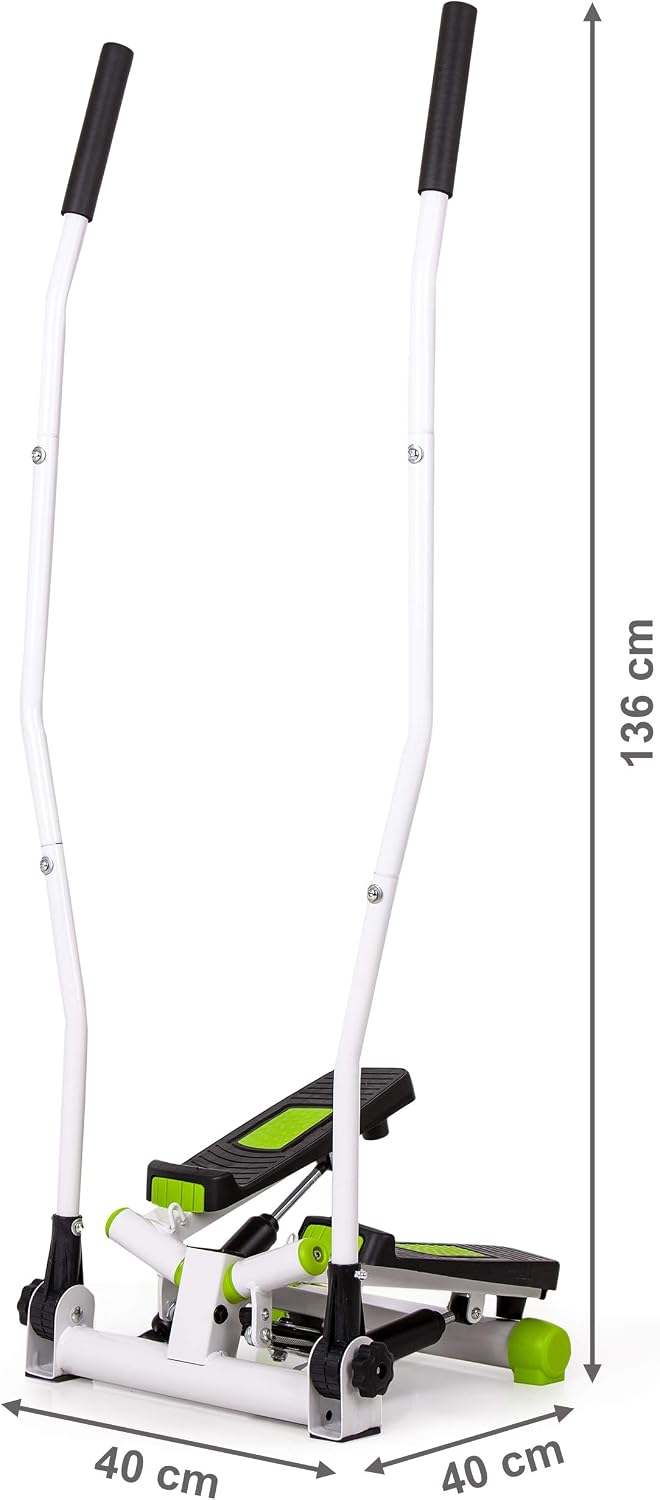
Image 7.1: Side view of the stepper illustrating its dimensions.
8. Warranty and Support
For warranty information, please refer to the documentation included with your purchase or contact the retailer where the product was acquired. For technical support or inquiries regarding your Goodhome Fitness Stepper GB-5085A, please contact Goodhome customer service through their official website or the contact details provided in your purchase documentation.
Ask a question about this manual
Ask about setup, troubleshooting, compatibility, parts, safety, or missing instructions. Manuals+ will review the question and use this page’s manual context to help answer it.