
1. Introduction
This manual provides essential information for the safe and effective use of your Goodhome Fitness Stepper GB-5032Y. Please read it thoroughly before assembly and operation, and retain it for future reference.
The Goodhome GB-5032Y Fitness Stepper is designed for home fitness, offering a comprehensive workout for both lower and upper body. It features a twist system for multi-directional movement and an LCD display to monitor your progress.
2. Safety Instructions
- Consult a physician before starting any new exercise program.
- Ensure the stepper is placed on a flat, stable surface.
- Keep children and pets away from the equipment during use.
- Maximum user weight: 120 kg. Do not exceed this limit.
- Wear appropriate athletic footwear during exercise.
- Stop exercising immediately if you feel pain, dizziness, or shortness of breath.
- Inspect the stepper for any loose or damaged parts before each use. Do not use if damaged.
3. Package Contents
Verify that all components are present and undamaged:
- Goodhome Fitness Stepper unit
- Resistance bands (expanders) x 2
- User Manual (this document)
4. Setup
4.1 Unpacking
Carefully remove all components from the packaging. Retain packaging materials for potential future transport or storage.
4.2 Placement
Place the stepper on a firm, level surface. Ensure there is sufficient clear space around the stepper for safe operation, especially for the resistance bands.
4.3 Attaching Resistance Bands
Attach the two resistance bands to the designated attachment points on the stepper. Ensure they are securely fastened before use.

Image: Goodhome Fitness Stepper with resistance bands attached. This image shows the stepper from an elevated angle, highlighting the green foot pedals and the black resistance bands extending upwards from the base.
5. Operating Instructions
5.1 Getting Started
- Step onto the foot pedals one at a time, ensuring your feet are centered and stable.
- Hold onto a stable object or use the resistance bands for balance if needed.
- Begin stepping by pressing down on one pedal, then the other, in a rhythmic motion.

Image: Goodhome Fitness Stepper from a side angle, showing the foot pedals in a stepped position. The green pedals are prominent, and the white frame with green accents is visible.
5.2 Twist System Operation
The stepper features a patented twist system that allows for both up-down and inward-outward motion. This dual-action movement engages additional muscle groups, enhancing your workout.
5.3 Using the Resistance Bands
The included resistance bands allow for upper body exercises while stepping. Hold the handles firmly and perform arm movements such as curls, rows, or presses to engage your arms, shoulders, and back.
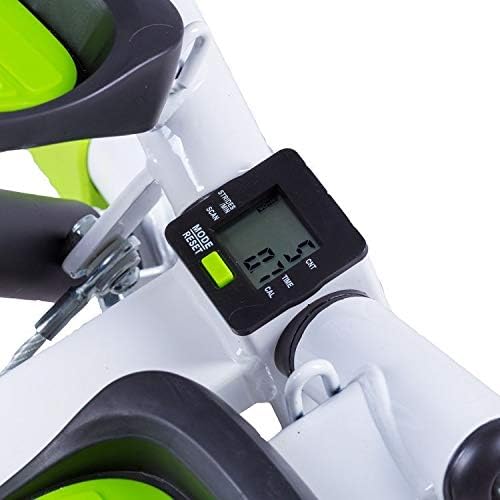
Image: Goodhome Fitness Stepper viewed from the front, showing the resistance bands attached and a jump rope resting on the floor next to it. The stepper's white frame and green foot pedals are clearly visible.

Image: Close-up of a black resistance band handle with a foam grip. The elastic cord extends from the handle.
5.4 LCD Display Functions
The integrated LCD display tracks your workout progress. Press the "MODE/RESET" button to cycle through or reset values.
- TIME: Displays the duration of your exercise session.
- REPS/MIN: Shows the number of steps per minute.
- CNT: Counts the total number of steps during the current exercise.
- CAL: Estimates the number of calories burned during the workout.
- SCAN: Automatically cycles through all display functions.
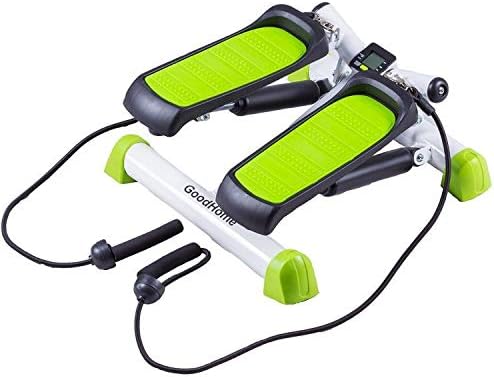
Image: Close-up of the black LCD display unit mounted on the stepper's frame. The screen shows numerical values and labels like "STRIDES", "SCAN", "TIME", "CNT", "CAL", and "REPS/MIN". A green "MODE/RESET" button is visible below the screen.
6. Maintenance
- Clean the stepper regularly with a damp cloth. Do not use abrasive cleaners.
- Check all bolts and connections periodically to ensure they are tight.
- Store the stepper in a dry, cool place away from direct sunlight when not in use.
7. Troubleshooting
| Problem | Possible Cause | Solution |
|---|---|---|
| LCD display not working | Batteries are dead or incorrectly installed. | Replace batteries (not included) or ensure correct polarity. |
| Stepper feels unstable | Not on a level surface; loose connections. | Move to a level surface; tighten all bolts and screws. |
| Squeaking noise during use | Moving parts require lubrication. | Apply a small amount of silicone-based lubricant to pivot points. |
8. Specifications
- Model: GB-5032Y
- Brand: Goodhome
- Maximum User Weight: 120 kg
- Product Weight: 5 kg
- Total Length: 40 cm
- Total Width: 40 cm
- Total Height: 23 cm
- Package Size: 50 x 50 x 30 cm
- Features: LCD Display, Twist System, Anti-slip feet, Resistance bands (expanders)
- Batteries: Not included
9. Warranty and Support
For warranty information or technical support, please refer to the retailer where the product was purchased or visit the official Goodhome website. Keep your proof of purchase for warranty claims.