
1. Introduction and Overview
The hOmeLabs True HEPA Air Purifier is designed to significantly improve indoor air quality by filtering out airborne particles. Featuring a 3-stage filtration system, including a pre-filter, H13 True HEPA filter, and activated carbon filter, it effectively captures 99.97% of particles as small as 0.3 microns. Its compact and modern design makes it suitable for various small to medium-sized spaces such as kitchens, home offices, living rooms, and bedrooms.
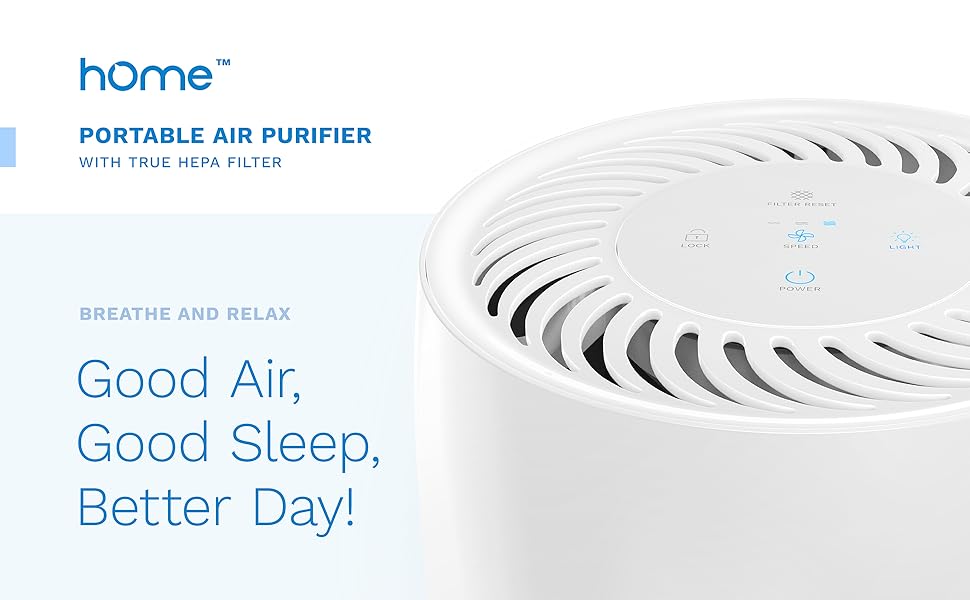
Image: hOmeLabs True HEPA Air Purifier in a living room setting, showcasing its compact and modern design.
2. Safety Instructions
Please read all safety instructions carefully before operating the air purifier to ensure safe and efficient use.
- Always unplug the air purifier from the power outlet before cleaning, performing maintenance, or when not in use.
- Ensure the unit is placed on a stable, level surface to prevent tipping.
- Keep the air purifier away from water or moist environments to prevent electrical hazards.
- Do not block the air inlets or outlets. Maintain adequate clearance around the unit for proper airflow.
- Important: The included filter ships with a protective plastic sleeve. Please remove this plastic sleeve from the filter before initial use. Failure to do so will prevent the unit from functioning correctly.
- Do not operate the unit with a damaged cord or plug. If the cord or plug is damaged, contact customer support.
- This appliance is not intended for use by persons (including children) with reduced physical, sensory or mental capabilities, or lack of experience and knowledge, unless they have been given supervision or instruction concerning use of the appliance by a person responsible for their safety.
3. Product Components
Familiarize yourself with the main components of your hOmeLabs Air Purifier:
- Main Unit: The primary housing of the air purifier.
- Control Panel: Located on the top of the unit, featuring touch controls for various functions.
- Air Inlet: Located around the lower part of the unit, where air is drawn in for filtration.
- Air Outlet: Located on the top of the unit, where purified air is released.
- 3-in-1 Filtration System: Consists of a pre-filter, H13 True HEPA filter, and activated carbon filter.

Image: Top view of the hOmeLabs Air Purifier control panel, showing touch-sensitive buttons for various functions.
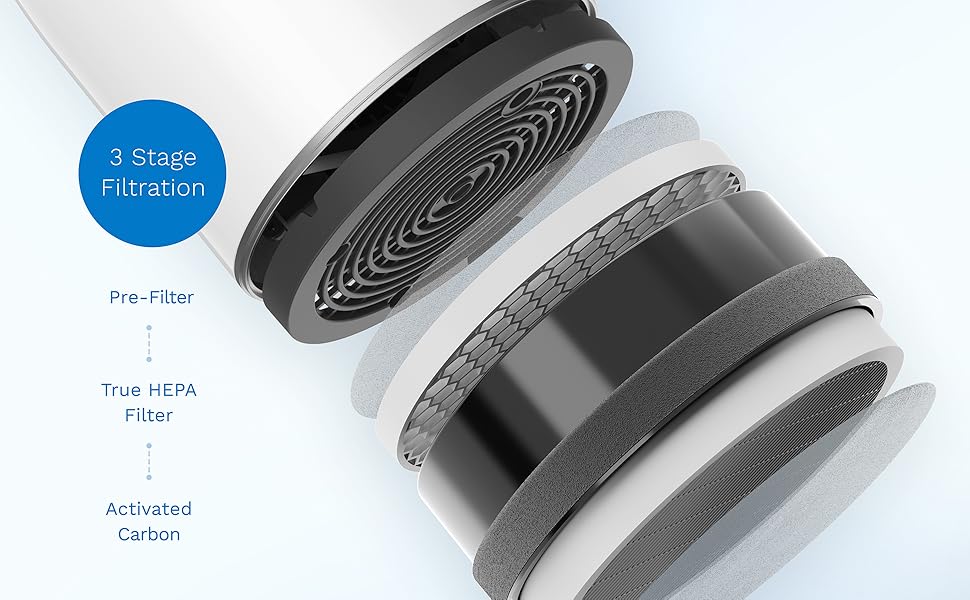
Image: Cross-section diagram illustrating the 3-stage filtration system, including the pre-filter, True HEPA filter, and activated carbon filter.
4. Setup
Follow these steps to set up your air purifier for the first time:
- Unpack: Carefully remove the air purifier and all packaging materials from the box.
- Remove Filter Packaging: Turn the unit upside down. Rotate the base counter-clockwise to unlock and remove it. Take out the 3-in-1 filter and remove its protective plastic sleeve. Reinsert the filter into the unit, ensuring it is seated correctly. Secure the base by rotating it clockwise until it locks.
- Placement: Place the air purifier on a firm, level surface. Ensure there is at least 6 inches (15 cm) of clearance from walls or furniture to allow for optimal airflow.
- Power Connection: Plug the power cord into a standard electrical outlet.
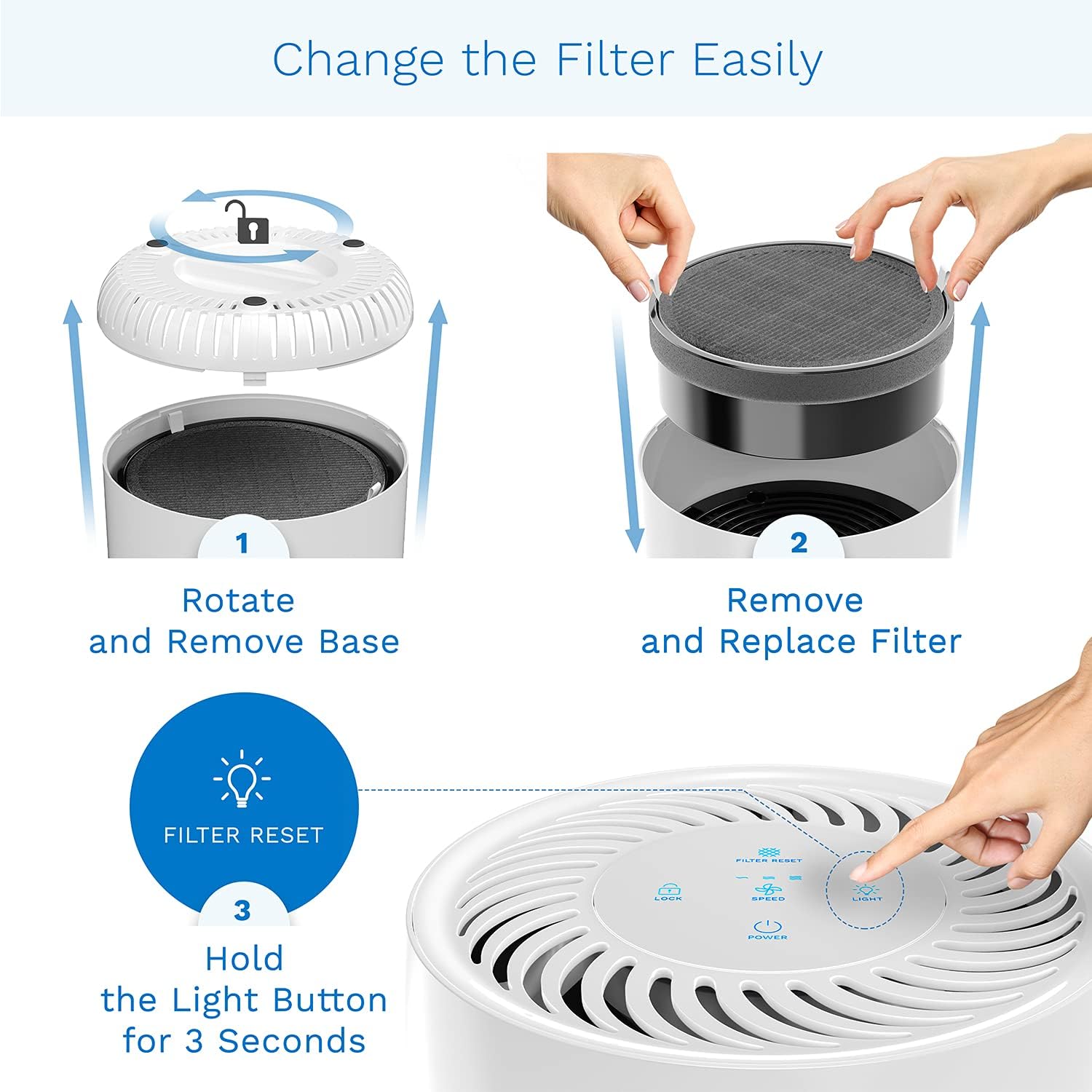
Image: Visual guide for filter replacement, detailing how to access and secure the filter compartment.
5. Operating Instructions
Your hOmeLabs Air Purifier features an intuitive touch control panel:
- Power On/Off: Touch the Power button to turn the unit on or off.
- Fan Speed: Touch the Speed button to cycle through three fan speed settings: Low, Medium, and High. The current speed is indicated by illuminated bars on the control panel.
- Night Light: Touch the Light button to turn the night light on or off. The night light has adjustable brightness options.
- Child Lock: Press and hold the Lock button for 3 seconds to activate or deactivate the child lock function. This prevents accidental changes to settings.
- Timer: Touch the Timer button to set the operating time for 2, 4, 6, or 8 hours. The unit will automatically turn off after the set time.
- Filter Reset Indicator: A dedicated indicator light will illuminate when it's time to replace the filter.

Image: Detailed view of the touch control panel, highlighting the various operational buttons.
6. Maintenance
Regular maintenance ensures optimal performance and extends the lifespan of your air purifier.
Filter Replacement
The 3-in-1 filter should be replaced approximately every 2100 hours of use (about 3 months on low to medium fan mode). The Filter Reset Indicator light will illuminate to remind you.
- Power Off and Unplug: Turn off the air purifier and unplug it from the power outlet.
- Remove Base: Turn the unit upside down. Rotate the base counter-clockwise to unlock and remove it.
- Remove Old Filter: Carefully pull out the used 3-in-1 filter. Dispose of it properly.
- Install New Filter: Insert a new hOmeLabs 3-in-1 replacement filter into the unit, ensuring it is seated correctly.
- Secure Base: Replace the base and rotate it clockwise until it locks securely.
- Reset Filter Indicator: Plug the air purifier back in. With the unit powered on, press and hold the Light button for 3 seconds until the Filter Reset Indicator light turns off. This resets the filter life counter.
Cleaning the Exterior
Wipe the exterior of the air purifier with a soft, dry cloth as needed. Do not use abrasive cleaners or solvents.
7. Troubleshooting
If you encounter any issues with your air purifier, refer to the following common problems and solutions:
| Problem | Possible Cause | Solution |
|---|---|---|
| Unit does not turn on. | Power cord not securely plugged in. | Ensure the power cord is firmly plugged into a working outlet. |
| No power from the outlet. | Test the outlet with another device or check the circuit breaker. | |
| Airflow is weak or noisy. | Filter is dirty or clogged. | Replace the filter as per maintenance instructions. |
| Air inlets/outlets are blocked. | Ensure adequate clearance around the unit. | |
| Filter Reset Indicator light remains on after filter replacement. | Filter life counter not reset. | Press and hold the Light button for 3 seconds to reset the indicator. |
| Child Lock is active. | Child Lock function is engaged. | Press and hold the Lock button for 3 seconds to deactivate. |
If the problem persists after trying these solutions, please contact hOmeLabs customer support.
8. Specifications
| Feature | Specification |
|---|---|
| Model Number | HME020248N |
| Brand | hOmeLabs |
| Color | White |
| Product Dimensions | 7.87"D x 7.87"W x 12.8"H |
| Item Weight | 5.29 pounds |
| Floor Area Coverage | 215 Square Feet |
| Noise Level | 50 Decibels |
| Controller Type | Touch Control |
| Filter Class | HEPA (H13), Activated Carbon |
| Power Source | Corded Electric |
| UPC | 850000941397 |
9. Warranty and Support
For warranty information or technical support, please refer to the contact details provided in your product packaging or visit the official hOmeLabs website. Keep your purchase receipt as proof of purchase for any warranty claims.

