
1. Product Overview
The Tosuny T1 is a portable digital media player designed for music, video, image, and e-book playback. It features Bluetooth connectivity, an FM radio, and a voice recording function. The device supports a 32GB memory card for expanded storage.

Figure 1: Front view of the Tosuny T1 MP3/MP4 Player showing the display and control buttons.
2. Package Contents
Ensure all items are present in the package:
- 1 x Tosuny T1 MP3/MP4 Player
- 1 x Data Cable (USB)
- 1 x Headphone Cable (Earphones)
- 1 x User Manual

Figure 2: The MP3/MP4 player along with its USB data cable and earphones.
3. Setup
3.1 Charging the Device
Before first use, fully charge the player. Connect the provided USB data cable to the player's charging port and to a USB power source (e.g., computer, USB wall adapter). The built-in 250mAh lithium-polymer battery requires approximately 90 minutes for a full charge. A full charge provides 4-6 hours of continuous use.

Figure 3: The player's screen showing a battery indicator, signifying its built-in 250mAh polymer lithium battery.
3.2 Inserting a Memory Card
The player supports memory cards up to 32GB. Locate the memory card slot on the side of the device. Gently insert the memory card until it clicks into place. The player is plug-and-play, meaning it will recognize the card automatically.
3.3 Powering On/Off
Locate the ON/OFF switch on the side of the device. Slide the switch to the "ON" position to power on the player. Slide it to the "OFF" position to power off.

Figure 4: The bottom edge of the player, highlighting the headphone jack, ON/OFF switch, and USB port.
3.4 Language Settings
The player comes with English as the default language and supports 13 other languages. To change the language, navigate to the "Set" menu icon on the main screen and select "Language" to choose your preferred option.
4. Operating Instructions
4.1 Button Functions
- M (Menu) Button (Top Left): Tap to display the menu interface.
- Back Button (Top Right): Short press to exit the current menu or volume setting. Long press to exit to the main menu mode.
- LAST Button (Left): Short press to go to the previous file/track. Long press to rewind.
- NEXT Button (Right): Short press to go to the next file/track. Long press for fast forward.
- + Button (Above): Increase volume or move menu selection upwards.
- - Button (Below): Decrease volume or move menu selection downwards.
- Middle Button (Play/Pause): Short press to play or pause. Long press to stop playback.

Figure 5: Detailed view of the player's buttons and their layout.
4.2 Media Playback
The player supports various media types:
- Music: Supports MP3 format. Navigate to the "Music" icon and select your desired audio file.
- Video: Supports AMV format. Navigate to the "Video" icon and select your desired video file.
- Images: Supports JPG and JPEG formats. Navigate to the "PIC" (Picture) icon to view images.
- E-books: Supports TXT format. Navigate to the "EBook" icon to read text files.

Figure 6: The player's screen showing icons for various functions, confirming support for MP3 music and AMV video formats.

Figure 7: The player supports multiple functions including music, radio, recording, video, e-book, and a built-in stopwatch.
4.3 Bluetooth Connectivity
The player supports Bluetooth 4.2, compatible with most Bluetooth devices. To pair with a Bluetooth headphone or speaker:
- Turn on your Bluetooth audio device and set it to pairing mode.
- On the player, navigate to the "Bluetooth" menu icon.
- Select "Search Device" or similar option.
- Choose your device from the list and confirm pairing.
4.4 Additional Functions
- Radio: Access the "Radio" icon to listen to FM radio.
- Recording: Use the "REC" (Record) icon to access the voice recording function.
- Stopwatch: The player includes a built-in stopwatch function, accessible via its icon.
- Timed Shutdown: This feature allows you to set a timer for the device to automatically power off.
- Power Saving Mode: Adjust settings for power saving and sleep mode to optimize battery life.
5. Maintenance
To ensure the longevity and optimal performance of your Tosuny T1 player:
- Cleaning: Use a soft, dry cloth to clean the device. Avoid liquid cleaners.
- Handling: The player features a matte, anti-slip body. Handle with care to prevent drops or impacts.
- Battery Care: Avoid extreme temperatures. Charge the battery regularly, even if not in frequent use, to maintain battery health.
- Storage: Store the device in a cool, dry place away from direct sunlight and moisture.
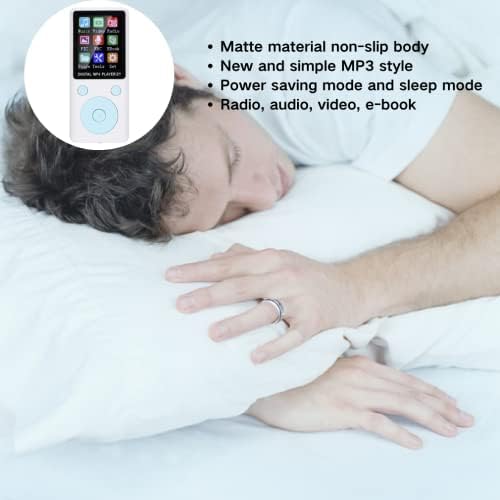
Figure 8: The player's matte non-slip body and power-saving features make it suitable for various uses, including relaxation.
6. Troubleshooting
If you encounter issues with your Tosuny T1 player, refer to the following common solutions:
- Device not powering on: Ensure the battery is charged. Connect the player to a power source and try again. Check the ON/OFF switch is in the "ON" position.
- Player not recognized by computer: Ensure the USB cable is securely connected to both the player and the computer. Try a different USB port or cable. Restart both the player and the computer.
- Cannot transfer files: Verify the memory card is properly inserted. Ensure the player is connected to the computer in data transfer mode (if prompted).
- Bluetooth pairing issues: Ensure the Bluetooth device is in pairing mode and within range. Restart both the player and the Bluetooth device.
- Unresponsive buttons: Power off the device and then power it back on. If the issue persists, ensure the device is not in a locked mode.
- Poor sound quality: Check headphone connection. Ensure volume is adjusted correctly. Test with different headphones.
7. Specifications
| Feature | Specification |
|---|---|
| Model Name | T1 |
| Brand | Tosuny |
| Display Size | 1.8 Inch |
| Display Technology | LCD |
| Battery Capacity | 250mAh Lithium Polymer |
| Continuous Use Time | 4-6 hours (Music playback) |
| Charging Time | Approx. 90 minutes |
| Max. Supported Memory Card | 32GB (Micro SD) |
| Music Format Support | MP3 |
| Video Format Support | AMV |
| Image Format Support | JPG, JPEG |
| E-book Format Support | TXT |
| Bluetooth Version | 4.2 |
| Dimensions | Approx. 9 x 4 x 1 cm |
| Special Features | Portable, FM Radio, Voice Recording, Stopwatch, Timed Shutdown, Power Saving Mode |
| Languages | Chinese, English, German, French, Spanish, Portuguese, Japanese, Turkish, Russian, Indonesian, Thai, Vietnamese, Hebrew |
8. Warranty and Support
For warranty information, please refer to the documentation provided at the time of purchase or contact your retailer. For technical support or further assistance, please contact the manufacturer, Tosuny, or your point of purchase.