
1. Introduction
This instruction manual provides essential information for the proper installation, operation, and maintenance of your uxcell GSM LTE Antenna. This antenna is designed to enhance 3G and 4G signal reception for compatible devices, offering a 5dBi high gain and broad frequency coverage.
Please read this manual thoroughly before using the product to ensure optimal performance and longevity.
2. Product Features
- High Gain: 5dBi for improved signal strength and data transfer.
- Wide Frequency Range: Supports 780-960MHz and 1710-2700MHz, compatible with various GSM, 3G, and 4G LTE networks.
- Connector Type: TNC Male connector with internal thread and central pin for secure attachment.
- Adjustable Angle: The antenna's paddle type design allows for angle adjustment up to 90 degrees to optimize signal reception.
- Easy Installation: No software required; simply connect to a compatible device.
- Durable Design: Foldable paddle type for convenience and protection.
3. Setup Instructions
Follow these steps to properly set up your uxcell GSM LTE Antenna:
- Identify Connector: Locate the TNC male connector on the antenna. This connector features external threads and a central pin.
- Prepare Device: Ensure your GSM/GPRS or LTE device has a compatible TNC female port.
- Connect Antenna: Carefully align the antenna's TNC male connector with the device's port. Gently screw the connector clockwise until it is finger-tight. Avoid over-tightening.
- Adjust Angle: Once connected, adjust the antenna's angle by pivoting the paddle section. Experiment with different angles to find the optimal position for the best signal strength. The antenna can be tilted up to 90 degrees.

A black paddle-type antenna with a TNC male connector at its base, designed for GSM and LTE signal reception.

A detailed view of the TNC male connector, featuring external threads and a central pin, ensuring a secure connection to compatible devices.
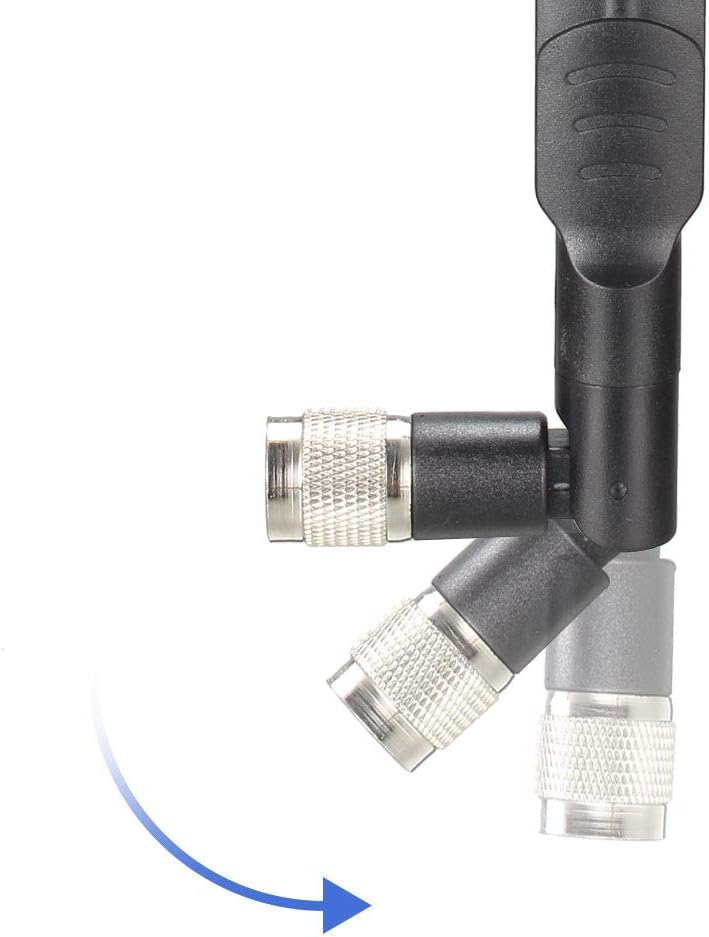
Illustration demonstrating the antenna's ability to pivot at the base, allowing for angle adjustment up to 90 degrees for optimal signal.
4. Operating Instructions
Once the antenna is securely connected to your device, it will immediately begin to function. The antenna is passive and does not require external power or software configuration.
- Signal Optimization: To achieve the best possible signal, you may need to experiment with the antenna's angle and the device's placement. Obstructions like walls, large metal objects, or being indoors can affect signal quality.
- Directional Adjustment: While not strictly directional, adjusting the angle can sometimes help in receiving signals more effectively from a particular direction.
5. Maintenance
To ensure the longevity and optimal performance of your antenna, follow these simple maintenance guidelines:
- Cleaning: Use a soft, dry cloth to gently wipe the antenna clean. Avoid using harsh chemicals or abrasive materials.
- Connection Check: Periodically check that the TNC connector remains securely fastened to your device. A loose connection can degrade signal quality.
- Physical Protection: Avoid dropping the antenna or subjecting it to strong impacts, which could damage internal components or the connector.
- Environmental Conditions: While designed for general use, avoid prolonged exposure to extreme temperatures or direct moisture if not rated for outdoor use.
6. Troubleshooting
If you experience issues with your antenna, consider the following troubleshooting steps:
- No Signal or Weak Signal:
- Ensure the antenna is securely connected to the device's TNC port.
- Verify that your device is compatible with a TNC male antenna and operates within the antenna's frequency range (780-960/1710-2700MHz).
- Adjust the antenna's angle and reposition your device to find a location with better signal reception.
- Check for any physical obstructions (e.g., thick walls, metal structures) that might be blocking the signal.
- Antenna Not Fitting:
- Confirm that your device requires a TNC male connector. There are various connector types (e.g., SMA, N-type), and they are not interchangeable.
7. Specifications
| Specification | Value |
|---|---|
| Model Number | a19070900ux0143 |
| Gain | 5dBi |
| Frequency Range | 780-960MHz / 1710-2700MHz |
| Connector Type | TNC Male |
| Total Size (L*W*H) | 165 x 18 x 15mm (6.5 x 0.7 x 0.6 inches) |
| Item Weight | 1.13 ounces |
| Color | Black |
| Manufacturer | uxcell |
| First Available Date | August 25, 2019 |

Diagram showing the antenna's dimensions: 165mm (6.5 inches) length, 18mm (0.7 inches) width, and 15mm (0.6 inches) connector height.
8. Warranty and Support
For warranty information or technical support regarding your uxcell GSM LTE Antenna, please contact uxcell customer service directly. Refer to the product packaging or the uxcell official website for the most current contact details.