1. Introduction
The Amico APC-70HF is a professional digital control plasma cutting machine featuring advanced IGBT inverter technology and a non-touch pilot arc system. This design ensures excellent arc stability and efficient cutting performance across various conductive metals, including stainless steel, alloy steel, low-carbon steel, copper, iron, and aluminum alloys. Its wide voltage input capability (90V to 300V) allows for versatile use in different environments, automatically adjusting to the available power supply. The machine is engineered for both industrial applications and general tasks, providing precise and clean cuts.
2. Safety Information
WARNING: Plasma cutting involves significant risks. Read and understand all safety precautions before operating this equipment. Failure to follow safety instructions can result in serious injury or death.
- Electrical Shock: This unit uses high voltage. Ensure proper grounding. Never operate in wet conditions. Wear dry gloves and protective clothing.
- Fumes and Gases: Cutting metals produces hazardous fumes. Operate in a well-ventilated area or use a fume extractor. Avoid breathing fumes.
- Arc Rays: The plasma arc produces intense visible and invisible (UV and IR) rays that can burn eyes and skin. Always wear appropriate welding helmets with suitable shade filters and protective clothing.
- Fire and Explosions: Sparks and hot metal can cause fires. Keep flammable materials away from the cutting area. Have a fire extinguisher readily available.
- Hot Parts: The torch and workpiece become extremely hot. Allow parts to cool before handling.
- Noise: Plasma cutting can be noisy. Wear hearing protection.
3. Package Contents
Verify that all items listed below are included in your package:
- APC-70HF Non-touch Pilot Arc Plasma Cutter Machine
- AP-80 13-Feet / 80-Amp Plasma Torch Gun Assembly
- 10-Feet 300A Work Clamp Assembly, 35-50mm Lead Dines
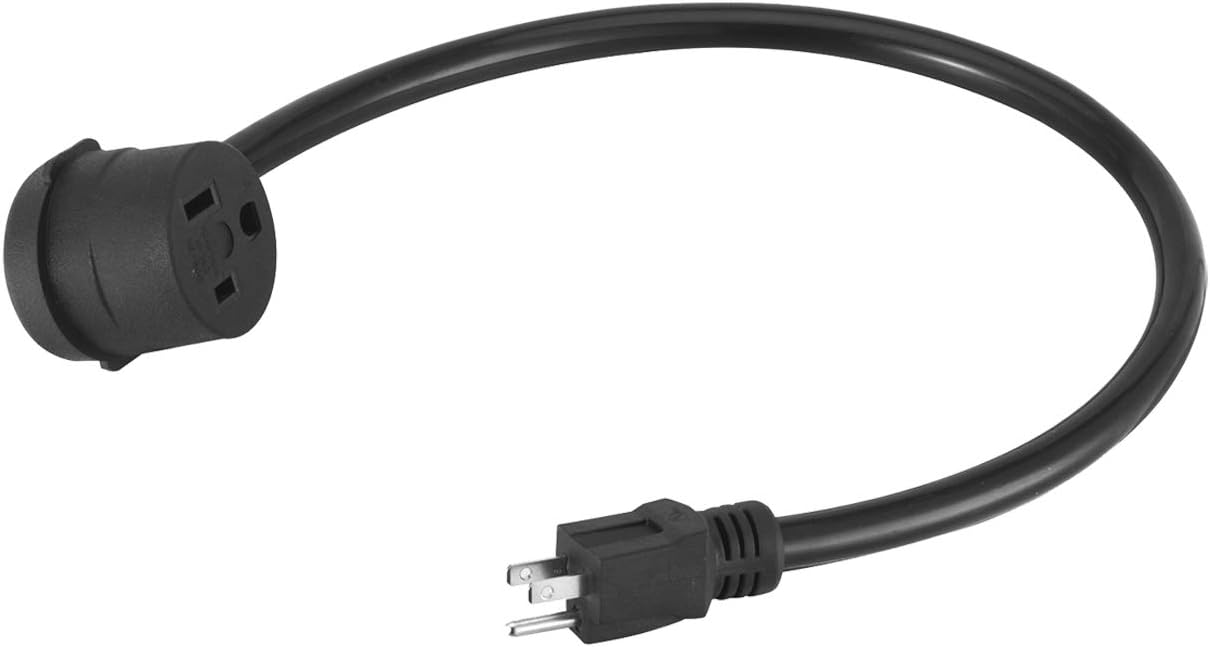
- 230V to 115V Power Adapter
- Air Filter and Pressure Gauge (Pre-installed inside the machine)
- Owner’s Manual (This document)


4. Product Overview
The Amico APC-70HF plasma cutter features a user-friendly interface and robust construction. Familiarize yourself with the main components and controls:


Front Panel Controls:
- Digital Display: Shows current settings and error codes.
- Current Adjustment Knob: Controls the output amperage (20-70 Amp). Adjust based on material thickness.
- Post Flow Knob: Adjusts the duration of air flow after the arc extinguishes, cooling the torch and extending consumable life.
- Air Adjust Knob: Fine-tunes the air pressure for optimal cutting.
- Air Pressure Gauge: Displays the current air pressure.
- 2T/4T/Air Test Switch: Selects between 2-touch, 4-touch torch operation, or air test mode.
- O.C. Indicator: Over-Current indicator.
- Power Indicator: Indicates when the machine is powered on.
Rear Panel Connections:
- Main Power Switch: Turns the unit on or off.
- Air Inlet: Connection point for the compressed air supply.
- Power Cord: Connects the machine to the electrical supply.
5. Setup
5.1 Power Connection
- Ensure the main power switch on the rear panel is in the OFF position.
- The APC-70HF features automatic voltage selection (90V-300V). Connect the power cord to a suitable electrical outlet. If using a 115V outlet, utilize the provided 230V to 115V power adapter.
- Verify that the power source meets the machine's requirements (50Hz/60Hz, 1-Phase).
5.2 Air Supply Connection
- Connect a clean, dry, oil-free compressed air supply to the air inlet on the rear panel. The machine has an internal air filter and pressure gauge.
- Ensure the air pressure is within the recommended range of 30-90 psi. The recommended gas inlet flow is 6.5 scfm at 90 psi.
- The air filter and pressure gauge are pre-installed for convenience.
5.3 Torch and Work Clamp Connection
- Connect the AP-80 plasma torch gun assembly to the designated port on the front panel. Ensure a secure connection.
- Connect the work clamp assembly to the appropriate terminal on the front panel.
- Attach the work clamp securely to the workpiece, ensuring good electrical contact. The workpiece must be clean and free of paint, rust, or heavy scale at the clamping point.
6. Operating Instructions
6.1 Initial Power On
- After completing all connections, turn the main power switch on the rear panel to the ON position.
- The digital display will illuminate, and the power indicator light will turn on.
6.2 Air Pressure Adjustment
- Set the 2T/4T/Air Test switch to 'Air Test'. This will allow air to flow without initiating an arc.
- Adjust the external air regulator (if used) and the internal Air Adjust knob until the pressure gauge reads the recommended pressure for your cutting application (typically 60-70 psi for most cuts).
- Return the switch to '2T' or '4T' mode after adjusting.
6.3 Current Adjustment
- Rotate the Current Adjustment knob to set the desired amperage. Refer to the cutting chart (if available in a separate document) or use the following general guidelines:
- Thinner materials require lower amperage.
- Thicker materials require higher amperage.
- The digital display will show the selected amperage.
6.4 Post Flow Adjustment
- Adjust the Post Flow knob to set the duration of air flow after the arc stops. A typical setting is 5-10 seconds.
- This post-flow air cools the torch consumables, extending their lifespan.
6.5 Cutting Operation (Non-Touch Pilot Arc)
- Ensure all safety gear is worn.
- Select either 2T (2-touch) or 4T (4-touch) mode:
- 2T Mode: Press and hold the torch trigger to start the arc and cut. Release the trigger to stop.
- 4T Mode: Press and release the trigger to start the arc. Press and release again to stop. This mode is useful for longer cuts to reduce hand fatigue.
- Position the torch nozzle approximately 1/8 inch to 1/4 inch above the workpiece. The non-touch pilot arc will initiate without direct contact.
- Maintain a consistent torch height and travel speed for optimal cut quality.
- Guide the torch along the desired cut line.
7. Maintenance
Regular maintenance ensures optimal performance and extends the lifespan of your plasma cutter.
7.1 Consumables Inspection and Replacement
The torch consumables (electrode, nozzle, shield cup) wear out during use and must be replaced regularly. Inspect them before each use.

- Electrode: Replace when the emitter (small dimple in the center) is eroded to a depth of approximately 1/16 inch (1.5 mm).
- Nozzle: Replace if the orifice becomes oval, enlarged, or shows signs of excessive wear.
- Shield Cup: Replace if cracked, chipped, or severely discolored.
- Always use genuine replacement parts for optimal performance and safety.
7.2 Air Filter Maintenance
- The internal air filter helps ensure a clean air supply. Periodically check the filter for accumulated moisture or debris.
- Drain any accumulated moisture from the filter bowl (if applicable) and clean or replace the filter element as needed.
7.3 General Cleaning
- Keep the machine's exterior clean and free of dust and metal particles.
- Ensure cooling vents are unobstructed to prevent overheating.
8. Troubleshooting
This section provides solutions to common issues you may encounter. For problems not listed here, contact customer support.
| Problem | Possible Cause | Solution |
|---|---|---|
| No power to the machine | Power cord not connected; Main switch off; Circuit breaker tripped; Insufficient input voltage. | Check power cord connection; Turn main switch ON; Reset circuit breaker; Verify input voltage is within 90-300V range. |
| No pilot arc | No air supply; Insufficient air pressure; Worn consumables; Torch trigger not pressed; Work clamp not connected. | Check air compressor and connections; Adjust air pressure to 60-90 psi; Replace worn electrode/nozzle; Press torch trigger; Ensure work clamp is securely attached to workpiece. |
| Poor cut quality (rough, dross, wide kerf) | Incorrect cutting speed; Incorrect amperage; Worn consumables; Insufficient air pressure; Incorrect torch height. | Adjust travel speed; Adjust amperage for material thickness; Replace consumables; Verify air pressure; Maintain consistent torch height. |
| Machine overheats (Over-heating protection activated) | Exceeded duty cycle; Blocked cooling vents; High ambient temperature. | Allow machine to cool down; Ensure cooling vents are clear; Operate in a cooler environment. The machine has automatic over-heating protection. |
| Digital display shows error code | Internal fault; Over-current; Over-voltage. | Turn off the machine, wait a few minutes, then restart. If the error persists, contact customer support. The machine has over-current and over-loading protection. |
9. Specifications
Technical specifications for the Amico APC-70HF plasma cutter:
| Feature | Specification |
|---|---|
| Model | APC-70HF |
| Type | Non-touch Pilot Arc Plasma Cutter |
| Supply Power | AC 90V-300V, 50Hz/60Hz, 1-Phase |
| Rated Input Current | 115V/230V/55 Amp |
| Cutter Current Range | 230V/20-70 Amp, 115V/20-50 Amp |
| Nominal DC Open Circuit Voltage | 265-Volt |
| Output Voltage | 108-Volt |
| Duty Cycle @ 104°F (40°C) | 80% @ 70 Amp |
| Efficiency | 85% |
| Power Factor | 0.93 |
| Cooling Method | Fan Air Cooled |
| Gas Supply | Clean Dry Oil-Free Air |
| Gas Pressure Range | 30-90 psi |
| Recommended Gas Inlet Flow | 6.5 scfm @ 90 psi |
| Standard Severance Cutting Thickness | 1.2 in. |
| Maximum Severance Cutting Thickness | 1.5 in. |
| Net Weight | 31.0 lbs. |
| Product Size (L x W x H) | 20.0 x 8.7 x 15.7 in. |
| Certification | ETL Listed |
10. Warranty and Support
For warranty information, technical support, or to purchase replacement parts and consumables, please contact AmicoPower customer service. Refer to the contact information provided with your product packaging or visit the official AmicoPower website.


