
1. Introduction
Thank you for choosing the Havit HV-H2002d Gaming Headset. This manual provides essential information for setting up, operating, and maintaining your headset to ensure optimal performance and longevity. Please read these instructions carefully before use.

Image 1.1: The Havit HV-H2002d Gaming Headset, featuring a black design with silver accents and a detachable microphone.
2. Product Overview
2.1. Key Features
- Elegant Design: Features a sleek plastic piano finish.
- Durable Construction: Robust and resistant to scratches.
- High-Quality Audio: Equipped with 53mm high-magnetism speakers for powerful sound and excellent quality.
- Optimized Sound Profile: Distinct sound for gaming, with meticulous bass and treble for music listening.
- Adjustable Headband: Ergonomically designed for comfort during extended use, with moderate weight to prevent pressure.
- Multi-Platform Compatibility: Compatible with Xbox One, PS4, PC, and other multimedia devices.
- Detachable Microphone: Flexible and high-fidelity microphone for clear communication.

Image 2.1: An exploded view illustrating the internal components of the 50mm speaker drivers, designed for enhanced bass and audio dynamics.

Image 2.2: The headset's design emphasizes light weight (305g) and soft-touch, skin-friendly earcups for prolonged comfort.

Image 2.3: A close-up of the detachable microphone, highlighting its noise-canceling sponge, flexible adjustment, and high-fidelity audio capture.
2.2. Package Contents
- Havit HV-H2002d Gaming Headset
- Detachable Microphone
- Headset Splitter Adapter (1x TRRS female to 2x P2 male)
- User Manual
3. Setup Instructions
3.1. Attaching the Microphone
- Locate the microphone input port on the left earcup of the headset.
- Align the detachable microphone's connector with the port.
- Gently push the microphone into the port until it is securely seated.
- Adjust the flexible microphone arm to your preferred position for optimal voice pickup.
3.2. Connecting to Devices
The Havit HV-H2002d headset offers versatile connectivity options:
- For Consoles (PS4/PS5, Xbox One S/X, Nintendo Switch) and Mobile Devices (Tablet, Phone):
Connect the headset's 3.5mm audio jack directly into the controller or device's audio port. - For PC:
When connecting to a PC with separate audio and microphone jacks, use the included headset splitter adapter. Plug the headset's 3.5mm jack into the female end of the splitter. Then, plug the two male P2 connectors of the splitter into the corresponding audio (green) and microphone (pink) ports on your computer.
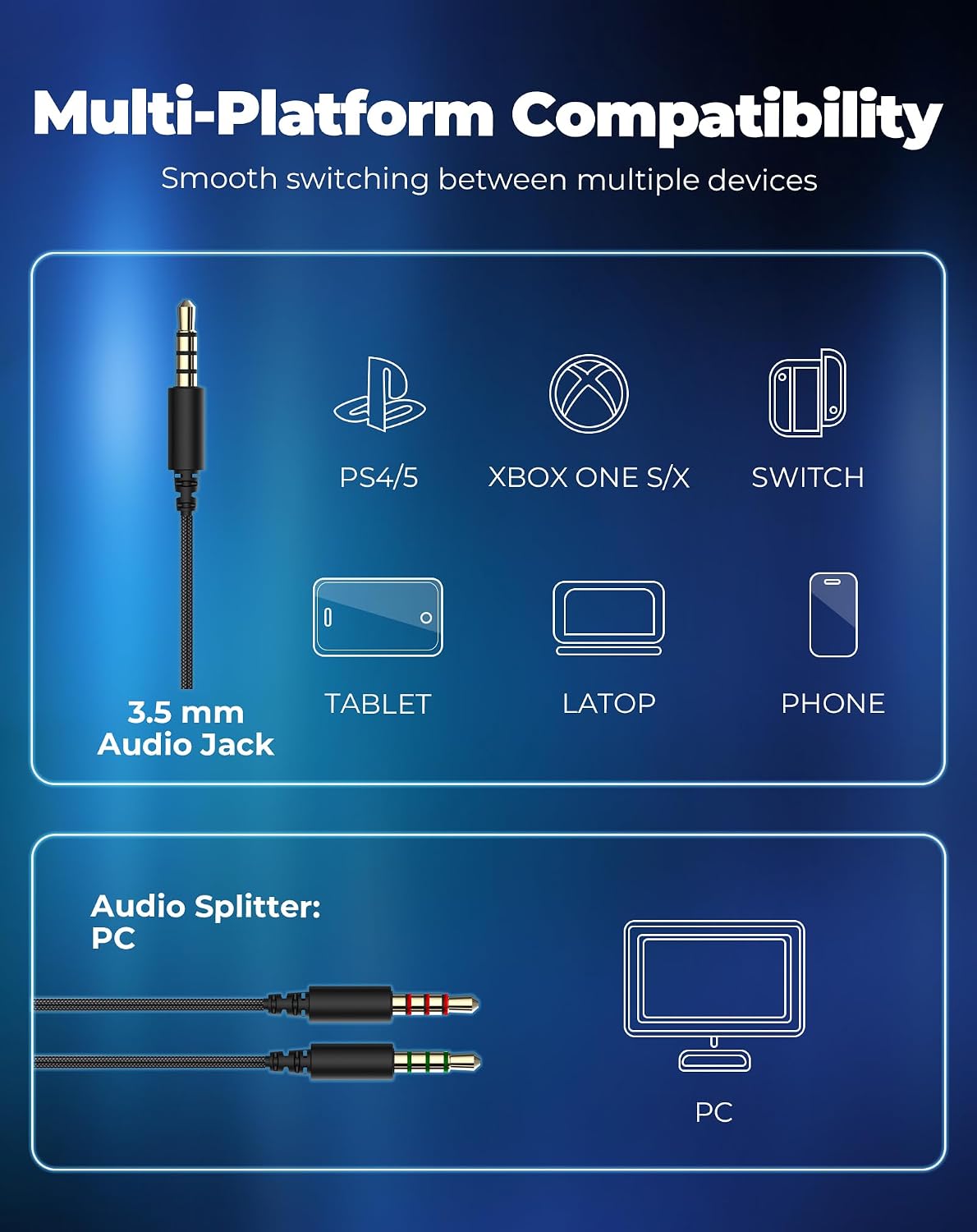
Image 3.1: Diagram illustrating the headset's multi-platform compatibility, showing direct 3.5mm jack connection for consoles and mobile devices, and the use of an audio splitter for PC connection.
4. Operating Instructions
4.1. Adjusting Volume
The headset features an in-line controller on the cable for convenient volume adjustment:
- To increase volume, roll the volume scroll wheel upwards.
- To decrease volume, roll the volume scroll wheel downwards.
4.2. Microphone Mute Function
The in-line controller also includes a microphone mute switch:
- To mute the microphone, slide the switch to the 'Mute' position.
- To unmute the microphone, slide the switch back to the 'Unmute' position.
- Important: When connecting to a PC, ensure the microphone mute switch on the in-line controller is in the 'Unmute' position for the microphone to function.

Image 4.1: Close-up of the in-line controller, showing the volume scroll wheel and the microphone mute switch for easy audio management.
5. Maintenance
Proper maintenance ensures the longevity and performance of your Havit HV-H2002d Gaming Headset:
- Cleaning: Use a soft, dry cloth to wipe down the earcups and headband. For stubborn dirt, a slightly damp cloth can be used, but ensure no moisture enters the speaker grilles or microphone.
- Storage: Store the headset in a cool, dry place away from direct sunlight and extreme temperatures. Avoid placing heavy objects on the headset.
- Cable Care: Avoid sharp bends or excessive pulling on the cable. When not in use, gently coil the cable.
- Microphone Care: When detaching the microphone, pull it straight out without twisting to prevent damage to the connector.
6. Troubleshooting
If you encounter issues with your Havit HV-H2002d Gaming Headset, please refer to the following common solutions:
| Problem | Possible Cause | Solution |
|---|---|---|
| No sound from headset |
|
|
| Microphone not working |
|
|
| Sound distortion or static |
|
|
If the problem persists after trying these solutions, please contact Havit customer support for further assistance.
7. Specifications
| Model Number | HV-H2002d |
| Speaker Diameter | 53 mm |
| Impedance | 64 Ω ± 15% |
| Sensitivity | 110 dB ± 3 dB |
| Frequency Response | 20 Hz - 20 kHz |
| Microphone Dimensions | 6.0 x 2.2 mm |
| Operating Current | ≤ 80 mA |
| Cable Length | 1.7 m |
| Plug Type | 3.5 mm Jack |
| Connectivity Technology | Wired |
| Noise Control | Sound Isolation |
| Product Weight | 297 Grams |
| Material | Plastic |
8. Warranty and Support
8.1. Warranty Information
Havit products are designed and manufactured to the highest quality standards. For specific warranty terms and conditions applicable to your region, please refer to the warranty card included with your product or visit the official Havit website. Keep your proof of purchase for warranty claims.
8.2. Customer Support
If you require further assistance, have questions about your product, or need to report a defect, please contact Havit customer support through their official website or the contact information provided in your product packaging.
9. Official Product Videos
No official product videos from the seller were found for this model in the provided data.


