
1. Introduction
This manual provides detailed instructions for the safe and proper installation, operation, and maintenance of your Maclean MC-862 Universal TV Wall Mount. Please read all instructions carefully before beginning installation to ensure correct setup and to prevent damage or injury. Keep this manual for future reference.
2. Safety Information
- Weight Capacity: Do not exceed the maximum weight capacity of 40 kg (88 lbs). Exceeding this limit may result in serious injury or property damage.
- Screen Size: This mount is designed for TVs between 26 and 55 inches.
- Wall Type: Ensure the mounting surface (wall) can safely support the combined weight of the mount and your TV. Consult a qualified professional if unsure about your wall's strength.
- Tools: Use appropriate tools for installation. Always wear safety glasses.
- Assembly: Two people are recommended for installation to ensure safety and ease of handling.
- Children: Keep children away from the work area during installation.
- Tightening Screws: Do not overtighten screws. Overtightening can damage the product or the mounting surface.
3. Package Contents
Verify that all components are present and undamaged before installation. If any parts are missing or defective, contact your retailer for assistance.

Image: The Maclean MC-862 TV wall mount, including the wall plate, TV brackets, and various screws, washers, and spacers for installation.

Image: A clear plastic bag containing various screws, washers, and wall anchors, organized by size for easy identification during assembly.
List of Components:
- Wall Plate (1x)
- TV Brackets (2x)
- Mounting Hardware Kit (screws, washers, spacers, wall anchors)
- Instruction Manual (this document)
4. Specifications
- Model: MC-862
- Brand: Maclean
- Material: Metal (Powder-coated)
- Screen Size Compatibility: 26 - 55 inches
- Maximum Load Capacity: 40 kg (88 lbs)
- VESA Compatibility: 100x100mm, 200x100mm, 200x200mm, 200x300mm, 300x300mm, 200x400mm, 300x400mm, 400x400mm
- Tilt Angle: Up to -8 degrees
- Distance from Wall: 40 mm (1.57 inches)
- Product Dimensions: 440 x 425 mm (Wall plate width x Max height with brackets)
- Item Weight: 1.28 kg

Image: Visual representation of compatible screen sizes (26" to 55") and various VESA mounting patterns supported by the MC-862 mount.
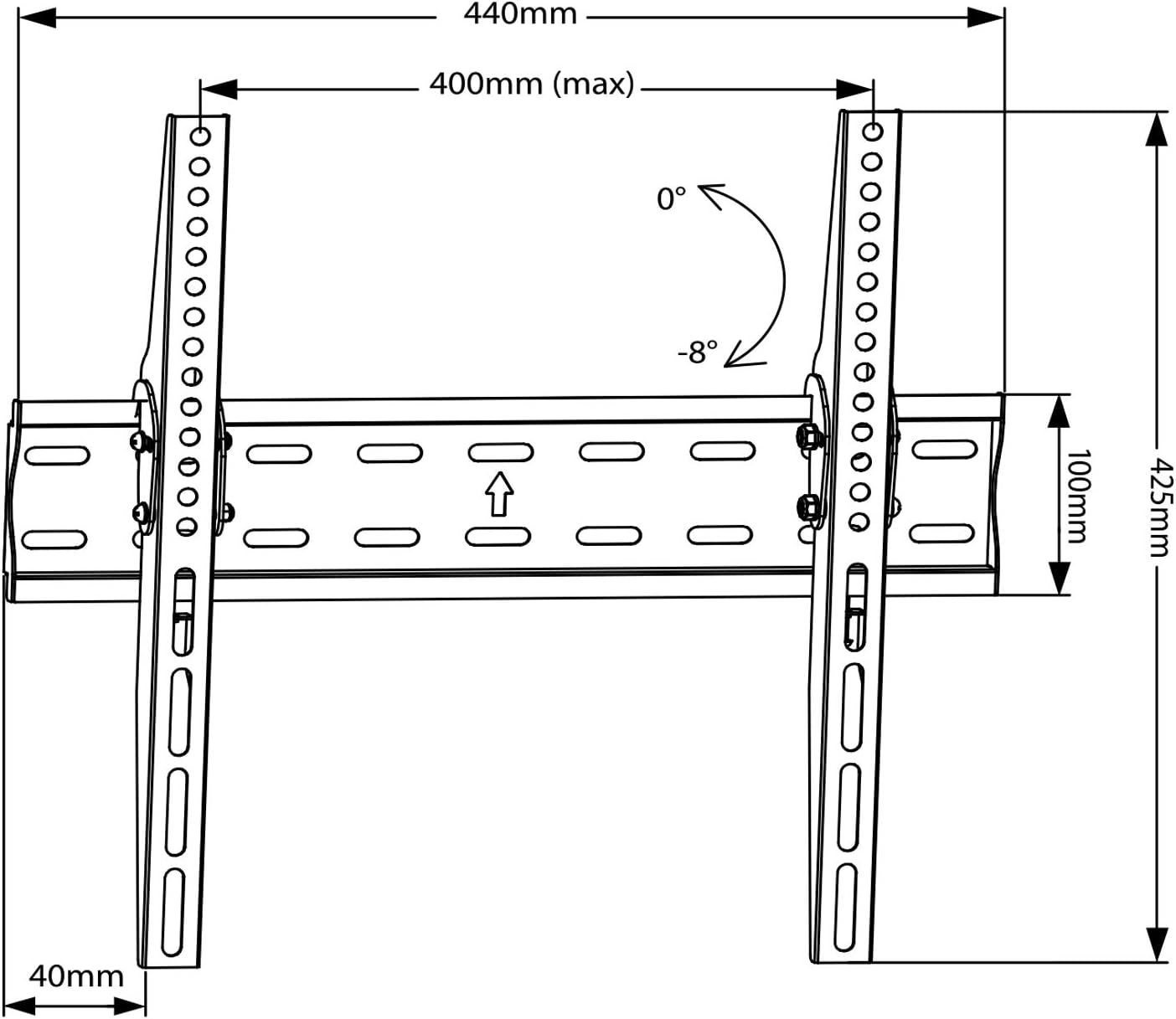
Image: A line drawing illustrating the overall dimensions of the wall mount (440mm width, 425mm height) and the 0 to -8 degree tilt capability, along with the 40mm wall distance.

Image: A side view diagram demonstrating the minimal 40mm distance between the mounted TV and the wall, highlighting the slim design.
5. Installation Guide
5.1. Pre-Installation Checks
- Check TV Weight and Size: Ensure your TV's weight does not exceed 40 kg and its screen size is between 26 and 55 inches.
- Verify VESA Pattern: Locate the four mounting holes on the back of your TV. Measure the horizontal and vertical distance between these holes to determine your TV's VESA pattern. Confirm it is compatible with the mount's specifications (e.g., 400x400mm).
- Identify Wall Type: Determine if your wall is made of wood studs, concrete, or brick. Different wall types require specific anchors and drilling techniques.
- Gather Tools: You will need a drill, stud finder (for wood walls), level, measuring tape, pencil, and a screwdriver/wrench.
5.2. Mounting the Wall Plate
- Mark Drilling Locations: Hold the wall plate against the wall at your desired TV height. Use a level to ensure it is perfectly horizontal. Mark the drilling points through the holes on the wall plate with a pencil.
- Drill Pilot Holes: For wood stud walls, drill pilot holes into the center of the studs. For concrete or brick walls, drill holes of the appropriate size for the wall anchors.
- Insert Wall Anchors (if applicable): For concrete or brick walls, insert the plastic wall anchors into the drilled holes. Tap them gently with a hammer until flush with the wall surface.
- Secure Wall Plate: Align the wall plate with the drilled holes. Use the provided lag bolts and washers to securely fasten the wall plate to the wall. Tighten all bolts firmly, but do not overtighten.
5.3. Attaching Brackets to TV
- Select TV Screws: Choose the correct diameter and length of screws from the hardware kit that fit your TV's VESA mounting holes. Use spacers if necessary to ensure the screws do not bottom out or damage internal components.
- Attach Brackets: Align the two TV brackets with the VESA mounting holes on the back of your TV. Ensure the hooks on the brackets are facing upwards and towards the bottom of the TV. Secure the brackets using the selected screws and washers.
5.4. Mounting TV to Wall Plate
- Lift TV: With assistance, carefully lift the TV.
- Hook TV onto Wall Plate: Align the hooks on the TV brackets with the top edge of the wall plate. Gently lower the TV so the hooks engage with the wall plate.
- Secure TV: Once the TV is securely hooked, locate the safety screws or locking mechanisms on the bottom of the TV brackets. Tighten these screws to prevent the TV from accidentally lifting off the wall plate.
6. Operating the Mount (Tilt Adjustment)
The Maclean MC-862 mount allows for a downward tilt of up to 8 degrees to optimize your viewing angle and reduce glare.

Image: A visual representation of a TV mounted on the wall, illustrating the ability to tilt the screen downwards by up to 8 degrees from its vertical position.
- Unlock Tilt (if applicable): Some models may have a locking mechanism for the tilt. If present, loosen it first.
- Adjust Angle: Gently push the bottom of the TV forward or pull it back to achieve the desired tilt angle. The mount is designed to hold the position once set.
- Lock Tilt (if applicable): If your mount has a tilt locking mechanism, tighten it to secure the TV in the desired position.
7. Maintenance
- Regular Checks: Periodically check all screws and bolts to ensure they remain tight and secure.
- Cleaning: Clean the mount with a soft, dry cloth. Avoid abrasive cleaners or solvents that could damage the finish.
- Damage: If any part of the mount appears damaged or worn, discontinue use and contact customer support.
8. Troubleshooting
Problem: TV is not level.
- Solution: Carefully remove the TV from the wall plate. Re-check the wall plate's level using a spirit level and adjust its position if necessary before re-mounting the TV. Ensure all wall plate screws are tightened evenly.
Problem: TV feels unstable on the mount.
- Solution: Ensure all screws securing the TV brackets to the TV are tight. Verify that the TV brackets are properly seated on the wall plate. Confirm the safety screws/locking mechanisms at the bottom of the TV brackets are engaged and tightened. Re-check wall plate stability.
Problem: Cannot achieve desired tilt.
- Solution: Ensure no cables are obstructing the tilt mechanism. Check if any tilt locking screws are present and loosen them before attempting to adjust the angle.
9. Warranty and Support
Maclean products are designed for durability and performance. For warranty information or technical support, please refer to the documentation included with your purchase or visit the official Maclean website. Keep your proof of purchase for warranty claims.