
Introduction
The ThermoPro TP90 WiFi Thermometer Hygrometer is designed to provide accurate, real-time monitoring of indoor temperature and humidity. With its WiFi connectivity, you can remotely access data and receive alerts via the ThermoPro Home App, ensuring you are always informed about your home environment. This device is ideal for monitoring living rooms, baby rooms, kitchens, greenhouses, guitar rooms, offices, cellars, and more.
This manual provides detailed instructions for setting up, operating, and maintaining your TP90 device to ensure optimal performance and longevity.
Key Features
- Wireless Smart Monitoring: Remotely monitor temperature and humidity via the ThermoPro Home App using a 2.4GHz Wi-Fi connection (5GHz Wi-Fi not supported).
- Smart App Control: Access the last 7 days of data history on the app and view 3 comfortable level indicators (Dry/Comfort/Wet) for quick environmental assessment.
- Unlimited Sensors: Add an unlimited number of additional TP90 sensors within the app to monitor various locations throughout your home.
- Clear Readings: Features a backlight and large luminous digits for easy readability in dim light conditions.
- User-Friendly Design: Powered by an AC adapter, eliminating the need for frequent battery replacements. Includes a tabletop stand and wall-mount hole for versatile placement.
Package Contents
- Thermometer body (TP90 unit)
- USB Charging Cable
- AC Power Adapter
Product Overview

Figure 1: The ThermoPro TP90 device alongside a smartphone displaying its remote monitoring capabilities, highlighting the absence of range limitations with WiFi connectivity.

Figure 2: A detailed view of the ThermoPro Home App interface, illustrating how users can check indoor temperature and humidity, view comfort level indicators, and access 7-day historical data and trends.
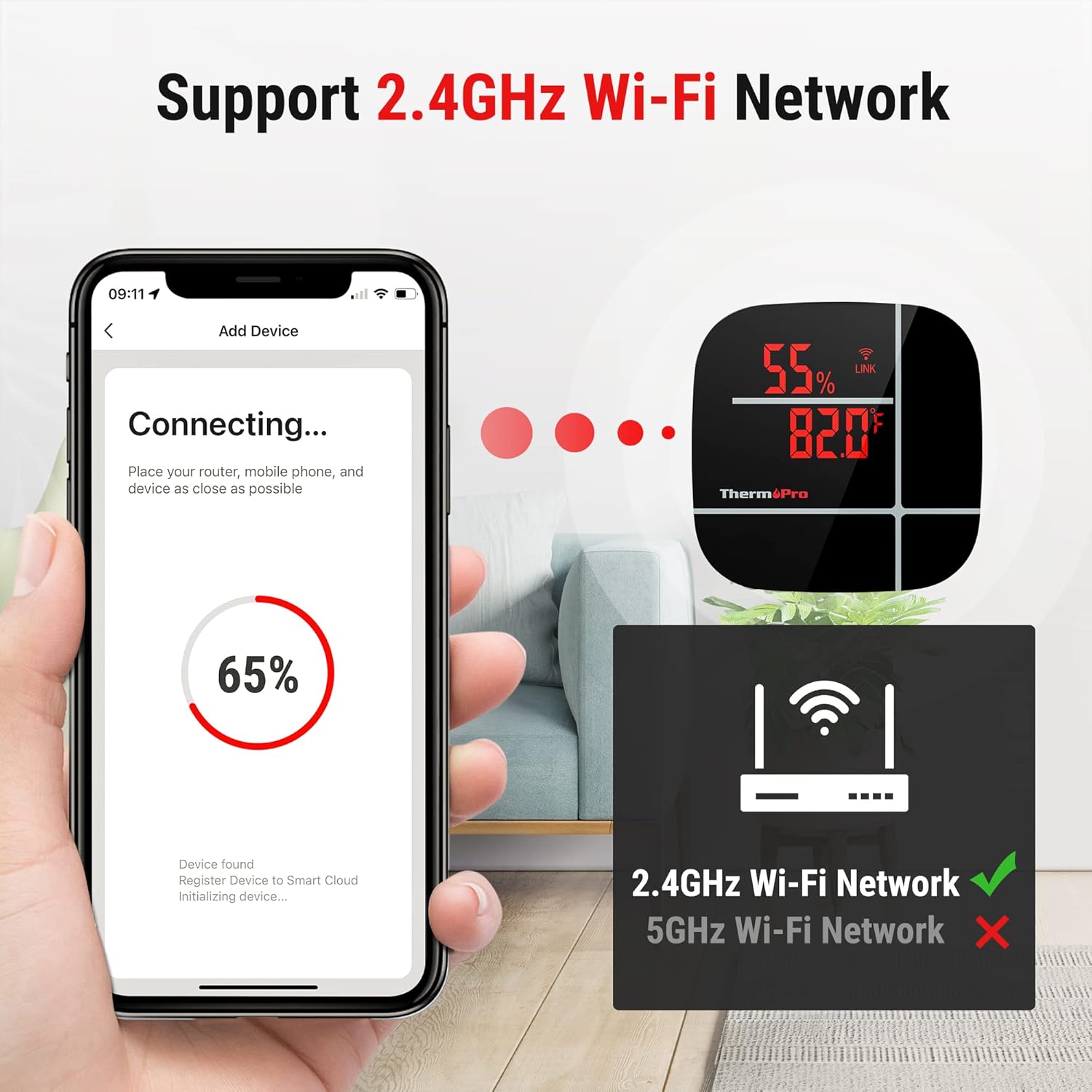
Figure 3: The device connecting to a Wi-Fi network via the app, emphasizing support for 2.4GHz Wi-Fi networks only.

Figure 4: The TP90 unit powered by an AC adapter, highlighting its wall-mount hole and internal cooling fan for optimal performance.

Figure 5: The adjustable digital LCD display brightness levels of the TP90, ensuring clear visibility in various lighting conditions.

Figure 6: The ThermoPro Home App demonstrating the capability to monitor an unlimited number of sensors placed in various rooms, providing a comprehensive overview of the entire home environment.
Setup Instructions
- Power On: Connect the ThermoPro TP90 to a power outlet using the provided USB charging cable and AC power adapter. The device will automatically power on.
- Download the App: Search for "ThermoPro Home" in your smartphone's App Store (iOS) or Google Play Store (Android) and download the application.
- Create an Account: Open the ThermoPro Home App and follow the on-screen instructions to create a new user account or log in if you already have one.
- Add Device: In the app, tap the "+" icon or "Add Device" option to begin the pairing process.
- Connect to Wi-Fi: Ensure your smartphone is connected to a 2.4GHz Wi-Fi network. The TP90 only supports 2.4GHz Wi-Fi. Follow the app's instructions to connect your TP90 to your home Wi-Fi network. Keep the device, router, and phone as close as possible during this step.
- Placement: Once connected, place the TP90 in your desired indoor location. Utilize the tabletop stand or the wall-mount hole for secure placement.
Operating Instructions
- Reading the Display: The large LCD display shows current temperature (in Fahrenheit or Celsius) and humidity percentage.
- Switching Temperature Units: Use the button on the back of the device to toggle between Fahrenheit (°F) and Celsius (°C) display.
- Backlight: The display features a backlight for enhanced visibility in low-light conditions. Refer to the device's physical buttons for backlight activation.
- Comfort Level Indicators: The display and app show comfort levels (Dry, Comfort, Wet) to quickly indicate the current environmental conditions.
App Integration
The ThermoPro Home App provides advanced monitoring and control features:
- Remote Monitoring: View real-time temperature and humidity data from anywhere with an internet connection.
- Data History: Access historical data for the past 7 days directly within the app, allowing you to track trends and changes over time.
- Multiple Sensors: Easily add and manage multiple TP90 sensors from a single app interface, allowing you to monitor different rooms or areas simultaneously.
- Customization: Rename sensors within the app for easy identification of each monitored location.
Maintenance
- Cleaning: Wipe the device clean with a soft, dry cloth. Avoid using abrasive cleaners or solvents.
- Power Source: The device is powered by an AC adapter. Ensure it is connected to a stable power source.
- Placement: For accurate readings, place the device in a location free from direct sunlight, drafts, or extreme temperature fluctuations.
Troubleshooting
| Problem | Possible Cause | Solution |
|---|---|---|
| Device not connecting to Wi-Fi | Incorrect Wi-Fi band (5GHz), weak signal, incorrect password. | Ensure connection to a 2.4GHz Wi-Fi network. Move device closer to the router. Re-enter Wi-Fi password carefully. |
| Inaccurate readings | Device placed in direct sunlight, near a heat source/vent, or in a draft. | Relocate the device to a stable environment away from direct heat, cold, or drafts. Allow time for readings to stabilize. |
| Display is dim or off | Power issue, backlight off. | Ensure the AC adapter is securely connected and receiving power. Activate the backlight if needed. |
Specifications
- Brand: ThermoPro
- Model Name: TP90
- Special Feature: High Accuracy
- Color: Black
- Outer Material: Plastic
- Display Type: Digital
- Connectivity Technology: Wi-Fi (2.4GHz only)
- Power Source: AC Adapter (USB Charging Cable included)
- Upper Temperature Rating: 158 Degrees Fahrenheit (70°C)
- Response Time: 500 Milliseconds
- Indoor/Outdoor Usage: Indoor
- Item Weight: 10.2 ounces
- Item Length: 1.69 Inches
Warranty and Support
ThermoPro products are designed for reliability and performance. For specific warranty details, please refer to the warranty card included with your product or visit the official ThermoPro website. For technical support, troubleshooting assistance, or any questions regarding your TP90 device, please contact ThermoPro customer service through their official channels.


