
Makita BL1830B-3
Makita BL1830B-3 18V LXT Lithium-Ion 3.0Ah Battery Pack (3-Pack) Instruction Manual
Model: BL1830B-3
1. Introduction
This manual provides important instructions for the safe operation, maintenance, and storage of your Makita BL1830B-3 18V LXT Lithium-Ion 3.0Ah Battery Pack. Please read this manual thoroughly before using the batteries to ensure proper function and to prevent damage or injury.
The Makita 18V LXT Lithium-Ion 3.0Ah battery is designed to provide reliable power for compatible Makita 18V LXT cordless tools. These batteries feature an integrated LED charge level indicator and are equipped with Star Protection Computer Controls for enhanced performance and protection.
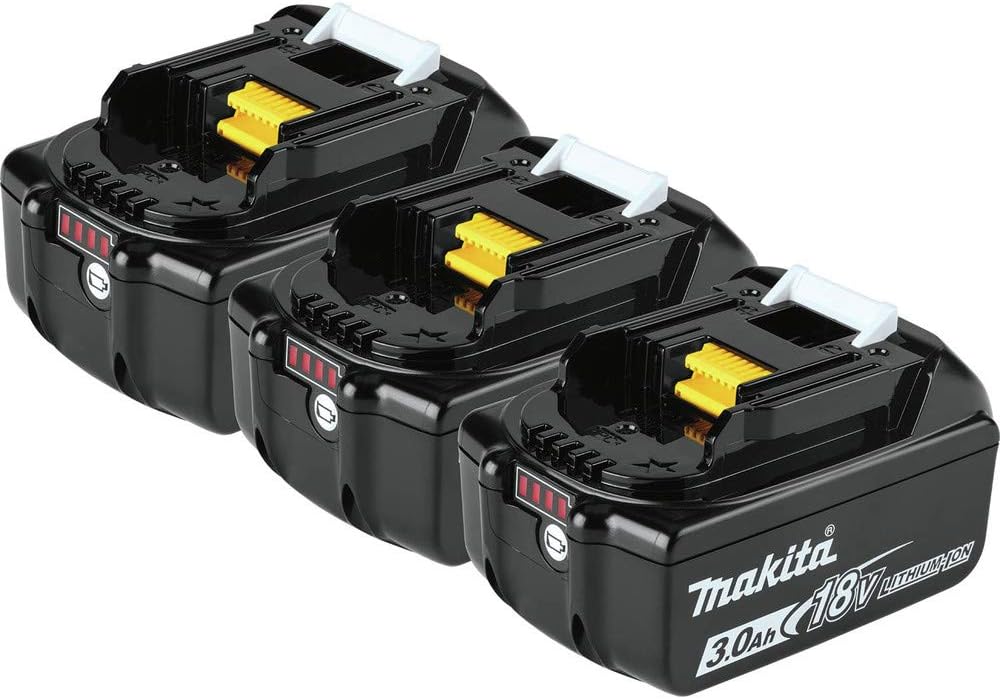
Figure 1: Makita BL1830B-3 18V LXT Lithium-Ion 3.0Ah Battery Pack (3-Pack)
2. Safety Information
WARNING:
- Always read and understand the instructions for both the battery and the tool before use.
- Do not disassemble, open, or shred battery packs.
- Do not short-circuit a battery pack. Do not store battery packs haphazardly in a box or drawer where they may short-circuit each other or be short-circuited by conductive materials.
- Do not expose battery packs to heat or fire. Avoid storage in direct sunlight.
- Do not subject battery packs to mechanical shock.
- In the event of battery leakage, do not allow the liquid to come into contact with the skin or eyes. If contact has been made, wash the affected area with copious amounts of water and seek medical advice.
- Keep battery packs clean and dry.
- Recharge only with the charger specified by Makita.
- Do not use any charger other than that specifically provided for use with the equipment.
- Do not use a battery pack that is not designed for use with the equipment.
- Keep battery packs out of the reach of children.
- Observe the plus (+) and minus (-) marks on the battery and equipment and ensure correct use.
- Dispose of battery packs properly. Refer to local regulations for disposal.
- This product contains chemicals known to the State of California to cause cancer and birth defects or other reproductive harm. For more information, visit www.P65Warnings.ca.gov.
3. Setup and Charging
3.1 Initial Charge
Before first use, fully charge the battery pack using a compatible Makita Rapid Optimum Charger (sold separately). The BL1830B battery reaches a full charge in approximately 30 minutes.
3.2 Charging Procedure
- Ensure the battery pack is clean and dry.
- Insert the battery pack into the Makita Rapid Optimum Charger. Ensure it is seated correctly.
- The charger will indicate the charging status. Refer to your charger's manual for specific indicator lights.
- Once fully charged, remove the battery from the charger.
Note: The Rapid Optimum Charger communicates with the battery to monitor current, voltage, and temperature, optimizing battery life and charging speed.
4. Operating the Battery
4.1 Tool Compatibility
The Makita BL1830B-3 battery pack is compatible only with Makita tools featuring Star Protection Computer Controls. These tools are indicated by a Star Symbol and/or a Yellow Battery Receiver under the tool. Using this battery with non-Star Protection tools may result in damage to the battery or tool, and will void the warranty.
4.2 Installing and Removing the Battery
- To install: Align the battery pack with the battery housing on the tool and slide it in until it clicks into place. Ensure it is securely latched.
- To remove: Press the release button(s) on the battery pack and slide the battery out of the tool.
4.3 Monitoring Battery Charge Level
The battery features an integrated LED charge level indicator. Press the button on the battery pack to display the current charge level.

Figure 2: Integrated LED Charge Level Indicator
- 4 Red Bars: Full charge
- 3 Red Bars: Approximately 75% charge
- 2 Red Bars: Approximately 50% charge
- 1 Red Bar: Low charge, recharge soon
- Flashing Red Bar: Very low charge, recharge immediately
5. Maintenance and Storage
5.1 General Maintenance
- Keep the battery terminals clean. Use a dry cloth to wipe away any dust or debris.
- Inspect the battery for any signs of damage, such as cracks or leaks, before each use. Do not use damaged batteries.
5.2 Storage
- Store battery packs in a cool, dry place, away from direct sunlight and moisture.
- Avoid storing batteries in temperatures exceeding 122°F (50°C) or below -4°F (-20°C).
- For long-term storage, it is recommended to store batteries at approximately 50% charge. Makita 18V LXT batteries resist self-discharge, maintaining charge over extended periods.
- Do not store battery packs with metal objects that could short-circuit the terminals.
6. Troubleshooting
| Problem | Possible Cause | Solution |
|---|---|---|
| Battery not charging |
|
|
| Tool not operating with charged battery |
|
|
| Reduced run time |
|
|
7. Specifications
| Feature | Detail |
|---|---|
| Model Number | BL1830B-3 |
| Battery Type | Lithium-Ion |
| Voltage | 18 Volts |
| Capacity | 3.0 Ah (3000 Milliampere Hour) |
| Charge Time (Rapid Optimum Charger) | Approximately 30 minutes |
| Item Weight (per battery) | 1.5 pounds |
| Product Dimensions (packaging for 3-pack) | 5.25 x 11.5 x 6.38 inches |
| Compatibility | Makita 18V LXT tools with Star Protection Computer Controls |
| Included Components | (3) 18V LXT® Lithium-Ion 3.0Ah Battery (BL1830B) |
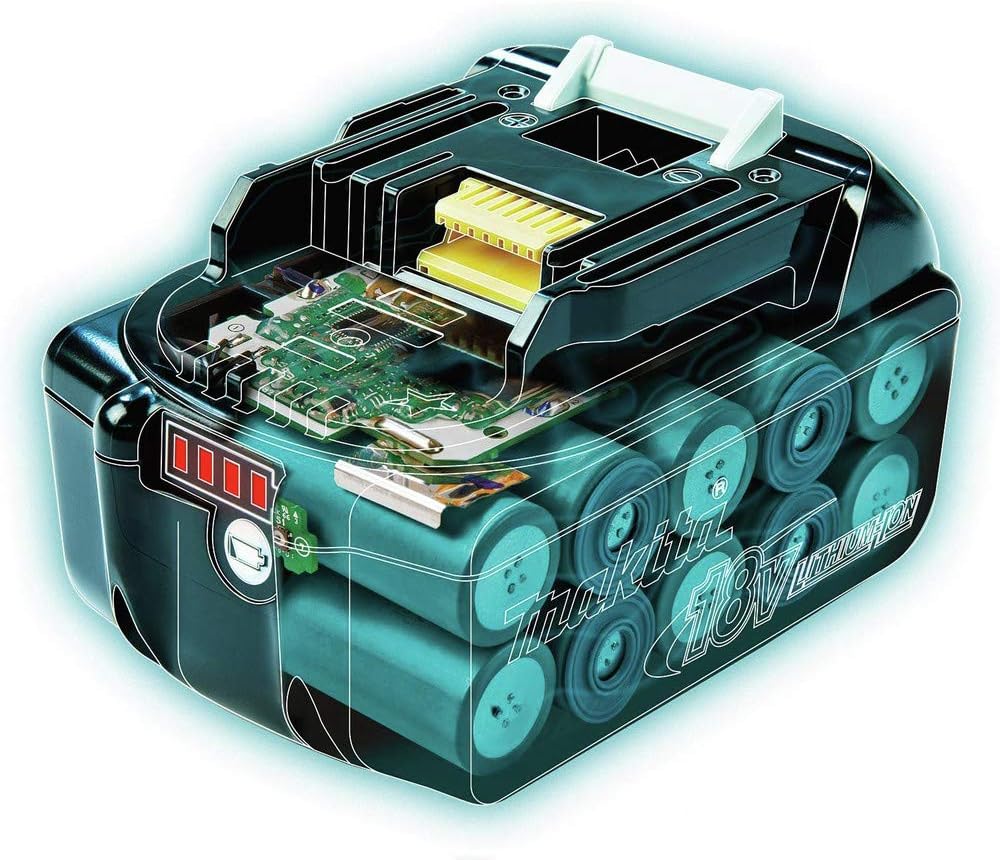
Figure 3: Internal view of Makita 18V LXT Lithium-Ion Battery
8. Warranty and Support
Makita batteries typically come with a 3-year limited warranty from the date of purchase, covering defects in materials and workmanship. For specific warranty details, claims, or technical support, please refer to the official Makita website or contact Makita customer service directly.
Makita Customer Service: Please visit www.makitatools.com for contact information and support resources.
Ask a question about this manual
Ask about setup, troubleshooting, compatibility, parts, safety, or missing instructions. Manuals+ will review the question and use this page’s manual context to help answer it.