
iConnect TW5M34300
Contents
iConnect By Timex Active Smartwatch User Manual
Model: TW5M34300
Introduction
Welcome to your iConnect By Timex Active Smartwatch. This manual provides detailed instructions on how to set up, operate, and maintain your device, ensuring you get the most out of its features, including heart rate monitoring, activity tracking, and smart notifications.
Setup Guide
1. Charging Your Smartwatch
Before first use, fully charge your smartwatch. Connect the provided micro-USB charging cable to the charging contacts on the back of the watch and to a USB power source. A full charge typically takes approximately two hours. The watch features a 10-day battery life on a single charge.

Image: The smartwatch charging cable, a black micro-USB cable with a magnetic charging dock.

Image: The smartwatch display showing a full battery icon, indicating long use time.
2. App Installation and Pairing
To unlock the full functionality of your smartwatch, download and install the iConnect by Timex 2 app on your smartphone. The app is compatible with Android 5.0 & above and iOS 9.0 & above.
- Ensure Bluetooth is enabled on your phone.
- Download the iConnect by Timex 2 app from your device's app store.
- Open the app and follow the on-screen instructions to register as a new user.
- Select your device from the list (iConnect Active) and confirm pairing.

Image: The official logo for the iConnect by Timex 2 mobile application.

Image: A section of the Quick Start Guide illustrating how to connect the smartwatch to the mobile app via Bluetooth.
Operating Your Smartwatch
Basic Navigation
The smartwatch features a responsive color display. Use the touch button located at the bottom of the screen to navigate through menus and access various functions. A single tap typically navigates, while a press and hold activates a selected function.

Image: The smartwatch displaying the current time and heart rate on its main screen.
Customizable Watch Faces
Personalize your smartwatch experience by choosing from a variety of customizable watch faces available through the iConnect by Timex 2 app. These faces can display different information layouts, including time, date, steps, and heart rate.

Image: Three distinct watch face designs shown on the smartwatch, highlighting customization options.
Smart Features
- Notifications: Receive alerts for incoming calls, text messages, emails, and social media apps like Facebook and WhatsApp directly on your wrist.
- Music Controller: Control music playback on your paired smartphone directly from your smartwatch.
- Phone Finder: Use your smartwatch to locate your misplaced smartphone by triggering an audible alert.
- Weather Updates: Get local weather forecasts displayed on your watch.
- Sports Mode: Track specific activities with dedicated sports modes.
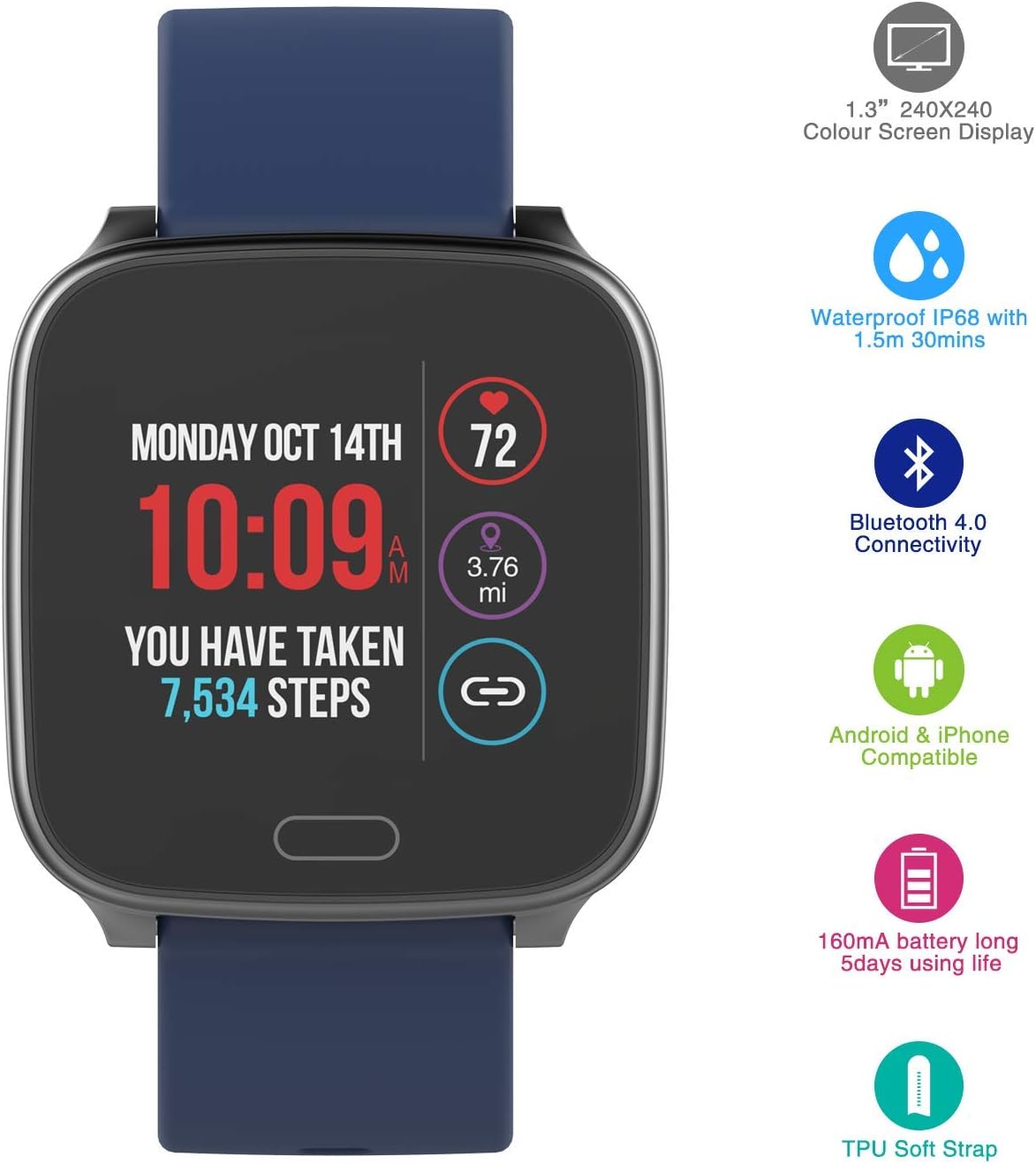
Image: The smartwatch displaying music controls, shown alongside a smartphone playing music.
Health and Activity Tracking
- Optical Heart Rate Monitor: The smartwatch continuously monitors your heart rate throughout the day, providing real-time data and historical trends in the app.
- Sleep Tracker: Monitor your sleep patterns to gain insights into your rest quality.
- Activity Tracker: Automatically track your daily steps, calories burned, and distance traveled.

Image: The smartwatch screen showing a heart rate reading and a graphical representation of heart activity.

Image: A smartphone screen showing the iConnect app's detailed heart rate monitoring history, with the smartwatch visible in the foreground.

Image: The smartwatch screen showing daily activity metrics, including steps taken and distance covered.
Maintenance and Care
Water Resistance
Your iConnect By Timex Active Smartwatch is IP68 water-resistant, meaning it can withstand immersion in water up to 1.5 meters for up to 30 minutes. It is suitable for everyday use, including hand washing and light rain exposure. Avoid prolonged submersion or use during high-velocity water sports.

Image: A graphic highlighting key features of the smartwatch, including its IP68 water resistance rating.
Cleaning
To clean your smartwatch, gently wipe the screen and strap with a soft, damp cloth. Avoid using abrasive cleaners or harsh chemicals, as these can damage the device's finish or internal components.
Strap Replacement
The smartwatch features a quick-release strap mechanism, allowing for easy replacement of the 20mm resin strap. Ensure any replacement strap is compatible with the quick-release pin system.

Image: The rear of the smartwatch, showing the optical heart rate sensor and the quick-release pins for the strap.
Troubleshooting
| Problem | Possible Solution |
|---|---|
| Watch not turning on or charging. |
|
| Cannot pair with smartphone. |
|
| Notifications not appearing. |
|
| Inaccurate activity tracking. |
|
Specifications
- Model: TW5M34300 (M05A)
- Display: 1.3-inch Color Screen Display (240x240 resolution)
- Case Dimensions: Lightweight resin 37mm square case
- Strap: Adjustable 20mm resin strap, fits up to 8-inch wrist circumference, quick-release mechanism
- Water Resistance: IP68 (up to 1.5m for 30 minutes)
- Battery: 160mAh Lithium-ion, up to 10 days battery life (typical usage)
- Charging: Micro-USB cable
- Connectivity: Bluetooth 4.0
- Compatibility: Android 5.0 & above, iOS 9.0 & above
- Sensors: Optical Heart Rate Monitor, Activity Tracker (steps, calories, distance)
Warranty and Support
For detailed warranty information and customer support, please refer to the official iConnect by Timex website or the full user manual provided with your product. You can also access the digital user manual here.
For further assistance, please contact iConnect by Timex customer service.
Ask a question about this manual
Ask about setup, troubleshooting, compatibility, parts, safety, or missing instructions. Manuals+ will review the question and use this page’s manual context to help answer it.