
Introduction
This manual provides detailed instructions for the safe installation, operation, and maintenance of your VOLT 150W Clamp Connect Low Voltage Transformer with Digital Timer. Please read this manual thoroughly before installation and retain it for future reference.

Image: Front view of the VOLT 150W Clamp Connect Low Voltage Transformer in its closed, stainless steel housing.
Important Safety Information
- Disconnect power before installing or servicing this equipment.
- Do not exceed the maximum primary current of 5 Amps.
- This unit is equipped with a thermal protector. If a circuit overloads or short circuits, the thermal protector will automatically shut off power. Reset by pushing the circuit breaker.
- Suitable for indoor or outdoor use.
- Always follow local electrical codes and regulations.
- Ensure proper grounding.
Product Features
- Clamp-Type Terminal Blocks: Tool-free wire insertion and clamping for secure connections. Supports up to 10-gauge wire.
- High Performance Toroidal Core: Ensures reliable, efficient, cooler, and quieter operation.
- Designed for LED Systems: Features 12V for short runs and 15V for longer runs or multiple fixtures.
- Professional Grade Construction: ETL listed, stainless steel enclosure with lockable hinged lid, and spacious wire compartment.
- Astronomic Digital Timer: Automatically determines dusk/dawn times based on geographical location, eliminating manual adjustments. Features a large, easy-to-read LCD display.

Image: The transformer with its front cover open, revealing the internal wiring, terminal blocks, timer receptacle, and photocell plug.
Setup and Installation
- Mounting: Securely mount the transformer to a wall or suitable vertical surface using appropriate hardware. Ensure it is in a location that allows for proper ventilation and access.
- Power Connection: Plug the transformer into a standard 120V AC outlet.
- Wiring Landscape Lights:
- Strip approximately 1/2 inch of insulation from the ends of your landscape lighting wires.
- Open the clamp-type terminal blocks by pressing down on the lever.
- Insert the stripped wire fully into the desired common (COM1 or COM2) and voltage tap (12V or 15V) terminals.
- Release the lever to secure the wire. Ensure all connections are tight.
- Timer/Photocell Setup:
- The unit includes a timer receptacle and a photocell plug. The digital timer (included) can be plugged into the timer receptacle.
- If using an external photocell (sold separately), remove the jumper from the photocell plug and insert the photocell.

Image: A detailed view of the clamp-type terminal blocks, showing wires inserted into the COM, 12V, and 15V terminals.
Video: This video provides an overview of the VOLT Clamp-Connect Low Voltage Transformers, demonstrating key features and the easy connection process using clamp-type terminals.
Operating Instructions: Digital Timer
The included Astronomic Digital Timer simplifies the control of your landscape lighting.
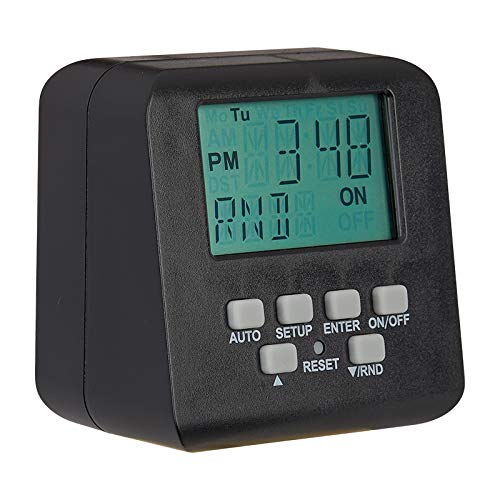
Image: The Astronomic Digital Timer, showing its LCD display and various control buttons for setup and operation.
Setting the Timer
- Initial Setup: Follow the timer's specific instructions to set the current time, date, and your geographical location. This allows the timer to accurately calculate local dusk and dawn times.
- Programming On/Off Cycles: Program the desired ON and OFF times for your lighting. The astronomic feature will adjust these times daily based on the changing dusk/dawn schedule.
- Manual Override: Most digital timers include a manual override function to temporarily turn lights on or off outside of programmed schedules.
Refer to the separate instruction sheet provided with the digital timer for detailed programming steps.
Maintenance
- Regular Inspection: Periodically inspect the transformer and wiring for any signs of damage, corrosion, or loose connections.
- Cleaning: Keep the transformer enclosure clean and free of debris. Use a soft, dry cloth for cleaning. Do not use abrasive cleaners or solvents.
- Ventilation: Ensure that the transformer's ventilation openings are not obstructed to prevent overheating.
- Circuit Breaker: If the circuit breaker trips, disconnect some lights or check for short circuits before resetting.
Troubleshooting
| Problem | Possible Cause | Solution |
|---|---|---|
| Lights not turning on | No power to transformer | Check power outlet and circuit breaker. |
| Lights not turning on | Faulty wiring connection | Inspect all wire connections at the terminal blocks. Ensure wires are fully inserted and clamped. |
| Lights not turning on | Digital timer not programmed correctly | Review timer instructions and reprogram. |
| Lights flickering or dim | Voltage drop due to long wire runs or too many fixtures | Use the 15V tap for longer runs or reduce the number of fixtures. Ensure appropriate wire gauge is used. |
| Circuit breaker trips | Overload or short circuit | Disconnect some lights. Inspect wiring for shorts. Reset the circuit breaker. |
Specifications
- Model: 150W
- Input Voltage: 120V AC
- Output Voltage: 12V AC, 15V AC
- Max Wattage: 150W
- Dimensions (H x W x D): 13.19" x 6.00" x 5.41"
- Weight: 15.01 lbs
- Enclosure Material: Stainless Steel
- Certifications: ETL Listed
- Power Source: Corded Electric
- Mounting Type: Wall Mount
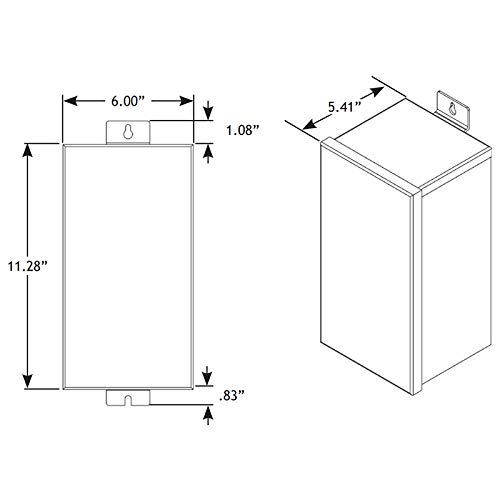
Image: Technical drawing illustrating the height, width, and depth dimensions of the transformer.
Warranty and Support
This VOLT transformer is backed by a lifetime warranty. For technical assistance, troubleshooting, or warranty claims, please contact VOLT Lighting customer support.
Visit the official VOLT Lighting website for contact information and additional resources.