
Product Overview
The Verbatim 2.4G Wireless Ergonomic LED Silent Mouse (Model 70242) is designed for comfortable and quiet operation. Featuring Silent Technology, noiseless click switches, and rubber covers, this mouse minimizes operational sound. Its ergonomic design with thumb support ensures comfort during extended use. Blue LED technology allows for precise tracking on various surfaces, and the adjustable DPI button provides customizable cursor sensitivity. The mouse connects wirelessly via a compact nano receiver, making it suitable for both desktop and mobile computing environments.

Image: The Verbatim 2.4G Wireless Ergonomic LED Silent Mouse in Graphite color, showcasing its ergonomic shape.
Package Contents
- Verbatim 2.4G Wireless Ergonomic LED Silent Mouse
- Nano Receiver
- 1 x AA Battery
Setup Guide
1. Insert Battery
Locate the battery compartment on the underside of the mouse. Open the compartment cover and insert the provided AA battery, ensuring correct polarity (+/-). Close the battery compartment cover securely.

Image: The bottom of the mouse showing the battery compartment and the ON/OFF switch.
2. Connect Nano Receiver
Plug the compact nano receiver into an available USB-A port on your computer (PC or Mac). The operating system will typically detect and install the necessary drivers automatically.
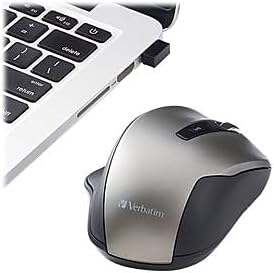
Image: The wireless mouse positioned next to a laptop, with its nano receiver inserted into a USB port.
3. Power On the Mouse
Slide the ON/OFF switch, located on the underside of the mouse, to the 'ON' position. The mouse is now ready for use.
Operating Instructions
DPI Adjustment
The mouse features an adjustable DPI button, located behind the scroll wheel. Press this button to cycle through different sensitivity settings: 800, 1300, and 1600 DPI. Select the DPI setting that best suits your preference and task requirements.

Image: A top-down view of the mouse, highlighting the scroll wheel and the DPI adjustment button.
Side Buttons
Utilize the side buttons for convenient navigation. These buttons typically function as 'back' and 'forward' in web browsers and file explorers, enhancing productivity.
Blue LED Technology
The integrated Blue LED technology allows the mouse to track accurately on a wide variety of surfaces, including glass, wood, and granite, providing versatility in your workspace.

Image: The Verbatim mouse resting on a wooden desk, demonstrating its use on common surfaces.
Silent Click Operation
Benefit from the Silent Technology, which incorporates noiseless click switches and rubber covers to eliminate distracting click sounds, creating a quieter working environment.
Key Features
- Truly noiseless mouse featuring Silent Technology, silent click switches and rubber covers.
- Adjustable DPI button: easily switch between 800, 1300 and 1600 DPI.
- 2.4Ghz wireless connection for lag-free performance.
- PC and Mac Compatible.
- Blue LED technology allows for use on virtually any surface with precision and control.
- Plug-and-forget nano receiver connects mouse to computer.
- Ergonomic design with thumb support for comfortable all-day use.
Maintenance
- Cleaning: Use a soft, dry cloth to clean the mouse. Avoid using harsh chemicals or abrasive materials.
- Battery Replacement: Replace the AA battery when the mouse's performance degrades or it stops responding. Always use a fresh, high-quality AA battery.
- Receiver Storage: When not in use, the nano receiver can be stored inside the mouse's battery compartment to prevent loss.
Troubleshooting
- Mouse not responding:
- Ensure the mouse is switched to the 'ON' position.
- Check if the nano receiver is securely plugged into a working USB port.
- Replace the AA battery with a new one.
- Try plugging the nano receiver into a different USB port.
- Intermittent connection or lag:
- Ensure there are no obstructions between the mouse and the nano receiver.
- Move the mouse closer to the nano receiver.
- Avoid using the mouse on highly reflective or uneven surfaces.
- Cursor movement is too fast or too slow:
- Adjust the DPI setting using the DPI button on the mouse.
- Adjust mouse pointer speed settings in your computer's operating system.
Specifications
| Brand | Verbatim |
| Model Name | Silent Wireless Blue LED Mouse – Graphite |
| Model Number | 70242 |
| Color | Graphite |
| Connectivity Technology | Wireless (2.4GHz) |
| Movement Detection Technology | Optical (Blue LED) |
| Mouse Maximum Sensitivity | 1600 DPI (Adjustable: 800, 1300, 1600) |
| Button Quantity | 3 (Left, Right, Scroll Wheel/Middle Click) + DPI button + 2 Side buttons |
| Hand Orientation | Ergonomic (Right-handed design with thumb support) |
| Compatible Devices | Personal Computer |
| Operating System | Windows XP, Vista, 7 and higher; Mac OS X 10.4 and higher; Linux Kernel 2.6 and higher |
| Power Source | Battery Powered (1 AA battery required, included) |
| Range | 10.0 meters |
| Material | Rubber (Enclosure) |
Warranty and Support
The Verbatim 2.4G Wireless Ergonomic LED Silent Mouse is backed by a 1-Year Limited Warranty. For technical support or warranty claims, please refer to the contact information provided on the Verbatim official website or your product packaging.
Please retain your proof of purchase for warranty validation.


