
CNAIER AE-8299
CNAIER Rechargeable Facial Cleansing Spin Brush Set
Instruction Manual
Introduction
Thank you for choosing the CNAIER Rechargeable Facial Cleansing Spin Brush Set. This waterproof face spa system is designed to provide a comprehensive cleansing and exfoliating experience, leaving your skin feeling refreshed and revitalized. Please read this manual thoroughly before first use to ensure proper operation and maintenance.

Image: The complete CNAIER Facial Cleansing Spin Brush Set, including the main unit, various brush heads, and a USB charging cable, neatly organized within its protective carrying case.
Safety Information
- Avoid contact with eyes.
- Do not use on broken skin.
- Ensure the charging port cover is securely closed before exposing the device to water.
- Keep out of reach of children.
- Do not disassemble or attempt to repair the device yourself.
Package Contents
- 1 x CNAIER Facial Cleansing Spin Brush Main Unit
- 1 x Deep Cleansing Brush Head
- 1 x Daily Cleansing Brush Head
- 1 x Silicone Cleansing Brush Head
- 1 x Exfoliating Facial Brush Head
- 1 x USB Charging Cable
- 1 x Protective Storage Case
Product Overview
The CNAIER Facial Cleansing Spin Brush features a ergonomic design for comfortable handling and intuitive controls. It comes with four specialized brush heads to cater to different skin needs.
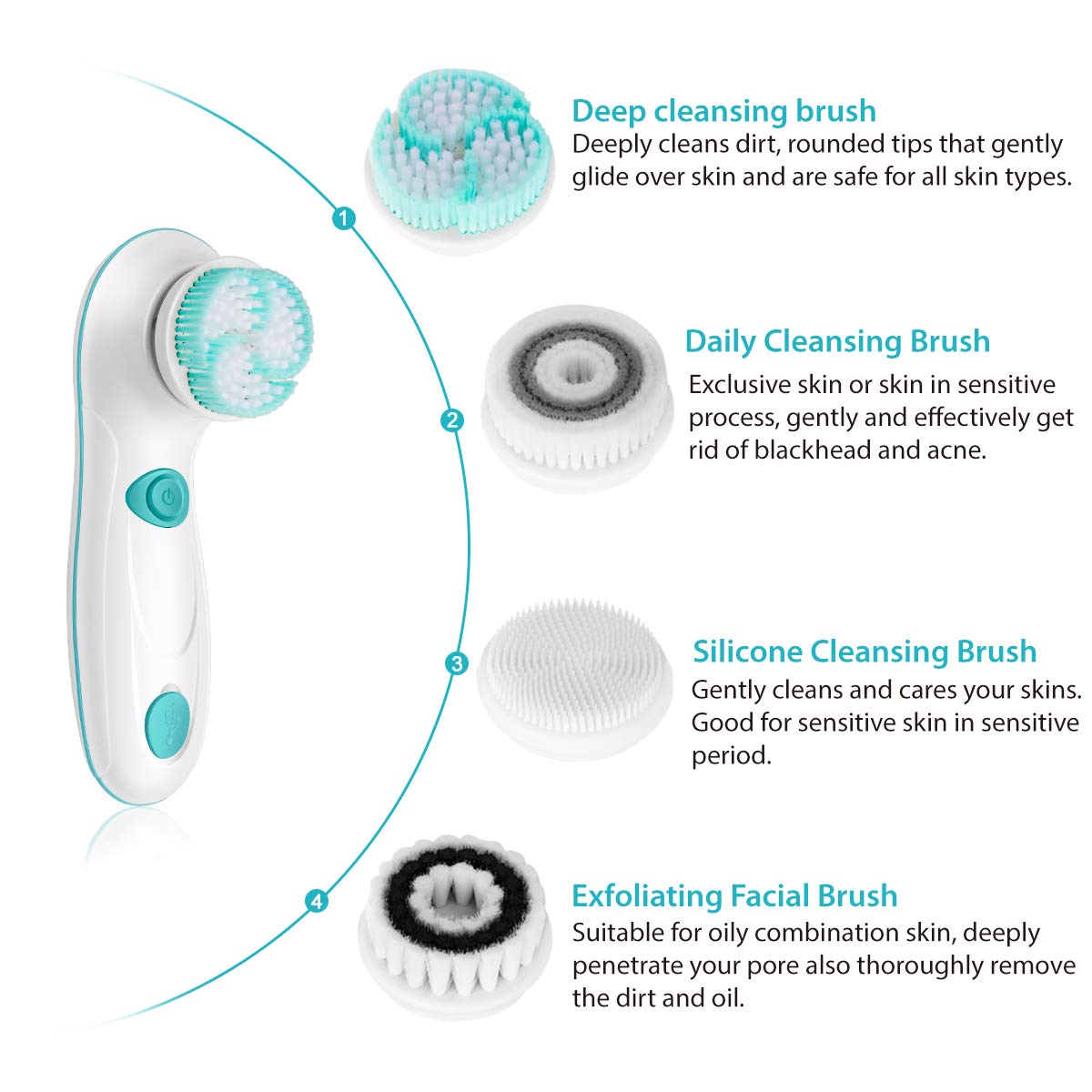
Image: An illustration detailing the main brush unit and its four interchangeable brush heads: Deep Cleansing, Daily Cleansing, Silicone Cleansing, and Exfoliating Facial Brush, each with a brief description of its purpose.
Key Features:
- Rotary Spin: Provides effective and thorough cleansing.
- 2 Speed Settings: Allows for customized cleansing intensity.
- Water Resistant: Designed for safe use in wet environments like showers.
- Rechargeable with USB: Convenient charging for cordless operation.

Image: An infographic illustrating the four key advantages of the product: Rotary Spin, 2 Speed Settings, Water Resistant, and USB Rechargeable, emphasizing its modern design and functionality.
Setup
1. Initial Charging
Before first use, fully charge the device. Connect the USB charging cable to the charging port on the brush unit and plug the other end into a compatible USB power adapter (not included) or computer USB port. The indicator light will show charging status.
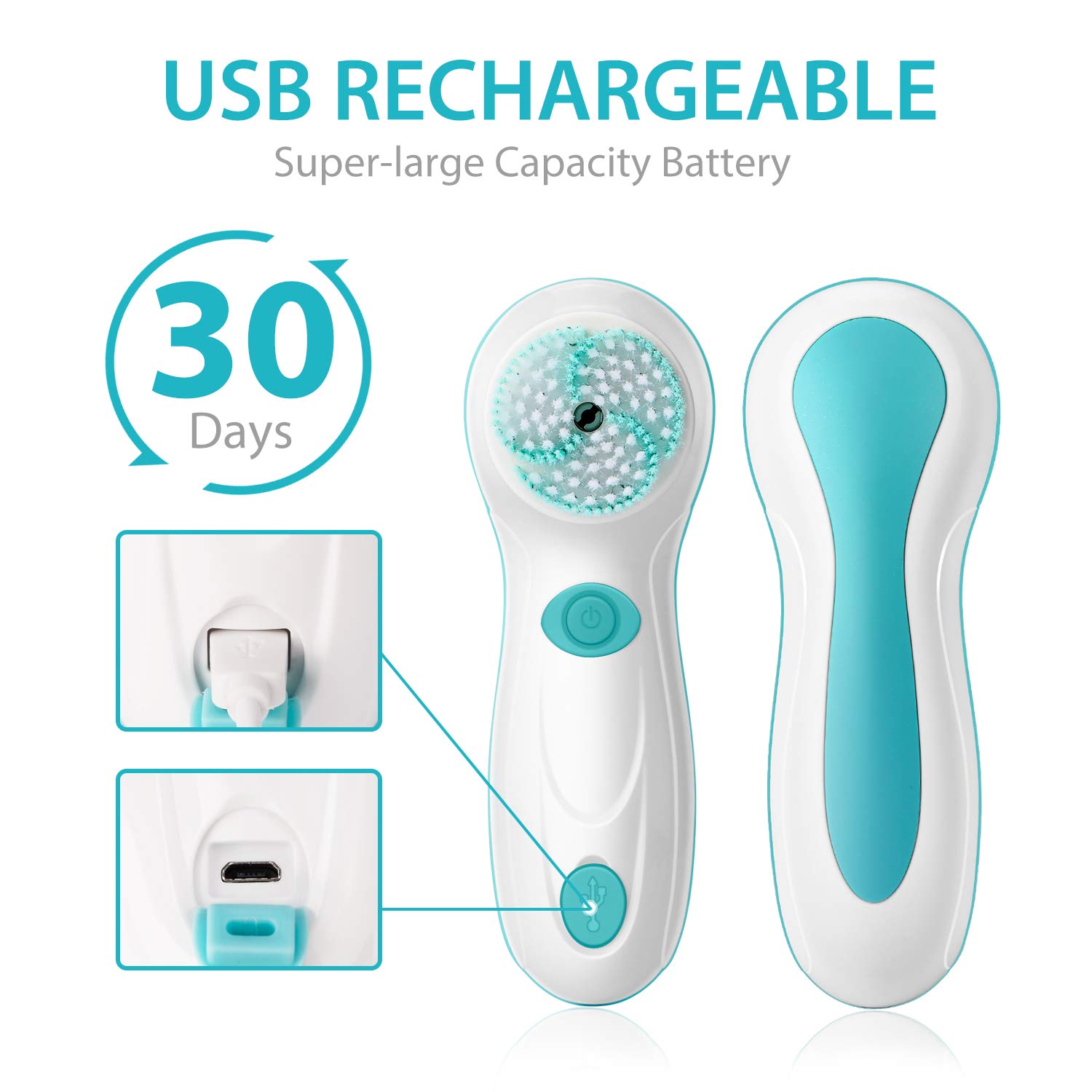
Image: A detailed view of the facial cleansing brush highlighting its USB charging port and the claim of up to 30 days of battery life on a single charge.
2. Attaching a Brush Head
Select the desired brush head. Align the brush head with the rotating shaft on the main unit and gently push until it clicks into place. Ensure it is securely fastened before use.
Operating Instructions
- Prepare Your Face: Wet your face and apply your preferred facial cleanser directly to your skin or onto the brush head.
- Power On: Press the power button on the device to turn it on.
- Select Speed: Use the speed setting button to choose between the two available speeds (low for gentle cleansing, high for deeper exfoliation).
- Cleanse: Gently move the brush in circular motions across your face. Avoid pressing too hard. Spend approximately 10-20 seconds on each area (forehead, nose, chin, cheeks).
- Rinse: After cleansing, rinse your face thoroughly with water and pat dry.
- Power Off: Press the power button again to turn off the device.

Image: The facial cleansing brush in action, demonstrating its effectiveness in removing makeup, reducing blackheads, cleansing pores, and providing gentle exfoliation.

Image: A woman demonstrating the waterproof capability of the facial cleansing brush by using it comfortably in a shower setting.
Maintenance
Cleaning the Device and Brush Heads
- After each use, rinse the brush head thoroughly under running water to remove any cleanser residue or debris.
- Clean the main unit with a damp cloth. Do not submerge the entire unit in water, especially the charging port area, unless the port cover is fully sealed.
- Allow the brush heads and unit to air dry completely before storing.
Replacing Brush Heads
For optimal performance and hygiene, it is recommended to replace brush heads every 3 months, or sooner if bristles appear worn or damaged. To replace, simply pull the old brush head off and snap a new one into place.
Troubleshooting
| Problem | Possible Cause | Solution |
|---|---|---|
| Device does not turn on. | Battery is low or depleted. | Charge the device fully using the provided USB cable. |
| Brush head does not spin or spins weakly. | Brush head not properly attached; debris caught in mechanism; low battery. | Ensure brush head is securely attached. Remove and reattach. Check for any obstructions. Charge the device. |
| Device not charging. | Charging cable faulty; charging port obstructed; power source issue. | Try a different USB cable or power adapter. Ensure the charging port is clean and free of debris. Try a different power outlet or USB port. |
| Skin irritation after use. | Using too much pressure; incorrect brush head for skin type; using too frequently. | Reduce pressure. Use a softer brush head (e.g., Silicone Cleansing Brush). Reduce frequency of use. Consult a dermatologist if irritation persists. |
Specifications
- Model Number: AE-8299
- Power Source: Battery Powered (1 Lithium Polymer battery included)
- Material: Nylon, Wool (for brush heads)
- Dimensions: 9.49 x 5.45 x 2.91 inches
- Weight: 1.1 Pounds
- Manufacturer: CNAIER
- UPC: 782855663172
Warranty and Support
For warranty information or technical support, please contact CNAIER customer service through the retailer where the product was purchased or visit the official CNAIER website. Please retain your proof of purchase for warranty claims.
CNAIER Store: Visit the CNAIER Store on Amazon
Ask a question about this manual
Ask about setup, troubleshooting, compatibility, parts, safety, or missing instructions. Manuals+ will review the question and use this page’s manual context to help answer it.