
Hakko T30-J
Hakko T30-J Micro Bent Tip User Manual
Model: T30-J
1. Product Overview
The Hakko T30-J is a specialized micro bent soldering tip designed for precision soldering applications. Its unique J-bent shape allows for access to tight spaces and intricate components, making it ideal for fine pitch soldering and rework. This tip is engineered for optimal heat transfer and durability when used with compatible Hakko soldering stations.
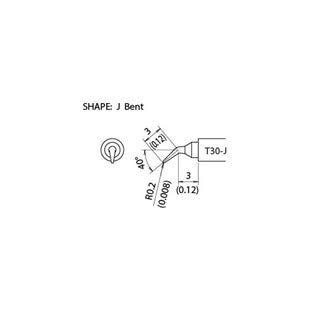
This diagram illustrates the precise dimensions and shape of the Hakko T30-J Micro Bent Tip. It shows a J-bent shape with a tip radius of R0.2mm (0.008 inches), a 40-degree bend, and specific lengths of 3mm (0.12 inches) for different sections of the tip, along with the model number T30-J.
2. Setup
Before using your Hakko T30-J tip, ensure your soldering station is properly set up and calibrated. This tip is designed for use with Hakko soldering irons that support T30 series tips.
- Power Off: Always ensure your soldering station is powered off and unplugged before installing or removing tips.
- Tip Installation: Carefully insert the T30-J tip into the soldering iron's heating element assembly. Ensure it is fully seated to allow for proper heat transfer.
- Power On: Plug in and power on your soldering station. Allow the iron to reach the desired operating temperature.
- Initial Tinning: Once the tip reaches temperature, immediately apply a small amount of solder to the working end of the tip. This process, known as tinning, protects the tip from oxidation and ensures efficient heat transfer to the solder joint.
3. Operating Instructions
The T30-J micro bent tip is ideal for precision work. Follow these guidelines for effective soldering:
- Temperature Setting: Set your soldering station to the appropriate temperature for the solder alloy and components you are working with. Refer to your solder's specifications for recommended temperatures.
- Tip Contact: Apply the bent portion of the tip to both the component lead and the PCB pad simultaneously. Ensure good thermal contact.
- Solder Application: Feed solder onto the junction of the tip, component lead, and pad. Allow the solder to flow and form a shiny, concave fillet.
- Dwell Time: Minimize the time the tip is in contact with the joint to prevent overheating components, especially with delicate micro-components.
- Tip Cleaning: Regularly clean the tip on a damp sponge or brass wool during operation to remove excess solder and flux residue.
4. Maintenance
Proper maintenance extends the life of your Hakko T30-J tip and ensures consistent performance.
- Regular Cleaning: Clean the tip frequently during use with a damp cellulose sponge or brass wool. Avoid abrasive materials that can damage the plating.
- Re-tinning: Always re-tin the tip with fresh solder before storing it or when pausing work for more than a few minutes. This protects the tip from oxidation.
- Oxidation Removal: If the tip becomes oxidized (dark and non-wetting), gently rub it on a tip cleaner paste or a fine abrasive pad specifically designed for soldering tips, then immediately re-tin.
- Storage: Store tips in a dry, non-corrosive environment. Avoid leaving the iron powered on for extended periods when not in use.
5. Troubleshooting
If you encounter issues with your Hakko T30-J tip, consider the following common problems and solutions:
- Tip Not Heating:
- Check if the tip is fully inserted into the heating element.
- Verify the soldering station is powered on and set to a suitable temperature.
- Inspect the heating element and iron for damage.
- Solder Not Adhering (Non-Wetting Tip):
- The tip may be oxidized. Clean and re-tin the tip immediately.
- Ensure you are using good quality solder with sufficient flux.
- Increase the tip temperature slightly if it's too low for the solder.
- Tip Life is Short:
- Ensure proper tinning before and after use.
- Avoid excessive tip temperatures.
- Use a proper cleaning method (damp sponge or brass wool, not abrasive files).
6. Specifications
| Attribute | Value |
|---|---|
| Model Number | T30-J |
| Manufacturer | Hakko |
| Item Weight | 1 Pound |
| Tip Shape | Micro Bent (J-shape) |
| Tip Radius | R0.2mm (0.008 inches) |
| Bend Angle | 40° |
| Tip Lengths | 6mm, 3mm x 3mm (0.12 inches) |
7. Warranty & Support
For information regarding warranty coverage, technical support, or service for your Hakko T30-J tip, please refer to the official Hakko website or contact your authorized Hakko distributor. Keep your purchase receipt for warranty claims.
For additional details or inquiries, please do not hesitate to contact Hakko customer service.
Ask a question about this manual
Ask about setup, troubleshooting, compatibility, parts, safety, or missing instructions. Manuals+ will review the question and use this page’s manual context to help answer it.