
1. Introduction
Thank you for purchasing the QFX BT-41-Egg-Yolk Bluetooth Streaming TWS Ready Lightshow Speaker. This portable and rechargeable speaker offers versatile audio playback options including Bluetooth, USB/TF card, and FM radio. It also features hands-free calling and True Wireless System (TWS) capability for stereo sound. This manual provides detailed instructions for setup, operation, maintenance, and troubleshooting to ensure optimal performance and longevity of your device.
2. Safety Information
- Do not expose the speaker to extreme temperatures, humidity, or direct sunlight.
- Avoid dropping or subjecting the speaker to strong impacts.
- Do not disassemble or attempt to repair the speaker yourself. Refer all servicing to qualified personnel.
- Keep the speaker away from water and other liquids. This product is not waterproof.
- Use only the provided USB cable for charging.
- Do not operate the speaker at excessively high volumes for prolonged periods to prevent hearing damage.
3. What's in the Box
- QFX BT-41-Egg-Yolk Bluetooth Speaker
- USB Charging Cable
- AUX Cable
- User Manual (this document)
4. Product Overview
Familiarize yourself with the speaker's components and controls.

This image displays the front of the QFX BT-41-Egg-Yolk speaker, highlighting its distinctive yellow and white design with egg-yolk patterns and the two main speaker grilles.
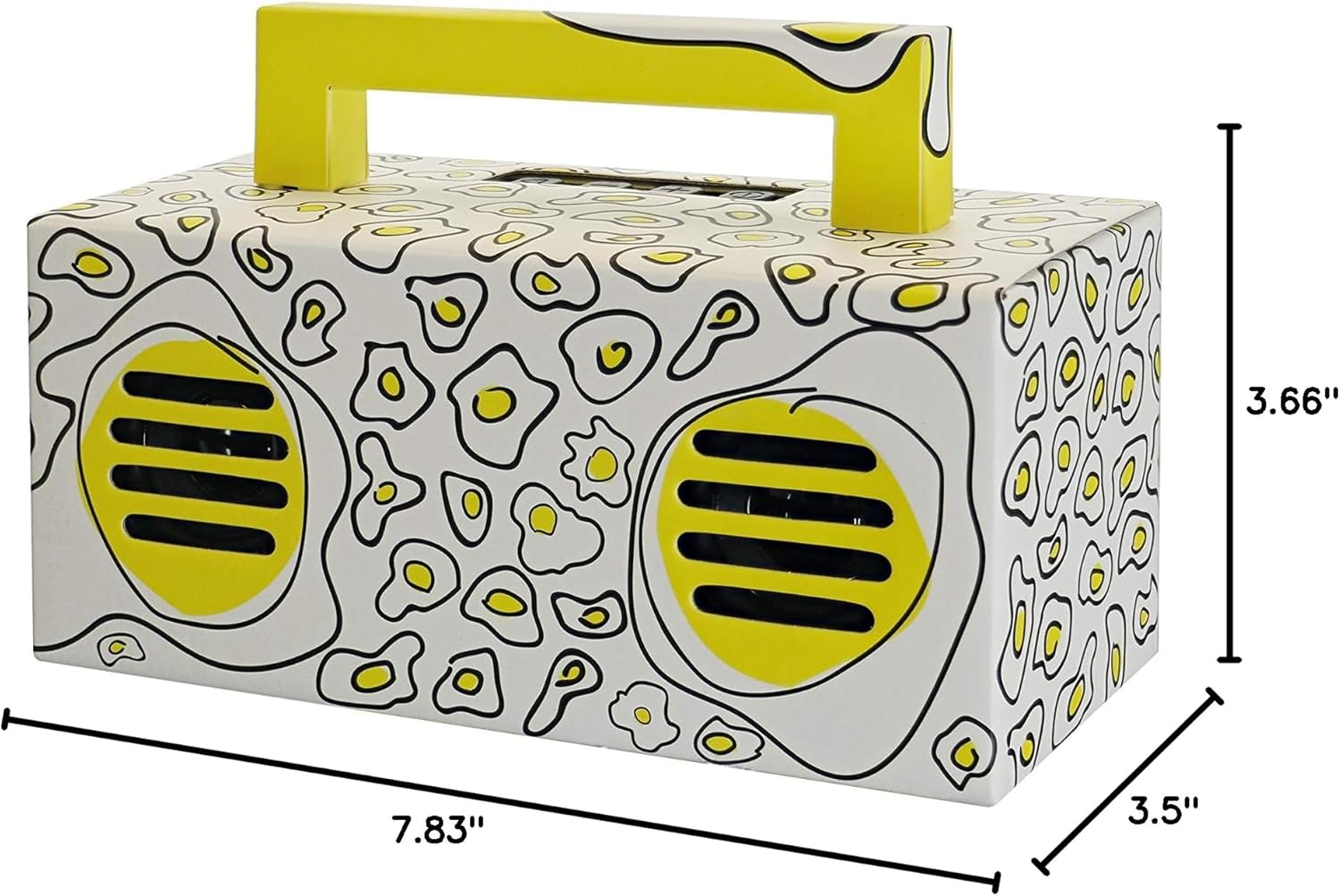
This image provides a side view of the QFX BT-41-Egg-Yolk speaker, illustrating its compact dimensions. The speaker measures approximately 7.83 inches in length, 3.5 inches in width, and 3.66 inches in height, making it highly portable.
Controls and Ports (Typical Layout)
- Power Button: Turns the speaker ON/OFF.
- Mode Button: Switches between Bluetooth, FM, USB, TF, and AUX modes.
- Play/Pause Button: Plays or pauses audio; answers/ends calls.
- Volume Up/Next Track Button: Increases volume; short press for next track.
- Volume Down/Previous Track Button: Decreases volume; short press for previous track.
- USB Port: For USB flash drive playback.
- TF Card Slot: For TF (Micro SD) card playback.
- AUX Input: For connecting external audio devices via 3.5mm cable.
- DC 5V Charging Port: For charging the speaker's internal battery.
5. Setup
5.1. Charging the Speaker
- Connect the small end of the included USB charging cable to the DC 5V charging port on the speaker.
- Connect the large end of the USB cable to a USB power adapter (not included) or a computer's USB port.
- The charging indicator light will illuminate (color may vary) to show that the speaker is charging.
- Once fully charged, the indicator light will change or turn off. Disconnect the charging cable.
A full charge provides several hours of use, depending on volume and features used.
5.2. Powering On/Off
- To power ON: Press and hold the Power button for a few seconds until you hear an audible prompt or see the light indicators activate.
- To power OFF: Press and hold the Power button again for a few seconds until the speaker powers down.
6. Operating Instructions
6.1. Bluetooth Pairing
- Ensure the speaker is powered on and in Bluetooth mode. If not, press the Mode button until you hear the Bluetooth prompt. The speaker will enter pairing mode, indicated by a flashing light.
- On your Bluetooth-enabled device (smartphone, tablet, etc.), go to the Bluetooth settings and enable Bluetooth.
- Search for available devices. You should see "QFX BT-41" or a similar name appear in the list.
- Select the speaker from the list to connect. Once connected, you will hear a confirmation sound.
- You can now play audio from your device through the speaker.
6.2. TWS (True Wireless System) Pairing
TWS allows two BT-41 speakers to connect wirelessly and play Bluetooth audio simultaneously for a true stereo sound experience. This feature only works in Bluetooth mode.
- Ensure both BT-41 speakers are powered on and in Bluetooth mode, but NOT connected to any Bluetooth device.
- On one of the speakers (this will be your primary speaker), press and hold the Play/Pause button for a few seconds until you hear a pairing tone.
- The two speakers will automatically search and connect to each other. Once connected, you will hear a confirmation sound, and one speaker will act as the left channel, the other as the right.
- Now, connect your Bluetooth-enabled device to the primary speaker as described in section 6.1.
- Audio will now play in stereo through both speakers.
6.3. USB/TF Card Playback
- Insert a USB flash drive or TF (Micro SD) card into the corresponding port on the speaker. Ensure the card/drive contains MP3 audio files.
- The speaker will automatically switch to USB/TF mode and begin playing music. If not, press the Mode button to select the correct mode.
- Use the Volume Up/Next Track and Volume Down/Previous Track buttons to navigate through tracks.
- Use the Play/Pause button to pause or resume playback.
6.4. FM Radio
- Press the Mode button until you hear the FM radio prompt.
- To auto-scan and save available stations: Press and hold the Play/Pause button. The speaker will scan and store all available FM stations.
- To switch between saved stations: Short press the Volume Up/Next Track or Volume Down/Previous Track buttons.
6.5. Hands-Free Calling
When your smartphone is connected via Bluetooth:
- Answering a call: Short press the Play/Pause button.
- Ending a call: Short press the Play/Pause button during a call.
- Rejecting a call: Press and hold the Play/Pause button when a call comes in.
- Redialing last number: Double-press the Play/Pause button.
6.6. AUX Input
- Connect one end of the included 3.5mm AUX cable to the AUX input port on the speaker.
- Connect the other end of the AUX cable to the headphone jack or audio output of your external audio device (e.g., MP3 player, computer).
- The speaker will automatically switch to AUX mode. If not, press the Mode button to select AUX.
- Control playback and volume from your external audio device.
6.7. Lightshow Feature
The speaker features an integrated lightshow that syncs with the music. This feature is typically enabled by default. Refer to the speaker's physical controls for a dedicated light button if available, or it may be controlled by a long press of the Mode button or another button not explicitly listed in the general controls.
7. Maintenance
- Cleaning: Use a soft, dry cloth to wipe the exterior of the speaker. Do not use abrasive cleaners, waxes, or solvents.
- Storage: When not in use for extended periods, store the speaker in a cool, dry place away from direct sunlight and extreme temperatures.
- Battery Care: To prolong battery life, avoid fully discharging the battery frequently. Charge the speaker regularly, even if not in use.
8. Troubleshooting
| Problem | Possible Cause | Solution |
|---|---|---|
| Speaker does not power on. | Battery is low or dead. | Charge the speaker fully. |
| No sound from speaker. | Volume is too low; incorrect mode selected; device not connected. | Increase speaker and device volume; press Mode button to select correct input; ensure Bluetooth/AUX connection is established. |
| Bluetooth device cannot find speaker. | Speaker not in pairing mode; device too far; interference. | Ensure speaker is in Bluetooth pairing mode; move device closer to speaker (within 30 ft); turn off other Bluetooth devices. |
| TWS pairing fails. | Speakers already connected to a device; too far apart. | Ensure both speakers are disconnected from any Bluetooth device; place speakers close to each other during TWS pairing. |
| USB/TF card not playing. | Incorrect file format; card/drive not inserted correctly; corrupted files. | Ensure files are MP3 format; reinsert card/drive; try a different card/drive. |
9. Specifications
| Feature | Detail |
|---|---|
| Model Name | QFX |
| Speaker Type | Multimedia |
| Special Feature | Portable |
| Recommended Uses | Music |
| Controller Type | Battery Powered |
| Surround Sound Channel Configuration | 2.0 |
| Color | Yolk Yellow |
| Product Dimensions | 7.83"D x 3.5"W x 3.66"H |
| Item Weight | 1.7 Pounds |
| Is Waterproof | FALSE |
| Number of Items | 1 |
| Speaker Size | 2 Inches (dual speakers) |
| Power Source | Corded Electric (for charging) |
| Number of Batteries | 1 Lithium Ion (included) |
| Connectivity Protocol | Bluetooth |
| UPC | 606540039199 |
| Manufacturer | QFX |
| Item Model Number | BT-41-EG |
| Date First Available | September 14, 2019 |
| Speaker Maximum Output Power | 10 Watts |
| Connectivity Technology | Bluetooth, USB |
| Audio Output Mode | Stereo |
| Mounting Type | Freestanding, Plug Mount |
10. Warranty and Support
Specific warranty details for the QFX BT-41-Egg-Yolk speaker are not provided in this manual. For warranty information, technical support, or service inquiries, please refer to the warranty card included with your purchase or visit the official QFX website. Keep your purchase receipt as proof of purchase for any warranty claims.