
AINOPE AP-2634
Contents
AINOPE 10000mAh Mini Portable Charger User Manual
Model: AP-2634
Introduction
Thank you for choosing the AINOPE 10000mAh Mini Portable Charger. This compact and powerful device is designed to provide reliable and fast charging for your mobile devices on the go. Please read this manual carefully to ensure proper use and maintenance of your portable charger.

Image: The AINOPE 10000mAh Mini Portable Charger, showcasing its compact size when held in a hand. The device features a textured black finish and a digital display showing "100".
Package Contents
Ensure all items are present in the package:
- AINOPE Mini 10000mAh Portable Charger (Model: AP-2634)
- USB-C to USB-C Cable (3.3 ft / 1m)
- USB-A to USB-C Cable (1 ft / 0.3m)
- Welcome Guide

Image: The AINOPE portable charger alongside the included USB-C to USB-C cable and USB-A to USB-C cable, demonstrating the accessories provided with the product.
Setup
Initial Charging of the Portable Charger
Before first use, fully charge your AINOPE portable charger. This ensures optimal battery performance and longevity.
- Connect the provided USB-C to USB-C cable to the USB-C port on the portable charger.
- Connect the other end of the USB-C cable to a compatible 20W PD (Power Delivery) wall charger (not included).
- The digital display on the portable charger will show the charging percentage. It takes approximately 3 hours to fully charge the device using a 20W PD input.
Alternatively, you can use the USB-A to USB-C cable with a standard USB-A wall charger, though charging times may be longer.
Operating Instructions
Charging Your Devices
The AINOPE portable charger is equipped with multiple ports for versatile charging:
- 1x USB-C Port (20W PD3.0 Input & Output): For fast charging compatible USB-C devices like iPhone 15 series, Samsung Galaxy, iPad, and other USB-C enabled devices. This port also serves as the input for recharging the power bank.
- 2x USB-A Ports (18W QC3.0 Output): For charging a wide range of USB-A compatible devices.
You can charge up to three devices simultaneously using a combination of the USB-C and USB-A ports. The intelligent controlling IC automatically identifies connected devices and optimizes power distribution.

Image: The AINOPE portable charger connected to and simultaneously charging three different devices: a smartphone via USB-C, another smartphone via USB-A, and wireless earbuds via USB-A. The image highlights the charger's ability to deliver 56W total output.
Fast Charging Capabilities
This portable charger supports advanced PD 3.0 and QC 4.0 fast charging technologies, providing significantly faster charging speeds compared to standard chargers.
- iPhone: Charge from 0% to 60% in approximately 30 minutes.
- Samsung: Charge from 0% to 80% in approximately 30 minutes.

Image: A visual representation illustrating the speed of 20W PD charging, showing an iPhone 15 Pro reaching 60% and a Samsung Galaxy S23 reaching 63% in 25 minutes. It also contrasts this with slower 3A charging.
Checking Battery Level
The integrated LED display shows the remaining battery percentage of the portable charger, allowing you to monitor its power status easily.

Image: A four-panel image demonstrating the charger's portability (in pocket, in bag, on plane) and a close-up of its LED display showing "100" for full charge.
Maintenance
- Keep the portable charger away from extreme temperatures, direct sunlight, and liquids.
- Store in a cool, dry place when not in use.
- Clean the surface with a soft, dry cloth. Do not use harsh chemicals or abrasive materials.
- Avoid dropping or subjecting the device to strong impacts.
- For optimal battery health, fully charge and discharge the power bank at least once every three months if not used regularly.
Troubleshooting
| Problem | Possible Cause | Solution |
|---|---|---|
| Portable charger not charging devices. | Low battery on portable charger; cable issue; device incompatibility. | Recharge the portable charger. Try a different charging cable. Ensure your device is compatible with USB-A or USB-C charging. |
| Portable charger not recharging. | Faulty charging adapter or cable; incorrect port used. | Use a different wall adapter and cable (preferably 20W PD). Ensure you are using the USB-C port for input. |
| Slow charging speed. | Non-fast charging cable/adapter; multiple devices charging; device not supporting fast charge. | Use a fast-charging compatible cable and wall adapter. Disconnect other devices if charging multiple. Verify your device supports PD/QC fast charging. |
| LED display not working. | Device malfunction. | Contact customer service if the issue persists after recharging. |
Specifications
| Feature | Detail |
|---|---|
| Model Number | AP-2634 |
| Battery Capacity | 10000mAh (Lithium Polymer) |
| USB-C Input/Output | 20W PD3.0 |
| USB-A Output (x2) | 18W QC3.0 |
| Dimensions (L x W x H) | 3.76 x 2.53 x 0.88 inches |
| Weight | 9.6 ounces |
| Color | Black |
| Recharge Time (20W PD) | Approx. 3 hours |
| Safety Features | Short-Circuit Protection, Overload Protection, Over-Temperature Protection, Over-Voltage Protection |
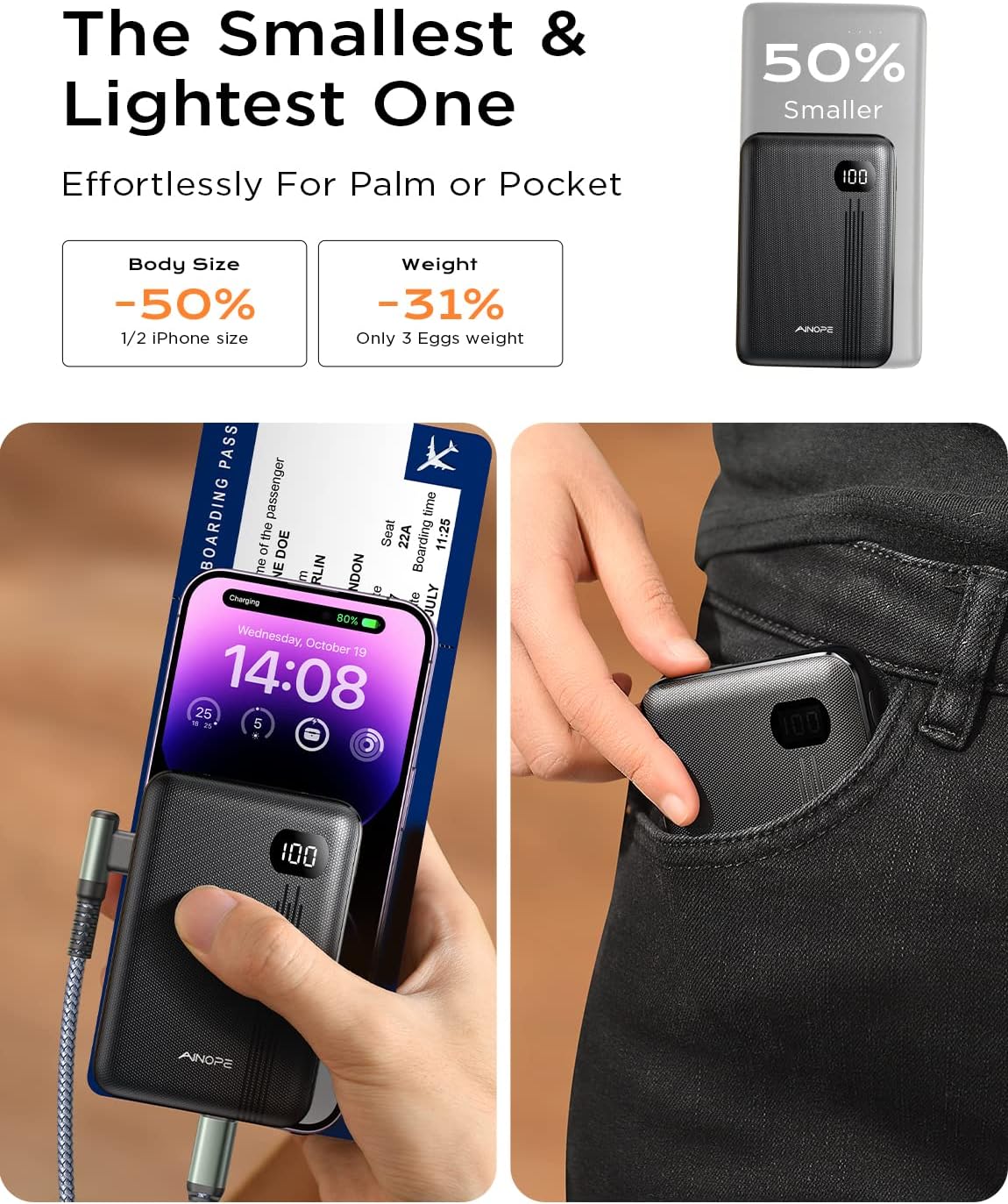
Image: A comparison image highlighting the AINOPE portable charger as "The Smallest & Lightest One," stating it is 50% smaller than an iPhone and weighs only as much as 3 eggs.
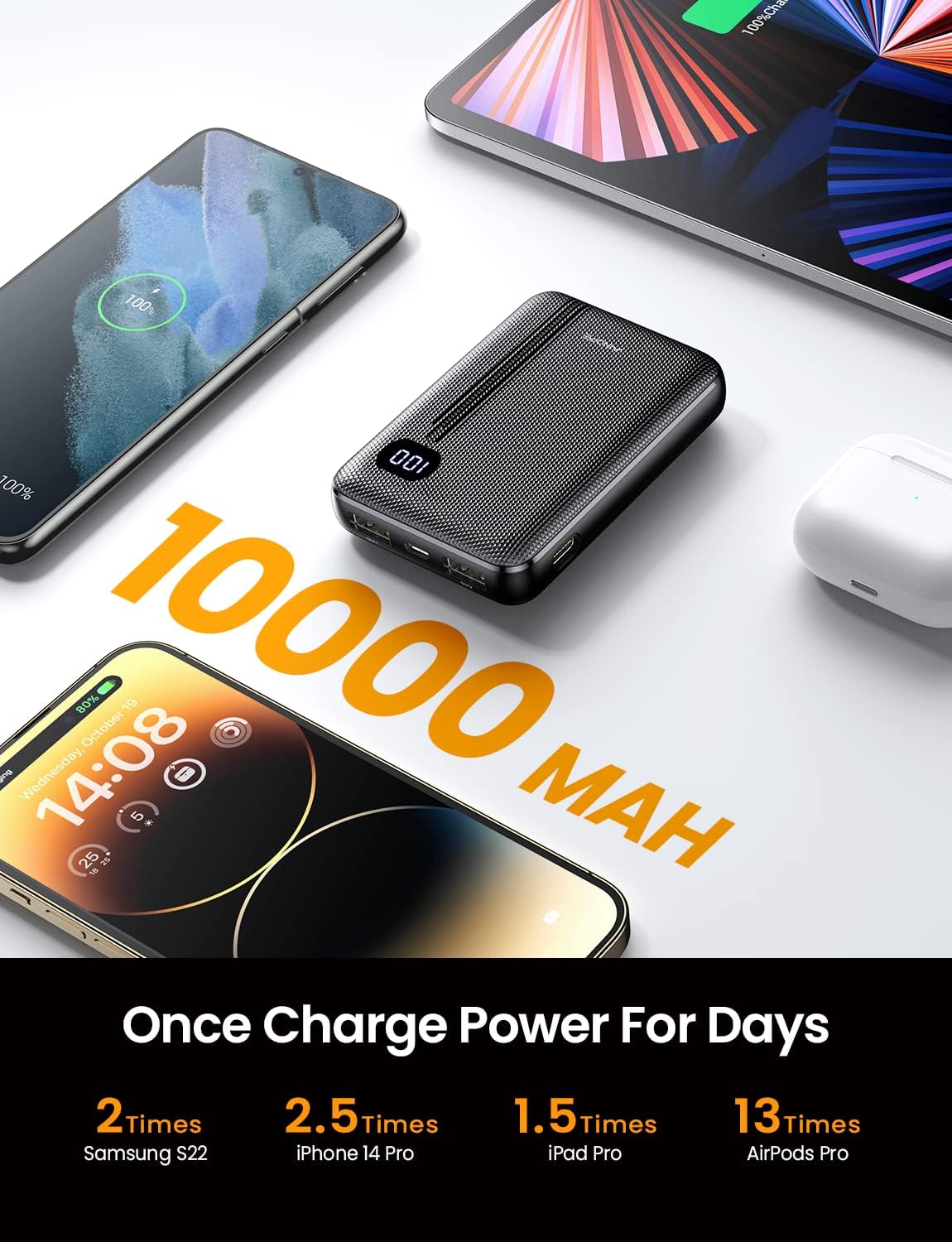
Image: A visual demonstrating the 10000mAh capacity, indicating it can charge a Samsung S22 2 times, iPhone 14 Pro 2.5 times, iPad Pro 1.5 times, and AirPods Pro 13 times.
Warranty and Support
AINOPE provides a worry-free 18-month warranty for this product. If you encounter any issues or have questions, please contact our friendly customer service team for assistance.
For support, please refer to the contact information provided in your Welcome Guide or visit the official AINOPE website.
Ask a question about this manual
Ask about setup, troubleshooting, compatibility, parts, safety, or missing instructions. Manuals+ will review the question and use this page’s manual context to help answer it.