
Eschenbach Visolux Digital XL FHD
Eschenbach Visolux Digital XL FHD User Manual
Advanced Portable Color Video Magnifier
Introduction
This manual provides comprehensive instructions for the setup, operation, maintenance, and troubleshooting of your Eschenbach Visolux Digital XL FHD portable video magnifier. Please read this manual carefully before using the device to ensure proper function and longevity.
The Visolux Digital XL FHD is designed to assist individuals with low vision by providing magnified views of text and objects, enhancing readability and visual clarity.
Product Overview
The Eschenbach Visolux Digital XL FHD is an advanced portable video magnifier featuring a 12-inch TFT LCD display with a touch screen interface and a Full HD camera. It includes a built-in stand for comfortable viewing and offers various connectivity options.

Figure 1: Front view of the Visolux Digital XL FHD with a cleaning cloth.
Key features include Dynamic Line Scrolling (DLS) for easy navigation of magnified content, the ability to capture and store images on an 8GB SD card, and versatile HDMI and USB ports for external display and data transfer.
Setup
Unpacking and Initial Inspection
- Carefully remove the Visolux Digital XL FHD from its packaging.
- Inspect the device for any signs of damage. If damage is found, do not use the device and contact customer support immediately.
- Ensure all included accessories are present: the Visolux Digital XL FHD unit, power adapter, HDMI cable, USB cable, and protective zippered case.
Charging the Battery
Before first use, fully charge the device's built-in Li-ion rechargeable battery.
- Connect the power adapter to the charging port on the device.
- Plug the power adapter into a standard electrical outlet.
- The charging indicator light will illuminate. A full charge takes approximately 4.5 hours.
- Once fully charged, the device provides approximately 2.5 hours of continuous operation.
Operating Instructions
Powering On/Off
- To power on, press and hold the power button located on the front panel until the screen illuminates.
- To power off, press and hold the power button until the screen shuts down.
Adjusting Magnification
Magnification can be adjusted from 2x to 22x using either the physical buttons or the touch screen interface.
- Use the + button to increase magnification.
- Use the - button to decrease magnification.
- Alternatively, pinch-to-zoom gestures can be used on the touch screen.
Viewing Modes and Color Settings
The device offers a true color mode and 14 false color modes to enhance contrast and readability for different visual needs.
- Access the menu via the touch screen or dedicated button to cycle through available color modes.
- Options include black on white, white on black, yellow on black, and more.
Dynamic Line Scrolling (DLS)
The DLS feature allows you to navigate content horizontally and vertically without physically moving the device, especially useful at higher magnification levels.

Figure 2: The Visolux Digital XL FHD in use, demonstrating its ergonomic stand.
- When magnified, use the touch screen to drag the viewable area across the document.
- The FHD camera captures a wider area than displayed, facilitating smooth scrolling.
Image Capture and Storage
Images can be captured and saved to the included 8GB SD card.
- Press the camera button to capture the current screen view.
- Captured images are stored on the SD card and can be reviewed later.
- To transfer images to a computer, connect the device via the USB cable.
External Connectivity (HDMI & USB)
The Visolux Digital XL FHD offers versatile connectivity options.

Figure 3: Device connected to an external display via HDMI for larger viewing.
- HDMI Out: Connect the included HDMI cable from the device to a television or monitor to live stream the magnified image to a larger screen.
- USB: Connect the included USB cable to a Mac or PC to download captured images.
- HDMI In: An HDMI-in port allows connection of an external video camera (sold separately) to display its feed on the Visolux Digital XL FHD screen. This is useful for distance viewing applications.
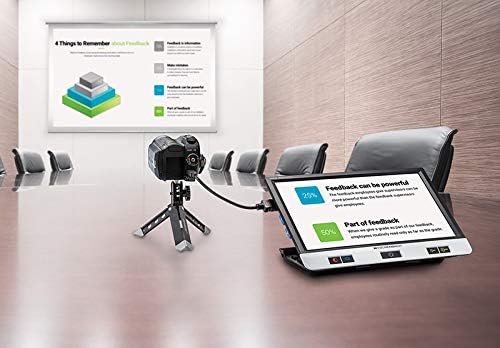
Figure 4: Device connected to an external camera for distance viewing.
Maintenance
Cleaning the Device
- Use the included Liberty Cleaning Cloth or a soft, lint-free cloth to gently wipe the screen and device body.
- For stubborn smudges, slightly dampen the cloth with a small amount of screen cleaner or water. Do not spray liquids directly onto the device.
- Avoid using abrasive cleaners, solvents, or alcohol-based solutions, as these can damage the screen and finish.
Battery Care
- To prolong battery life, avoid fully discharging the battery frequently.
- Store the device in a cool, dry place when not in use for extended periods.
- If storing for a long time, charge the battery to about 50% before storage.
Storage
Always store the Visolux Digital XL FHD in its protective zippered case when not in use to prevent scratches and damage.
Troubleshooting
| Problem | Possible Cause | Solution |
|---|---|---|
| Device does not power on. | Battery is depleted. | Connect the device to the power adapter and allow it to charge for at least 15 minutes before attempting to power on again. |
| Screen is blank or frozen. | Software glitch or temporary error. | Perform a hard reset by pressing and holding the power button for 10-15 seconds until the device shuts down, then power on again. |
| Image is blurry or out of focus. | Camera lens is dirty; object is too far/close. | Clean the camera lens with a soft cloth. Ensure the object is placed correctly under the camera for optimal focus. |
| Cannot connect to external display via HDMI. | Incorrect cable connection; TV input not selected. | Ensure the HDMI cable is securely connected to both the device and the TV. Select the correct HDMI input on your television. |
Specifications
- Model: Eschenbach Visolux Digital XL FHD
- Magnification: 2x to 22x (in steps or continuous zoom)
- Display: 12-inch non-reflective TFT LCD, 16:9 widescreen format
- Camera: Full HD (1920x1080 pixels)
- Illumination: LED with 3 brightness settings (100%, 75%, 50%)
- Power Source: Li-ion rechargeable battery
- Operation Time: Approximately 2.5 hours
- Recharging Time: Approximately 4.5 hours
- Weight: 2.2 lbs (approx. 1 kg)
- Viewing Modes: True color and 14 false color modes
- Storage: Supports removable 8GB SD card (included)
- Connectivity: HDMI out, USB for PC/Mac, HDMI in (for external camera)
- Operation: Button or touch-screen with speech output on menu options
- Dimensions: 12"L x 12"W (approximate, based on product dimensions)
Warranty and Support
Warranty Information
The Eschenbach Visolux Digital XL FHD comes with a 2-year manufacturer's warranty. This warranty covers defects in materials and workmanship under normal use. Please retain your proof of purchase for warranty claims.
The warranty does not cover damage caused by misuse, accident, unauthorized modification, or improper maintenance.
Customer Support
For technical assistance, troubleshooting, or warranty inquiries, please contact Eschenbach customer support. Refer to the contact information provided with your product packaging or visit the official Eschenbach website.
Note: Camcorder and tripod for distance viewing, and a separate carrying case (model 1655-109) are sold separately and are not covered under the standard product warranty unless specified by their individual warranties.
Related documentsVisolux Digital XL FHD


Ask a question about this manual
Ask about setup, troubleshooting, compatibility, parts, safety, or missing instructions. Manuals+ will review the question and use this page’s manual context to help answer it.