
Eschenbach Visolux Digital HD
Eschenbach Visolux Digital HD User Manual
Model: Visolux Digital HD
Brand: Eschenbach
1. Introduction and Overview
The Eschenbach Visolux Digital HD is an advanced portable color video magnifier designed to assist individuals with low vision by providing enhanced reading comfort and visual aid. This device features a 7-inch LCD screen with an anti-glare coating, an integrated HD camera, and a built-in stand for versatile use.
It offers a magnification range from 2x to 22x, adjustable in steps or continuously, and includes various viewing modes to optimize readability. The Visolux Digital HD is equipped with connectivity options for external displays and computers, making it a comprehensive tool for daily visual tasks.

Figure 1: The Visolux Digital HD portable video magnifier shown with its included Liberty cleaning cloth. The device features a large screen and intuitive controls.
2. Setup
2.1 Initial Charging
Before first use, fully charge the Visolux Digital HD. Connect the provided power adapter to the device's charging port and plug it into a standard electrical outlet. The charging indicator will show the charging status. A full charge typically takes 2-3.5 hours and provides approximately 3.5 hours of operation time.
2.2 Powering On/Off
To power on the device, press and hold the power button (usually marked with a circle and a vertical line) located on the device's control panel until the screen illuminates. To power off, press and hold the same button until the screen turns off.
2.3 Adjusting the Built-in Stand
The Visolux Digital HD features a built-in stand that allows for comfortable viewing angles. Gently unfold the stand from the back of the device until it locks into position. Ensure the device is stable on a flat surface before use.

Figure 2: Side view of the Visolux Digital HD, illustrating the built-in stand in its extended position, providing an ergonomic viewing angle.
3. Operating Instructions
3.1 Basic Operation
- Magnification Adjustment: Use the zoom in (+) and zoom out (-) buttons to adjust the magnification level from 2x to 22x. This can be done in discrete steps or continuously.
- Brightness Control: The device has LED illumination with three brightness settings: 100%, 75%, and 50%. Press the brightness button to cycle through these levels to suit your environment.
- Viewing Modes: The Visolux Digital HD offers "True Color" mode and 14 false color options. Press the mode button to switch between these viewing modes to find the contrast and color combination most comfortable for your eyes.
3.2 Dynamic Line Scrolling (DLS)
The Dynamic Line Scrolling (DLS) feature allows you to read text at higher magnification levels without physically moving the device across the page. When magnified, the HD camera captures more content than what is displayed on the screen. Use the directional controls to scroll horizontally across the magnified text, enabling a smoother reading experience for books and magazines.

Figure 3: The Visolux Digital HD in use, demonstrating the Dynamic Line Scrolling (DLS) feature with a red line indicating the current reading position on a magnified recipe.
3.3 Connectivity Options
The Visolux Digital HD includes built-in HDMI and USB ports for extended functionality:
- HDMI Output: Connect the device to a television screen using the included HDMI cable to live stream the magnified image onto a larger display. This is useful for group viewing or for users who prefer a larger screen.
- USB Connection: Use the included USB cable to connect the Visolux Digital HD to a PC or Mac. This allows for the transfer of captured images from the device's 4GB removable SD card to your computer.
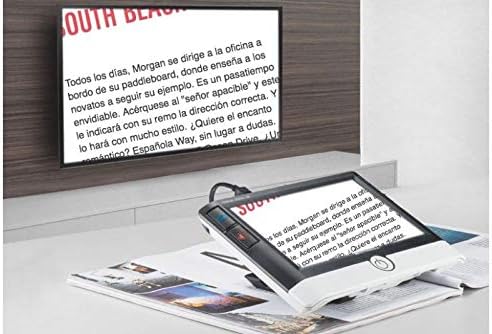
Figure 4: The Visolux Digital HD connected to an external television, demonstrating its HDMI output capability for displaying magnified content on a larger screen.
4. Maintenance
4.1 Cleaning the Device
To clean the screen and body of the Visolux Digital HD, use the provided Liberty cleaning cloth or a soft, lint-free cloth. For stubborn smudges, slightly dampen the cloth with a small amount of screen cleaner or water. Avoid using abrasive cleaners, solvents, or harsh chemicals, as these can damage the screen and casing.
4.2 Battery Care
To prolong battery life, avoid fully discharging the device frequently. Recharge the Li-ion battery when the low battery indicator appears. If storing the device for an extended period, ensure it is charged to approximately 50% capacity and store it in a cool, dry place.
4.3 Storage
When not in use, store the Visolux Digital HD in a protective case or a safe place to prevent scratches or damage to the screen and lens. Keep it away from extreme temperatures and direct sunlight.
5. Troubleshooting
5.1 Common Issues and Solutions
| Problem | Possible Cause | Solution |
|---|---|---|
| Device does not power on. | Low battery; power button not pressed correctly. | Charge the device for at least 30 minutes. Press and hold the power button firmly for a few seconds. |
| Image is blurry or unclear. | Dirty camera lens or screen; incorrect focus distance. | Clean the camera lens and screen with a soft cloth. Ensure the device is placed flat on the reading material. |
| Battery life is shorter than expected. | Frequent use of high brightness; aging battery. | Reduce brightness settings. Ensure full charge cycles. If issue persists, contact support. |
| No image on external TV via HDMI. | Loose HDMI cable; incorrect TV input. | Ensure HDMI cable is securely connected to both device and TV. Select the correct HDMI input on your TV. |
If you encounter issues not listed here or if the suggested solutions do not resolve the problem, please refer to the Warranty and Support section for further assistance.
6. Specifications
| Feature | Detail |
|---|---|
| Magnification | 2x to 22x (step or continuous zoom) |
| Illumination | LED with 3 brightness settings (100%, 75%, 50%) |
| Power Source | Li-ion rechargeable battery |
| Operation Time | Approximately 3.5 hours |
| Recharge Time | 2-3.5 hours |
| Field of View | 71mm x 40mm |
| Weight | 16 oz. (approx. 1 pound) |
| Screen | 7'' LCD (1024x600) with anti-glare coating |
| Viewing Modes | True color + 14 false color options |
| Included Accessories | 4GB removable SD card, HDMI cable, USB cable, Liberty Cleaning Cloth |
| Optional Accessories | Visolux Digital HD Base (#1652-105) |
| ASIN | B07XTN5XC7 |
| UPC | 682858259160 |
7. Warranty and Support
7.1 Manufacturer's Warranty
The Eschenbach Visolux Digital HD comes with a 2-year manufacturer's warranty. This warranty covers defects in materials and workmanship under normal use. Please retain your proof of purchase for warranty claims.
7.2 Customer Support
For technical assistance, troubleshooting beyond this manual, or warranty inquiries, please contact Eschenbach customer support. Refer to the official Eschenbach website or product packaging for the most current contact information.
Ask a question about this manual
Ask about setup, troubleshooting, compatibility, parts, safety, or missing instructions. Manuals+ will review the question and use this page’s manual context to help answer it.