
Introduction
Thank you for purchasing the JJC USB Dual Battery Travel Charger. This charger is designed to simultaneously charge two Canon LP-E12 type batteries, providing convenience and efficiency for photographers. Its compact design and USB power source compatibility make it ideal for travel. Please read this manual carefully before use to ensure proper operation and to maximize the lifespan of your batteries and charger.
Safety Information
- Only charge specified types of batteries (Canon LP-E12). Attempting to charge other battery types may cause damage or injury.
- Do not open or disassemble the charger. Servicing should only be performed by qualified personnel.
- Avoid exposing the charger to water, moisture, or extreme temperatures.
- Do not short circuit the battery terminals.
- Keep out of reach of children.
- Ensure the charger is connected to a stable 5V power source with a minimum output of 2.2A for optimal performance.
Package Contents
- 1 x JJC USB Dual Battery Travel Charger (DCH-LPE12)
- Built-in USB Cable
Setup
- Connect to Power: Extend the built-in USB cable from the charger. Connect the USB plug to a compatible USB power source such as an AC adapter, laptop, power bank, or car charger. Ensure the power source provides 5V DC with at least 2.2A output.
- Insert Batteries: Carefully insert one or two Canon LP-E12 batteries into the designated slots on the charger, ensuring the contacts align correctly.

Image: Charger with one battery inserted.

Image: Charger with two batteries inserted.
Operating Instructions
The JJC USB Dual Battery Travel Charger is designed for simple and safe operation:
- Simultaneous Charging: The charger can charge one or two batteries at the same time.
- Automatic Charging Stop: The charger automatically detects when batteries are fully charged and stops the charging process to prevent overcharging and damage to your batteries.
- Overheat Protection: If a battery begins to overheat during charging, the charger will sense this and immediately stop charging that specific battery to ensure safety.

Image: Front view of the charger with indicator display.
LED Indicators
The charger features two indicator lamps, one for each battery slot (CH1 and CH2), to display the charging status:
- Flashing Indicator: When a battery is being charged, its corresponding indicator lamp will flash.
- Constant On Indicator: Once a battery is fully charged, its indicator lamp will stop flashing and remain constantly on.
Maintenance
- Keep the charger clean and free from dust. Use a soft, dry cloth to wipe the surface.
- Do not use harsh chemicals or abrasive cleaners.
- Store the charger in a cool, dry place when not in use.
- Ensure the battery contacts on both the charger and batteries are clean for efficient charging.
Troubleshooting
| Problem | Possible Cause | Solution |
|---|---|---|
| Batteries not charging | Charger not connected to power; insufficient power supply; batteries not inserted correctly; faulty batteries. | Ensure USB cable is securely connected. Use a 5V/2.2A (minimum) power source. Reinsert batteries, ensuring proper contact. Test with different batteries if possible. |
| Indicator lights are confusing or not working | Insufficient power supply; charger malfunction. | Verify the power source meets the 5V/2.2A (minimum) requirement. If the issue persists, contact customer support. |
| Charger or batteries feel hot | Normal during charging; overheating protection activated. | A slight warmth is normal. If excessively hot, disconnect immediately. The charger has overheat protection and will stop charging if temperatures are too high. |
Specifications
- Model: DCH-LPE12
- Input: DC 5V - 2.2A (Min)
- Output: DC 8.4V - 600mA
- Dimensions: 80 x 58 x 25mm
- Material: ABS
- Number of Ports: 2
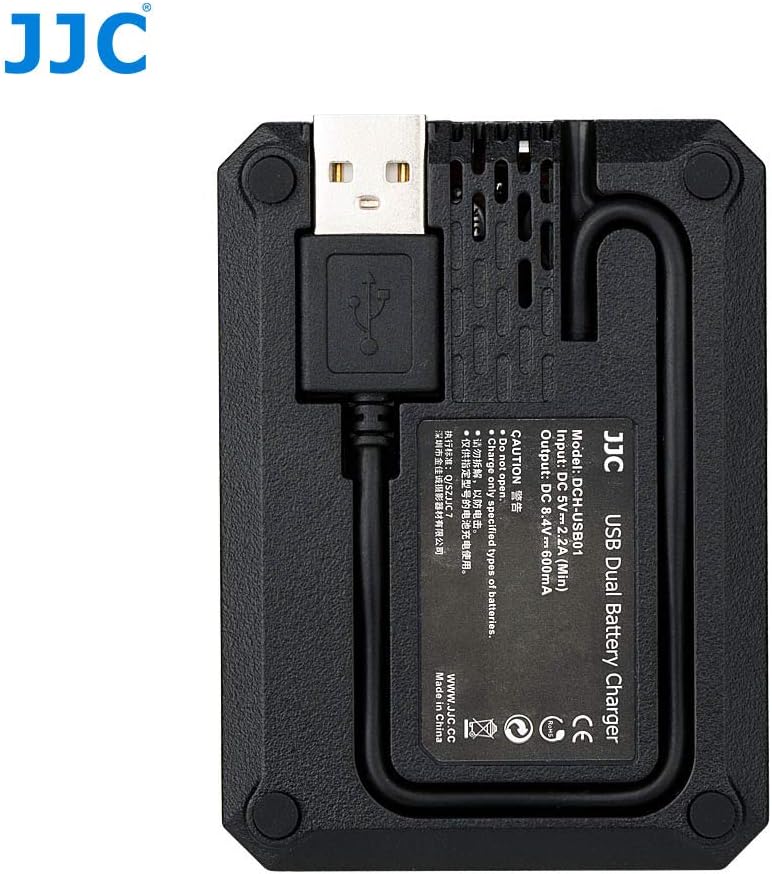
Image: Back view of the charger with specifications and built-in USB cable.

Image: Charger with its built-in USB cable extended.
Warranty and Support
This product is covered by a return policy, typically allowing returns within 30 days of purchase. For specific warranty details, technical support, or further assistance, please visit the official JJC store or contact your retailer.
For more information, visit the JJC Store.