
SYMA 36762
SYMA S5H Airwolf Helicopter
Model: 36762 - User Instruction Manual
Introduction
The SYMA S5H Airwolf Helicopter is a compact and user-friendly radio-controlled aircraft designed for both indoor and outdoor use. It incorporates advanced features such as one-key take-off and landing, auto-hovering, and two-speed modes, making it suitable for beginners and experienced pilots alike. This manual provides essential information for safe operation, setup, and maintenance of your helicopter.

Image: The SYMA S5H Airwolf Helicopter, showcasing its sleek design and main rotor blades.
Safety Precautions
To ensure safe operation and prevent damage to the helicopter or injury, please observe the following precautions:
- Always operate the helicopter in an open area, away from people, animals, and obstacles.
- Do not fly near power lines, trees, or water.
- Keep fingers, hair, and loose clothing away from rotating parts.
- Do not touch the motor or battery immediately after use, as they may be hot.
- Supervise children during operation. Recommended age for use is 8-16 years.
- Turn off the helicopter and remote control when not in use.
- Use only the original charging cable provided.
- Do not attempt to modify or disassemble the helicopter or its components.
Package Contents
Verify that all items are present in the package:
- SYMA S5H Airwolf Helicopter
- Radio Control Transmitter
- USB Charging Cable
- Spare Tail Propeller
- Instruction Manual (this document)
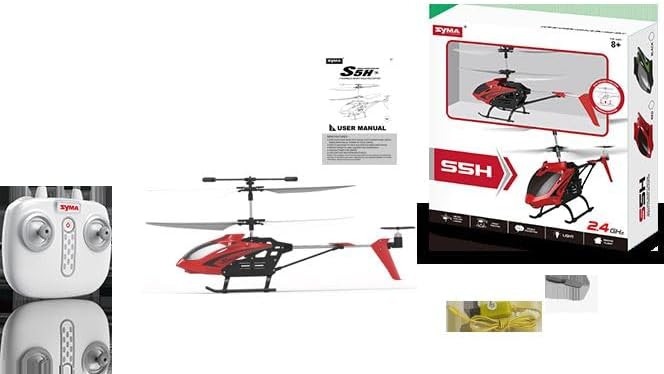
Image: The SYMA S5H Airwolf Helicopter, its remote control, and the USB charging cable.
Setup
1. Remote Control Battery Installation
- Locate the battery compartment on the back of the remote control.
- Open the battery cover.
- Insert 4 "AA" batteries (not included) into the compartment, ensuring correct polarity (+/-).
- Close the battery cover securely.
2. Helicopter Charging
The helicopter's internal battery must be charged before first use and after each flight.
- Ensure the helicopter is powered off.
- Connect the small end of the USB charging cable to the charging port on the helicopter.
- Connect the larger USB end of the cable to a USB power source (e.g., computer USB port, USB wall adapter).
- The indicator light on the USB cable will illuminate during charging and turn off when charging is complete.
- Charging time typically takes approximately 60-90 minutes. Do not overcharge.
Operating Instructions
1. Pairing the Helicopter and Remote Control
- Place the helicopter on a flat, level surface.
- Turn on the helicopter's power switch. The helicopter's lights will flash.
- Turn on the remote control.
- Push the left joystick (throttle) all the way up, then pull it all the way down. The helicopter's lights will stop flashing and remain solid, indicating successful pairing.
2. Basic Flight Controls
- Left Joystick (Throttle): Push up to ascend, pull down to descend.
- Right Joystick (Directional): Push forward to fly forward, pull back to fly backward. Push left to fly left, push right to fly right.
- Trim Buttons: Use the trim buttons on the remote control to fine-tune the helicopter's stability if it drifts in any direction.
3. One-Key Take-Off and Landing
- One-Key Take-Off: After pairing, press the one-key take-off button (usually marked with an arrow pointing up). The helicopter will automatically ascend and hover at a stable altitude.
- One-Key Landing: During flight, press the one-key landing button (usually marked with an arrow pointing down). The helicopter will automatically descend and land gently.
4. Auto-Hover Function
The SYMA S5H features an auto-hover function, which allows the helicopter to maintain a stable altitude without constant throttle input. This makes it easier for beginners to control.
5. Speed Modes
The helicopter offers two speed modes:
- Slow Speed: Ideal for beginners and indoor flying, providing more stable and controlled movements.
- Fast Speed: For more experienced pilots and outdoor flying, offering increased responsiveness and speed.
Refer to your remote control diagram for the specific button to switch between speed modes.

Image: The SYMA S5H Airwolf Helicopter demonstrating its flight capabilities.
Maintenance
- Cleaning: Use a soft, dry cloth to clean the helicopter. Do not use water or chemical cleaners.
- Storage: Store the helicopter and remote control in a cool, dry place, away from direct sunlight and extreme temperatures.
- Battery Care: If not used for an extended period, remove batteries from the remote control. Charge the helicopter's battery periodically to maintain its health.
- Propeller Inspection: Regularly check propellers for damage. Replace any bent or broken propellers with the provided spare or genuine replacement parts.
Troubleshooting
| Problem | Possible Cause | Solution |
|---|---|---|
| Helicopter does not respond to remote control. | Not paired; low battery in remote or helicopter; out of range. | Re-pair the helicopter and remote. Check/replace remote batteries. Charge helicopter battery. Ensure within operating range. |
| Helicopter drifts during flight. | Needs trimming; uneven surface during take-off. | Use trim buttons on the remote control to adjust. Ensure helicopter is placed on a flat surface for take-off. |
| Short flight time. | Battery not fully charged; aging battery. | Ensure battery is fully charged before each flight. Battery life naturally decreases over time. |
| Helicopter cannot take off. | Low battery; damaged propellers. | Charge helicopter battery. Check propellers for damage and replace if necessary. |
Specifications
| Model Number | 36762 |
| Brand | SYMA |
| Material Type | Plastic |
| Remote Control Type | Radio Control |
| Number of Channels | 4 |
| Batteries Required | Yes (4 "AA" for remote, internal rechargeable for helicopter) |
| Recommended Age | 8 - 16 years |
| Product Dimensions | 70 x 285 x 280 cm |
| Weight | 2 Grams (product only) |
Warranty and Support
This product is covered by a standard manufacturer's warranty against defects in materials and workmanship. Please retain your proof of purchase for warranty claims.
For technical support, troubleshooting assistance, or to inquire about replacement parts, please contact the retailer or the manufacturer's customer service department. Contact information can typically be found on the product packaging or the manufacturer's official website.
Ask a question about this manual
Ask about setup, troubleshooting, compatibility, parts, safety, or missing instructions. Manuals+ will review the question and use this page’s manual context to help answer it.