Spektrum Avian 100 Amp Brushless Smart ESC (SPMXAE1100) Instruction Manual
Model: SPMXAE1100 | Brand: Spektrum
Introduction
The Spektrum Avian 100 Amp Brushless Smart ESC is an advanced electronic speed controller designed for 3S-6S LiPo battery configurations in RC aircraft. This ESC integrates seamlessly into the Spektrum Smart ecosystem, providing real-time telemetry data and enhanced safety features. It functions as a virtual engineer, offering vital operating data to optimize performance and ensure reliable operation of your RC model.

Safety Information
WARNING: Read the ENTIRE instruction manual to become familiar with the features of the product before operating. Failure to operate the product correctly can result in damage to the product, personal property and cause serious injury.
This is a sophisticated hobby product. It must be operated with caution and common sense and requires some basic mechanical ability. Failure to operate this Product in a safe and responsible manner could result in injury or damage to the product or other property. This product is not intended for use by children without direct adult supervision. Do not use with incompatible components or alter this product in any way outside of the instructions provided by Horizon Hobby, LLC. The product manual contains instructions for safety, operation and maintenance. It is essential to read and follow all the instructions and warnings in the manual, prior to assembly, setup or use, in order to operate correctly and avoid damage or serious injury.
Product Features
- Smart All-in-One Telemetry: Provides real-time data such as current, voltage, cell balance, temperature, and RPM directly to your compatible Spektrum Smart transmitter.
- Fast, Powerful 32-bit ARM M4 Processor: Ensures precise control and rapid response.
- Multiple Options for Easy Programming: Configure settings via your Smart transmitter, Smart ESC Programming Box, or SmartLink USB application.
- Multi-Point Protection: Incorporates safety measures against overheating, imbalance, overcharge, and discharge issues.
- Adjustable High-Power BEC: Provides reliable power to your receiver and servos.

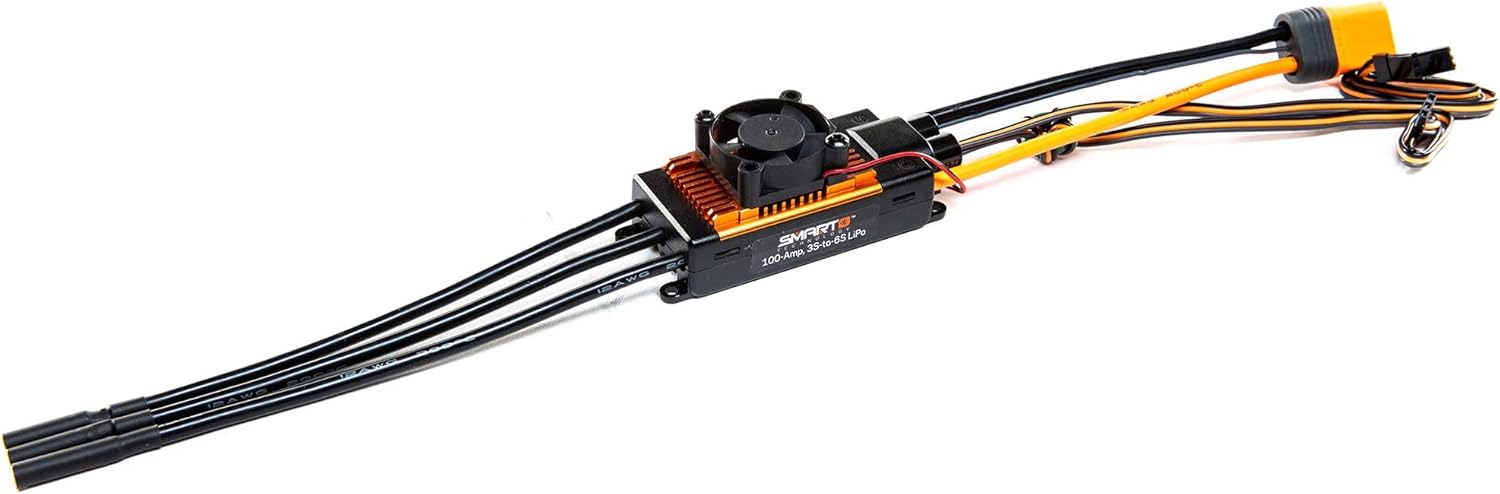
Setup and Installation
Proper installation of your Spektrum Avian Smart ESC is crucial for optimal performance and safety. Ensure all connections are secure and correctly oriented.
Connecting the ESC
- Battery Connection: Connect your 3S-6S LiPo battery to the main power input of the ESC. Ensure the battery is a Spektrum Smart battery for full telemetry functionality.
- Motor Connection: Connect the three motor phase wires from the ESC to your brushless motor. The order of connection may affect motor rotation direction, which can be adjusted later if needed.
- Receiver Connection: Plug the signal wire from the ESC into the throttle channel of your compatible Spektrum Smart receiver.
- Optional Connections: If using external programming devices or additional sensors, connect them according to their respective manuals.


Operating the Smart ESC
The Spektrum Avian Smart ESC simplifies operation by providing critical information and automated settings.
Smart Telemetry
When paired with a Spektrum Smart battery and compatible receiver/transmitter, the ESC transmits real-time telemetry data. This includes:
- Battery voltage and cell balance
- Current draw
- ESC and motor temperature
- Motor RPM
- Capacity used
This data is displayed on your Spektrum Smart transmitter, allowing you to monitor your power system's health and performance during flight. Alerts can be configured to warn you of critical conditions, such as low battery voltage, preventing unexpected power loss.
Battery Charging with Smart Chargers
Spektrum Smart chargers automatically detect the connected Smart battery and configure the correct charging parameters, simplifying the charging process and enhancing safety. This eliminates the risk of incorrect settings that could damage the battery.
Maintenance
Regular maintenance ensures the longevity and reliable performance of your ESC.
- Keep Clean: Regularly inspect and clean the ESC to remove dirt, dust, and debris, especially from the cooling fins and fan (if applicable).
- Check Connections: Periodically inspect all wiring and connectors for signs of wear, corrosion, or loose connections. Secure any loose connections.
- Firmware Updates: Spektrum Smart ESCs can receive firmware updates. Regularly check the Spektrum website or use the SmartLink USB application to ensure your ESC has the latest firmware for optimal performance and new features.
Troubleshooting
If you encounter issues with your Spektrum Avian Smart ESC, consider the following:
- No Power/Response: Verify all battery and receiver connections. Ensure the battery is adequately charged. Check for any visible damage to wires or connectors.
- Motor Not Spinning: Confirm motor phase wire connections are secure. Check your transmitter's throttle settings and calibration.
- Overheating: Ensure the ESC is properly ventilated and not obstructed. Check for excessive current draw from the motor or an undersized propeller.
- Inconsistent Performance/Telemetry: Verify that all components (ESC, battery, receiver, transmitter) are part of the Spektrum Smart ecosystem and are compatible. Ensure firmware is up to date.
- Refer to Manual: For detailed error codes or specific issues, consult the full product manual available on the Spektrum website.
Specifications
| Specification | Value |
|---|---|
| Product Dimensions | 5.6 x 4 x 2.3 inches |
| Item Weight | 4.3 ounces |
| Item Model Number | SPMXAE1100 |
| Manufacturer | Spektrum |
| Recommended Age | 14 years and up |
What's in the Box
- Spektrum Avian 100 Amp Brushless Smart ESC, 3S-6S, SPMXAE1100
Warranty and Support
For warranty information and technical support, please refer to the official Spektrum or Horizon Hobby website. Product registration may be required for warranty claims. Always use genuine Spektrum parts and accessories to ensure compatibility and maintain warranty validity.


