
1. Introduction
This manual provides detailed instructions for the FTVOGUE Super 555 Timer Off Delay Relay module, specifically the DC12V version. This versatile module is designed for various control applications requiring precise timing and relay switching. It supports multiple functional modes including delay ON, delay OFF, self-locking, and level trigger delay, making it suitable for a wide range of industrial and hobbyist projects.

Figure 1: FTVOGUE Super 555 Timer Off Delay Relay Module (DC12V)
2. Product Features
- Anti-Reverse Connection Protection: The module incorporates anti-reverse connection functionality for the power supply, preventing damage from incorrect wiring.
- Versatile 3-Wire Interface: Features a 3-wire interface with convenient wiring terminals for easy integration into circuits.
- Multiple Operating Modes: Supports Delay ON, Delay OFF, Self-Locking, and Level Trigger Delay functions to meet diverse application needs.
- Enhanced Stability and Anti-Interference: Designed with industrial-grade circuit boards, similar to PLC systems, ensuring stable operation and strong resistance to interference.
- Parameter Retention: Permanently remembers set parameters even after power loss, eliminating the need for repeated setup.
- Adjustable Delay Time: Equipped with a precision potentiometer for adjusting delay times from 0.1 seconds to 120 seconds.
- Low Power Consumption: Efficient design ensures low power usage, especially when the relay is not activated.

Figure 2: Low Power Consumption Details
3. Specifications
| Parameter | Value |
|---|---|
| Operating Voltage (This Model) | DC12V (Also available in 5V and 24V variants) |
| Operating Current (DC12V) | <35mA (Operating), <1mA (Relay not activated) |
| Contact Current Rating | 10A |
| Maximum Switching Current | 10A |
| Minimum Switching Voltage | 5V DC |
| Adjustable Delay Time Range | 0.1 seconds to 120 seconds |
| Number of Terminals | 3 (DC+, DC-, X1 input; COM, NO, NC output) |
| Contact Material | Gold |
| Dimensions (L x W x H) | 60mm x 35mm x 20mm |
| Operating Temperature | -20°C to 60°C |
| Extreme Temperature Range | -30°C to 70°C |
| Mounting Type | Panel Mount or Wall Mount |

Figure 3: Module Dimensions
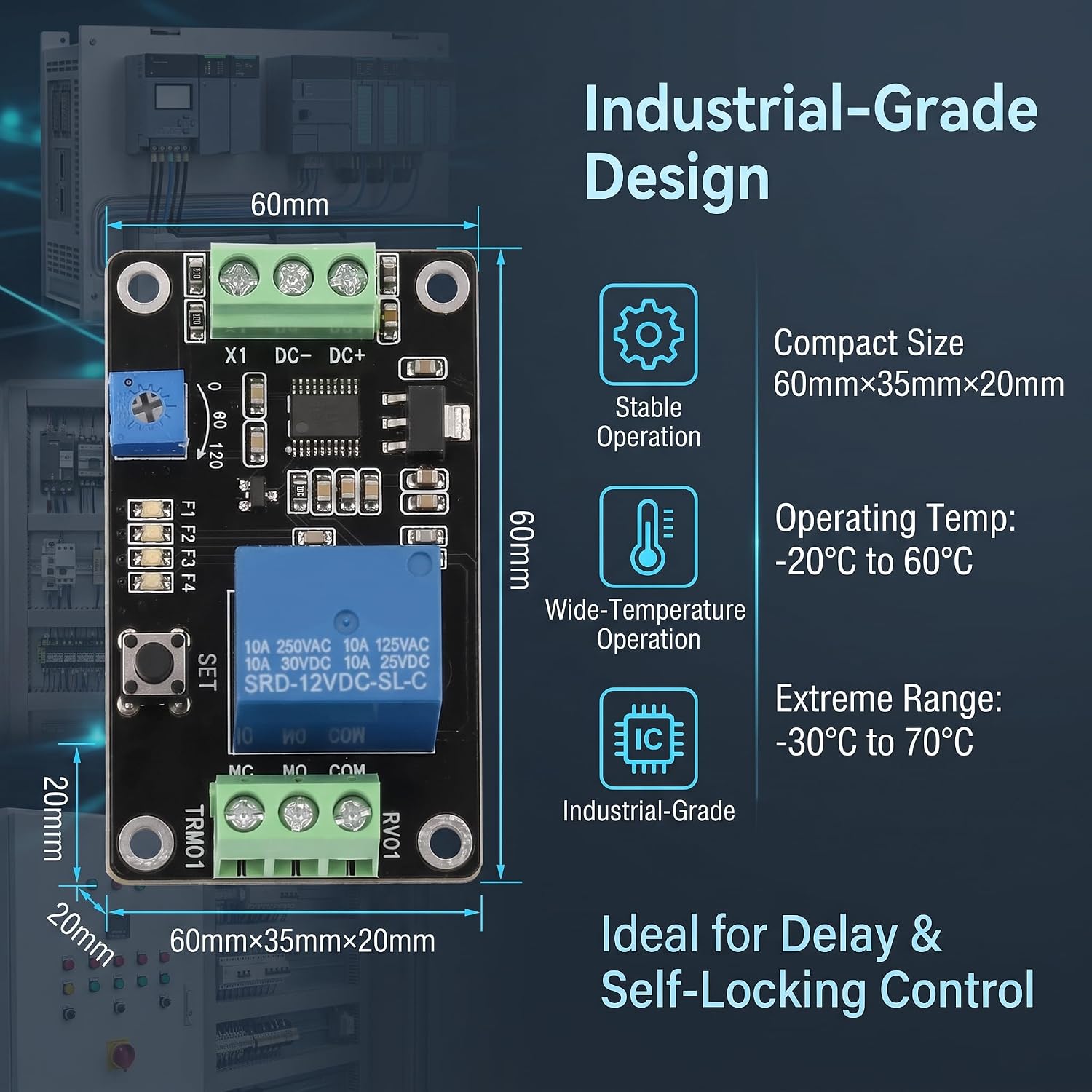
Figure 4: Industrial Design Overview
4. Setup and Installation
4.1 Wiring Connections
The module features a 3-wire input interface and a 3-terminal output for relay control. Ensure all connections are secure and correctly polarized.
- DC+: Positive power supply input (e.g., +12V for DC12V module).
- DC-: Negative power supply input (Ground).
- X1: Trigger input.
- COM: Common terminal for the relay output.
- NO: Normally Open relay contact. Connects to COM when the relay is activated.
- NC: Normally Closed relay contact. Disconnects from COM when the relay is activated.
The module includes anti-reverse connection protection on the power input (DC+, DC-) to prevent damage if polarity is accidentally reversed.

Figure 5: Reverse Polarity Protection

Figure 6: Wiring Terminals and Load Capacity
4.2 Power Supply
Connect the module to a stable DC12V power source. Ensure the voltage is within the specified operating range (DC12V ±10%).
5. Operating Instructions
5.1 Functional Modes
The module supports four distinct functional modes, selected via onboard jumpers or buttons (refer to the specific model's markings for selection method, typically F1, F2, F3, F4 indicators).
- F1: Power-On Delay Pull-In: The relay activates after a set delay time once power is applied.
- F2: Power-On Delay Release: The relay is initially active and deactivates after a set delay time once power is applied.
- F3: Self-Locking Relay Mode: The relay toggles its state (ON/OFF) with each trigger input.
- F4: Level Trigger Delay: The relay activates or deactivates based on a trigger signal and a set delay.

Figure 7: Four Functional Modes
5.2 Delay Time Adjustment
The delay time is adjusted using the blue precision potentiometer located on the module. Rotate the potentiometer clockwise to increase the delay time and counter-clockwise to decrease it. The adjustable range is from 0.1 seconds to 120 seconds.

Figure 8: Adjustable Delay Time Potentiometer
5.3 Parameter Retention
Once the functional mode and delay time are set, the module will retain these parameters even after the power supply is disconnected. This eliminates the need to reconfigure settings each time the module is powered on.
6. Maintenance
The FTVOGUE Super 555 Timer Off Delay Relay module is designed for robust and reliable operation. To ensure its longevity and optimal performance, consider the following:
- Keep Clean: Periodically clean the module to prevent dust and debris accumulation, which can affect performance.
- Environmental Conditions: Operate the module within its specified temperature range (-20°C to 60°C) and avoid environments with excessive humidity or corrosive substances.
- Secure Connections: Regularly check all wiring connections to ensure they remain tight and free from corrosion.
- Ventilation: Ensure adequate airflow around the module, especially if it is enclosed, to prevent overheating.
7. Troubleshooting
If you encounter issues with your FTVOGUE Super 555 Timer Off Delay Relay, consider the following troubleshooting steps:
- Module Not Powering On:
- Verify the power supply voltage is correct (DC12V for this model) and stable.
- Check power connections (DC+, DC-) for correct polarity and secure contact. The module has reverse polarity protection, but incorrect wiring can still prevent operation.
- Relay Not Activating/Deactivating as Expected:
- Confirm the selected functional mode (F1, F2, F3, F4) matches your intended operation.
- Check the delay time setting using the potentiometer. Ensure it is not set to an extremely short or long duration that might be overlooked.
- Verify the trigger input (X1) is functioning correctly and providing the expected signal for the chosen mode.
- Inspect the load connected to the relay (COM, NO, NC) for proper wiring and ensure it is within the module's load capacity (DC 0-30V/10A, AC 0-250V/10A for NO; DC 0-28V/10A, AC 0-125V/10A for NC).
- No Recurring Cycle Option:
Please note that this specific module provides delay ON, delay OFF, self-locking, and level trigger delay functions. It is not designed for continuous, repeating cycles (e.g., alternating ON/OFF indefinitely). For such applications, multiple modules or a different type of timer may be required.
8. Warranty and Support
FTVOGUE is committed to providing quality products. For any questions, technical assistance, or support regarding your Super 555 Timer Off Delay Relay module, please contact FTVOGUE customer service through the retailer where the product was purchased or visit the official FTVOGUE brand store for more information.
For additional resources and product information, you may visit the FTVOGUE Brand Store.