
1. Introduction
This manual provides comprehensive instructions for the installation, operation, maintenance, and care of your WeatherTech Custom Fit FloorLiners. Designed with precision for select 2007-2010 Ford Expedition and Lincoln Navigator models, these FloorLiners offer advanced interior protection against dirt, spills, and wear.
Please read this manual thoroughly before installation to ensure proper fitment and maximum protection for your vehicle's interior.
2. Product Overview
WeatherTech FloorLiners are engineered for a perfect fit and superior protection. Key features include:
- Custom Fit: Laser-measured to precisely fit the complex contours of your vehicle's floor.
- Advanced Material: Constructed from a patented High-Density Tri-Extruded (HDTE) material, providing a rigid core for strength, surface friction to the carpet, and a tactile feel.
- Fluid Channels: Advanced surfacing creates channels that direct fluids and debris to a lower reservoir, minimizing movement while driving.
- Comprehensive Coverage: Offers protection in the front, back, and even up the sides of the vehicle's footwell.
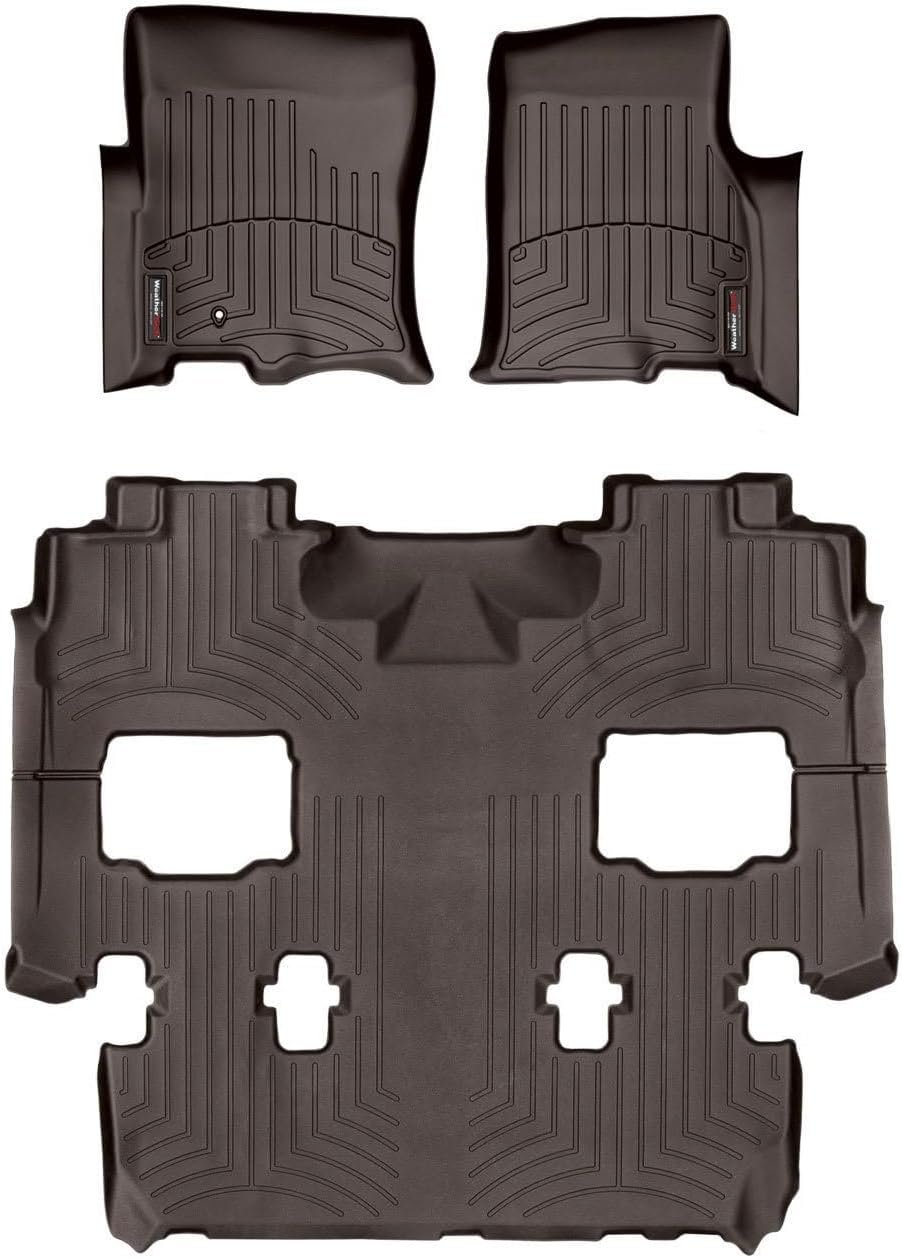
Image: Complete set of WeatherTech FloorLiners in Cocoa, showing the front and rear sections.

Image: A grey WeatherTech FloorLiner precisely fitted into the front passenger footwell of a vehicle, demonstrating its custom contouring.

Image: A graphic highlighting key features of the FloorLiner, including laser measurement for perfect fit, surface channels for liquid redirection, and a rigid core for strength.

Image: Detailed view of the FloorLiner's surface channels, designed to contain liquids, and the integrated retention system that secures the mat in place.

Image: A graphic emphasizing the extreme strength of the FloorLiner material, highlighting its resistance to cracking, warping, and wear.

Image: A graphic stating that the FloorLiner helps protect vehicle investment and resale value by preventing wear and tear.

Image: A graphic promoting the FloorLiner as durable, all-season, year-round protection.
Product Video
Video: An official WeatherTech video demonstrating the features and benefits of WeatherTech FloorLiners, including their custom fit, advanced material, and ease of installation.
3. Setup and Installation
Installing your WeatherTech FloorLiners is a straightforward process. Follow these steps for optimal fit and safety:
- Prepare the Vehicle: Ensure the vehicle's original floor carpeting is clean and dry before installation. Remove any existing floor mats.
- Position the Liner: Carefully slip the FloorLiner into place, ensuring it aligns with the contours of your vehicle's floor. For front liners, ensure it extends fully under the pedals.
- Check Pedal Operation: After placing the FloorLiner, always verify that it does not interfere with the full operation of the accelerator, brake, or clutch pedals. Depress each pedal fully to confirm unrestricted movement.
- Secure with Retention Devices: If your vehicle is equipped with factory floor mat retention devices (hooks or posts), secure the FloorLiner using these devices. If applicable, use any supplementary WeatherTech retention devices provided with your product.
Image: A WeatherTech FloorLiner being carefully positioned in the driver's side footwell, demonstrating the ease of installation.
4. Operating Instructions
Once installed, your WeatherTech FloorLiners require minimal "operation." Their primary function is passive protection. However, it is crucial to:
- Ensure Proper Placement: Periodically check that the FloorLiners remain securely in place and have not shifted, especially after heavy use or cleaning.
- Verify Pedal Clearance: Always ensure that the FloorLiners do not obstruct the movement of any vehicle pedals. This is a critical safety check.
- Avoid Stacking Mats: Never place other floor mats on top of your WeatherTech FloorLiners, as this can interfere with pedal operation and compromise safety.
5. Maintenance and Care
Maintaining your WeatherTech FloorLiners is simple and helps preserve their appearance and protective qualities:
- Regular Cleaning: For routine cleaning, simply remove the FloorLiners from the vehicle. Shake off loose dirt and debris.
- Washing: Wash the FloorLiners with mild soap and water. A soft brush can be used for stubborn dirt. Rinse thoroughly with water.
- Drying: Allow the FloorLiners to air dry completely before reinstalling them in your vehicle. Do not use harsh chemicals or abrasive cleaners, as these can damage the material.
- Recommended Products: For best results, consider using WeatherTech's TechCare FloorLiner and FloorMat Cleaner and Protector (sold separately) to clean and maintain your liners.

Image: A person hosing down a WeatherTech FloorLiner, illustrating the ease of cleaning and maintenance.
6. Troubleshooting
If you encounter any issues with your WeatherTech FloorLiners, consider the following common solutions:
| Problem | Possible Cause | Solution |
|---|---|---|
| Liner does not fit perfectly. | Incorrect model year or vehicle configuration; liner not fully seated. | Double-check vehicle compatibility. Ensure the liner is pushed firmly into all corners and under pedals. Allow time for the material to settle, especially in warm conditions. |
| Liner shifts during driving. | Retention devices not engaged; debris under liner. | Ensure all factory retention devices are properly engaged. Clean any debris from under the liner and re-secure. |
| Pedal interference. | Improper installation; liner not fully seated. | Immediately remove the liner. Reinstall carefully, ensuring no part of the liner obstructs pedal movement. Never drive with a liner that interferes with pedals. |
7. Specifications
- Product Name: WeatherTech Custom Fit FloorLiners
- Model Number: 471071-4710402
- Color: Cocoa
- Coverage Area: Complete Set (1st Row, 1-Piece 2nd/3rd Row)
- Material: Patented High-Density Tri-Extruded (HDTE)
- Compatibility: Select 2007-2010 Ford Expedition, 2007-2010 Lincoln Navigator Models
- Country of Origin: USA
- UPC: 787765489409
8. Warranty and Support
WeatherTech products are known for their quality and durability. Your FloorLiners are backed by a manufacturer's warranty against defects in materials and workmanship. For specific warranty details, claims, or product support, please refer to the official WeatherTech website or contact their customer service directly.
You can find more information and contact details by visiting the WeatherTech Store on Amazon or their official company website.


