
1. Introduction
The TOPENS AT1202 is an automatic gate opener designed for heavy-duty dual swing gates. This system provides convenience and security for residential, courtyard, ranch, and farm applications. It is equipped with two 24VDC 80W motors capable of operating gates up to 880lbs in weight or 18ft in length per gate leaf. This manual provides detailed instructions for safe and effective use of your gate opener.
2. Safety Information
Always prioritize safety during installation and operation. Read all warnings and instructions carefully before proceeding. Ensure all components are securely fastened and regularly check the system for proper function. The system includes features like obstacle detection (stop-and-reverse) and a manual release key for power outages.
3. Package Contents
The TOPENS AT1202 package includes the following components:
- 2 x Gate Opener Actuators (Arms), each with a 5-foot 5-Conductor Cable
- 1 x Waterproof Control Box
- 2 x M12 Remote Control Transmitters
- 2 x Emergency Release Keys
- 1 x Full Set of Required Installation Hardware

Image: All components included in the TOPENS AT1202 Automatic Dual Swing Gate Opener package.
4. Installation Guide
The installation process requires basic tools and careful adherence to instructions. Refer to the user manual for detailed diagrams and measurements.
4.1. Pre-installation Considerations
Determine whether your gate opens inward or outward to select the correct installation mode (Pull-to-Open or Push-to-Open). Ensure the gate structure is robust enough to support the opener.
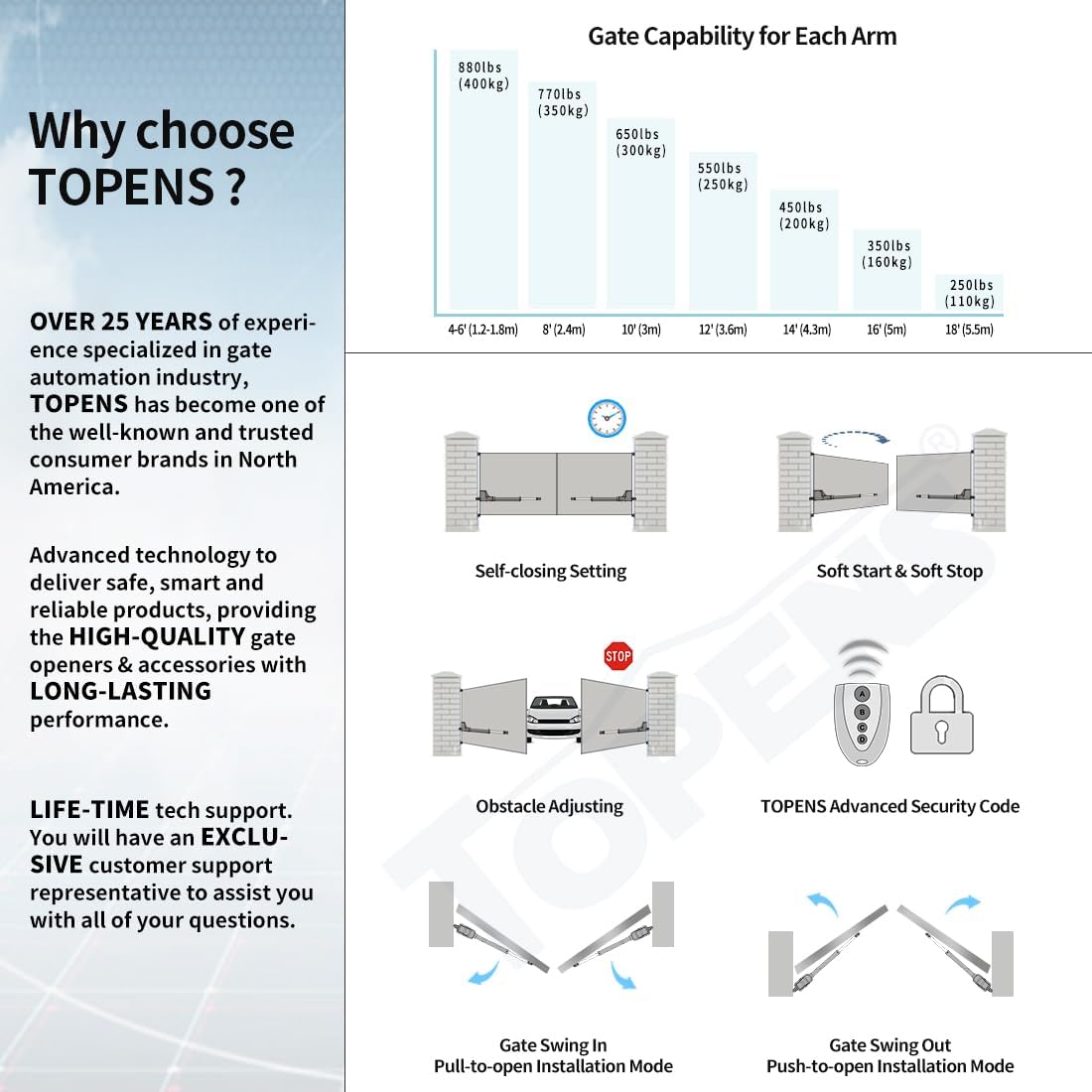
Image: Key features of the TOPENS AT1202 system, including self-closing, soft start/stop, obstacle adjusting, and advanced security code.
4.2. Mounting the Actuators
Mount the gate opener arms to the gate and posts according to the provided diagrams in the manual. Ensure the arms are level and securely fastened. The post bracket and post pivot bracket must be assembled correctly.

Image: Dimensions of the TOPENS AT1202 control box and actuator arm for installation planning.
4.3. Wiring the Control Board
Connect the actuator arms to the control board. The control box houses the main circuit board and transformer. Ensure all wiring connections are secure and follow the color-coded instructions in the manual.

Image: Detailed view of the motor's internal components, highlighting the electromagnetism limit switch, smart chip, remote control, manual release key, and 5-conductor cable.
4.4. Power Supply Options
The AT1202 can be powered in multiple ways:
- AC Electricity Only: Connect directly to 110-120VAC power.
- AC Electricity with Battery Backup: Integrate a 24V 12Ah automotive/marine type battery (not included) as a backup power source.
- AC Electricity, Solar Panels, and Battery Backup: Combine AC electricity with a 20W solar panel and solar charge controller (not included) for battery charging and backup.

Image: Visual representation of the three supported power modes for the AT1202 gate opener.
4.5. Installation Video
Video: A detailed installation guide for the TOPENS AT1202 gate opener, provided by TOPENS.
5. Operation
5.1. Remote Control Programming
The system includes M12 remote control transmitters. Follow the instructions in the manual to program your remotes for secure operation. The remotes utilize advanced TOPENS code technology for protection against unauthorized access.
5.2. Limit Switch Adjustment
The electromagnetism limit switch can be easily adjusted to define the open and close positions of your gate. Refer to the manual for precise adjustment steps.
5.3. Control Board Settings
The control board allows for various settings, including auto-close duration, soft start and soft stop functions, and obstacle detection sensitivity. Consult the manual for detailed configuration of these features.
5.4. General Operation Video
Video: An overview of the TOPENS AT1202 Swing Gate Opener in operation, demonstrating its AC electricity powered functionality.
6. Accessories
The TOPENS AT1202 is compatible with a range of accessories to enhance functionality and security. These include various keypads, vehicle sensors, safety photocell sensors, and warning lights.

Image: A selection of compatible accessories available for TOPENS gate openers.
7. Specifications
| Specification | Value |
|---|---|
| Model Number | AT1202 |
| Maximum Gate Weight Capacity | 880 Pounds |
| Maximum Gate Length per Leaf | 18 Feet |
| Motor Voltage & Power | 24VDC & 80W |
| Power Source | 110-120VAC Electricity (Optional 24V Battery/Solar) |
| Sound Level | 50 Decibels |
| Item Weight | 47.4 pounds |
| Product Dimensions | 32.6 x 4.9 x 8.2 inches |
| IP Rating | IP44 |
8. Troubleshooting
If you encounter issues with your AT1202 gate opener, refer to the troubleshooting section in the full user manual for specific solutions. Common issues may include:
- Gate not opening/closing fully: Check limit switch settings and gate path for obstructions.
- Remote control not working: Verify programming and battery status.
- Power issues: Ensure stable AC power supply or check battery connections if using backup.
The system features a stop-and-reverse function for obstacle detection during operation, which can help diagnose issues related to obstructions.
9. Maintenance
Regular maintenance ensures the longevity and safe operation of your gate opener. Perform periodic checks of the following:
- Mechanical Components: Inspect hinges, brackets, and actuator arms for wear, damage, or loose fasteners. Lubricate moving parts as recommended in the manual.
- Electrical Connections: Ensure all wiring connections in the control box and to the power source are secure and free from corrosion.
- Safety Devices: Test safety photocell sensors and other safety features regularly to confirm proper function.
- Gate Movement: Manually open and close the gate to check for smooth movement and any resistance that could affect the opener's performance.
10. Warranty & Support
All TOPENS products come with a 12-month warranty against defects and a 30-day exchange & return policy. For further assistance, visit the official TOPENS website for the full user manual, additional installation videos, and personalized service.
TOPENS is committed to providing professional solutions for any questions or support needs. You can reach customer support via email at support@topens.com. Kindly include your product model, purchasing date & site, order number, and your contact information for efficient service. All concerns are typically addressed within 24 hours.


