
Amazon Basics MDUDP-50AEN1-BA8B
Amazon Basics 50 Pint Dehumidifier with Drain Pump User Manual
Model: MDUDP-50AEN1-BA8B
Introduction
This manual provides instructions for the safe operation, installation, maintenance, and troubleshooting of your Amazon Basics 50 Pint Dehumidifier with Drain Pump. This Energy Star certified unit is designed to effectively reduce humidity in spaces up to 4000 square feet, maintaining optimal indoor humidity between 45-55% for enhanced comfort and air quality. It features a continuous drain pump, timer, auto-defrost, and overflow protection.
Important Safety Instructions
Read all instructions before using this appliance. Failure to follow these instructions may result in electric shock, fire, or personal injury.
- Always place the dehumidifier on a level, stable surface.
- Ensure the unit is properly grounded.
- Do not operate the unit with a damaged power cord or plug.
- Keep at least 8 inches (20 cm) of space around the unit for proper airflow.
- Do not insert objects into the air inlet or outlet.
- Unplug the unit before cleaning or performing any maintenance.
- Do not use the dehumidifier near flammable gases or combustible materials.
- This appliance is for residential use only.
Product Overview
Familiarize yourself with the components of your dehumidifier.
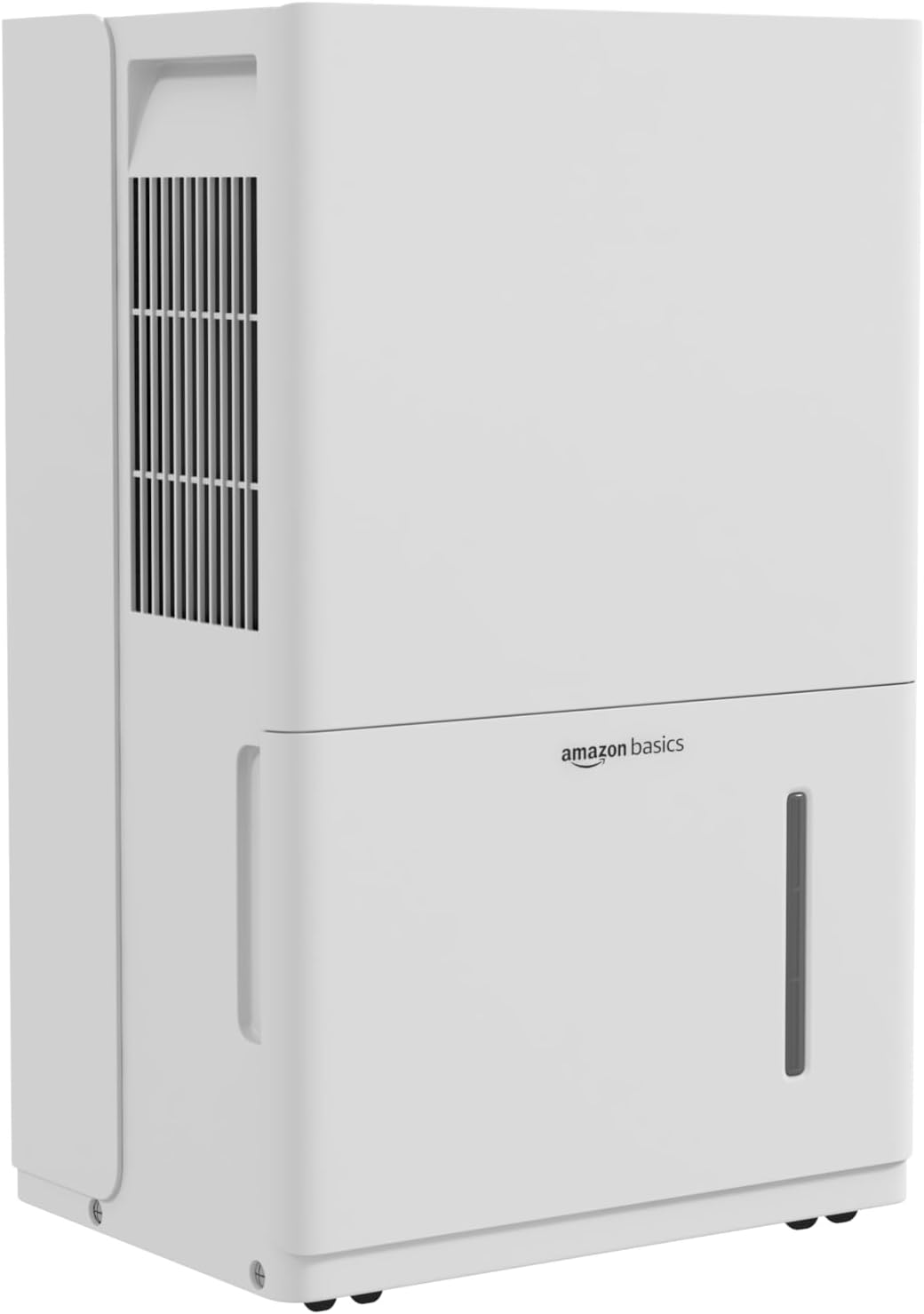
Front view of the Amazon Basics 50 Pint Dehumidifier, showing the air intake grille and water tank.

Diagram illustrating the control panel, humidity display, auto-defrost, auto re-start, and overflow protection features.
Control Panel
The control panel allows you to manage the dehumidifier's settings. It includes buttons for power, mode selection, fan speed, timer, and humidity adjustment, along with a digital display for current humidity levels.

Close-up of the dehumidifier's top panel, showing the control buttons and digital display.
Water Tank
The dehumidifier collects moisture in a removable water tank. The tank has a capacity of 1.59 gallons (6 liters) and features a full indicator to signal when it needs to be emptied.

Image showing the "Tank Full" indicator light on the control panel.
Portability
The unit is equipped with durable and smooth caster wheels for easy movement. A cord wrap is also provided for tidy storage of the power cord.

Rear view of the dehumidifier, highlighting the cord wrap for power cable management and the caster wheels for mobility.
Setup
- Unpacking: Carefully remove the dehumidifier from its packaging. Retain packaging materials for future storage or transport.
- Placement: Place the unit upright on a firm, level surface in the desired location. Ensure there is at least 8 inches (20 cm) of clear space around the air inlet and outlet for optimal performance. Avoid placing it against walls or furniture that could obstruct airflow.
- Initial Standby: After unpacking, allow the unit to stand upright for at least 24 hours before plugging it in. This allows the refrigerant to settle.
- Power Connection: Plug the grounded power cord into a suitable electrical outlet.
Operating Instructions
Turning On/Off
- Press the Power button (⏻) to turn the unit on or off.
- The unit will display the current room humidity when turned on.
Setting Desired Humidity Level
- Press the "Humidity" button (often indicated by % or a droplet icon) to cycle through desired humidity settings.
- Use the Up (∧) and Down (∨) arrows to adjust the target humidity level between 35% and 85% in 5% increments.
- The unit will operate until the set humidity level is reached, then cycle on and off to maintain it.
Fan Speed Selection
- Press the "Fan Speed" button (often indicated by a fan icon) to select between High, Medium, or Low fan speeds.
- Higher fan speeds result in faster dehumidification and more noise.
Timer Function
- Press the "Timer" button (often indicated by a clock icon) to set a delayed start or stop time.
- Use the Up (∧) and Down (∨) arrows to set the desired time from 0.5 to 24 hours.
- The timer can be used to automatically turn the unit on or off after the set duration.
Continuous Drain Operation (With Drain Pump)
This model includes a continuous drain pump, eliminating the need for manual tank emptying. This is ideal for basements or areas where continuous operation is desired.
- Locate the drain hose outlet on the back of the unit.
- Connect a standard garden hose (not included) to the drain hose outlet. Ensure the connection is secure to prevent leaks.
- Route the other end of the hose to a suitable drain (e.g., floor drain, sink, or outside). Ensure the hose is sloped downwards to allow gravity to assist drainage, or utilize the internal pump for upward drainage.
- Activate the continuous drain pump function via the control panel if a specific setting is available, or ensure the hose is properly connected for automatic pump activation when the tank fills.

Illustration showing two methods for water drainage: manual emptying of the tank and continuous drainage via a hose connection.
Auto Re-start Function
In the event of a power outage, the dehumidifier will automatically resume operation with its previous settings once power is restored.
Auto-Defrost Function
If frost builds up on the evaporator coils, the unit will automatically enter defrost mode to melt the ice, ensuring efficient operation.
Maintenance
Emptying the Water Tank (Manual)
When the water tank is full, the "Tank Full" indicator light will illuminate, and the unit will stop operating. Empty the tank as follows:
- Gently pull the water tank outwards from the front of the unit.
- Carefully carry the tank to a sink or drain and empty the collected water.
- Slide the empty tank back into the dehumidifier until it clicks into place. The unit will resume operation automatically.

Image illustrating the process of removing the water collection tank from the dehumidifier.
Cleaning the Air Filter
The reusable air filter should be cleaned regularly (approximately every two weeks, or more often depending on usage) to maintain optimal performance.
- Turn off and unplug the dehumidifier.
- Locate the air filter, typically behind the front grille or on the side/back panel.
- Remove the filter.
- Wash the filter with warm, soapy water. Rinse thoroughly and allow it to air dry completely before re-installing. Do not use a dishwasher or harsh chemicals.
- Re-install the dry filter into the unit.

Image showing a hand removing the reusable air filter for cleaning.
Cleaning the Unit Exterior
- Wipe the exterior with a soft, damp cloth.
- Do not use abrasive cleaners or solvents.
Troubleshooting
| Problem | Possible Cause | Solution |
|---|---|---|
| Dehumidifier does not turn on. | No power; Power cord not plugged in; Tank full or not properly seated. | Check power supply; Ensure cord is securely plugged in; Empty and re-seat the water tank. |
| Unit is running but not collecting water. | Room humidity is already low; Air filter is clogged; Temperature is too low (below 41°F / 5°C); Unit is in defrost mode. | Check current humidity setting; Clean the air filter; Ensure room temperature is within operating range; Wait for defrost cycle to complete. |
| Water is leaking. | Water tank not properly installed; Continuous drain hose is loose or clogged. | Re-seat the water tank; Check continuous drain hose connection and clear any obstructions. |
| Unit is noisy. | Unit not on a level surface; Air filter is clogged; Fan speed is set to high. | Place on a level surface; Clean the air filter; Reduce fan speed. |
| Error codes displayed. | Specific internal malfunction. | Refer to the full user manual for specific error code meanings or contact customer support. |
Specifications
| Brand | Amazon Basics |
| Model Name | MDUDP-50AEN1-BA8B |
| Capacity | 50 Pints per Day |
| Floor Area Coverage | Up to 4000 Square Feet |
| Tank Volume | 1.59 Gallons (6 Liters) |
| Product Dimensions (D x W x H) | 11.1"D x 15.43"W x 24.25"H |
| Item Weight | 41.7 Pounds |
| Special Features | Continuous Drain Pump, Timer, Auto-Defrost, Overflow Protection, Auto Re-start |
| Energy Certification | Energy Star Certified |
| Included Components | Reusable Filter |
| UPC | 810004816756 |
Warranty Information
This Amazon Basics dehumidifier is covered by a 1-year limited warranty from the date of purchase. This warranty covers defects in materials and workmanship under normal use. It does not cover damage resulting from accident, misuse, abuse, alteration, or improper installation. For warranty claims, please retain your proof of purchase.
For detailed warranty terms and conditions, please refer to the official warranty document available on the product's Amazon page or contact customer support.
Link to Warranty Document: Amazon Basics Warranty (PDF)
Customer Support
If you have any questions, require assistance, or need to report an issue with your Amazon Basics dehumidifier, please contact Amazon Customer Service. You can typically find contact information on the Amazon website under "Help" or "Customer Service."
Please have your product model number (MDUDP-50AEN1-BA8B) and proof of purchase ready when contacting support.
Related documentsMDUDP-50AEN1-BA8B


Ask a question about this manual
Ask about setup, troubleshooting, compatibility, parts, safety, or missing instructions. Manuals+ will review the question and use this page’s manual context to help answer it.