
WOLF-GUARD W4Q-JD-W06
Wolf-Guard W4Q-JD-W06 Wireless 4G WiFi Home Alarm Security System User Manual
Model: W4Q-JD-W06 | Brand: WOLF-GUARD
1. Introduction
This manual provides detailed instructions for the installation, operation, and maintenance of your Wolf-Guard W4Q-JD-W06 Wireless 4G WiFi Home Alarm Security System. This system is designed to provide robust home security with features such as app control, SIM card support for SMS and call alerts, and expandable accessory options. Please read this manual thoroughly before using the product to ensure proper functionality and safety.

Figure 1: Complete Wolf-Guard W4Q-JD-W06 Alarm System Kit, including the main panel, solar siren, remote controls, door/window sensors, PIR sensors, and RFID tags.
2. Package Contents
Upon unboxing, verify that all components listed below are present and in good condition:
- 1 x Main Control Panel
- 1 x Solar Siren
- 4 x Remote Controls
- 4 x Door/Window Sensors
- 2 x Pet Immune PIR Sensors
- 2 x RFID Tags
- 1 x Power Adapter
- 1 x User Manual

Figure 2: The product packaging, indicating the model number W4Q and system features.
3. Setup Guide
3.1 Main Panel Installation
The main control panel is the central hub of your alarm system. It should be placed in a secure, central location within your home, away from direct sunlight and moisture. Ensure it is within range of your Wi-Fi network if you plan to use the Wi-Fi connectivity.
- Connect the provided power adapter to the main panel and plug it into a standard wall outlet.
- The main panel includes a backup rechargeable battery. Ensure it is fully charged for uninterrupted operation during power outages.

Figure 3: Rear view of the main control panel, showing the SIM card slot and power input. The QR code links to the Smart Life app.
3.2 SIM Card Insertion (Optional for 4G Functionality)
For 4G SMS and call alert functionality, a dedicated data SIM card is required. Insert the SIM card into the slot located at the rear of the main alarm box. The system supports 6 groups of preset alarm phone numbers and 3 groups of SMS phone numbers.
3.3 Sensor and Accessory Placement
All included accessories (door/window sensors, PIR sensors, remote controls, RFID tags) are pre-linked to the control panel for ease of installation. Simply install them in their appropriate locations.
- Door/Window Sensors: Install on doors and windows. Ensure the two parts are aligned and close to each other when the door/window is closed.
- PIR Sensors (Pet Immune): Place in areas where motion detection is desired, such as hallways or living rooms. These sensors are designed to ignore pets up to a certain weight, reducing false alarms.
- Solar Siren: Mount outdoors in a visible location. It is powered by solar energy and will sound a loud 110dB alarm when triggered.

Figure 4: The pet-immune PIR motion detector, designed to prevent false alarms from household pets.
3.4 Mobile App Setup
The system can be controlled via a mobile application. Scan the QR code on the back of the main panel or in the manual to download the "Smart Life" or "Tuya Smart" app. Follow the in-app instructions to add your alarm system and connect it to your home Wi-Fi network.

Figure 5: The mobile application interface for controlling the alarm system, showing options for arming, disarming, and device sharing.
4. Operating Instructions
4.1 Arming and Disarming the System
The system can be armed or disarmed using the control panel, remote controls, or the mobile app.
- Arm (Away Mode): Activates all sensors. If a sensor is triggered, the alarm will sound and alerts will be sent.
- Home Arm (Stay Mode): Activates perimeter sensors (e.g., door/window sensors) while allowing free movement within the home.
- Disarm: Deactivates the alarm system.
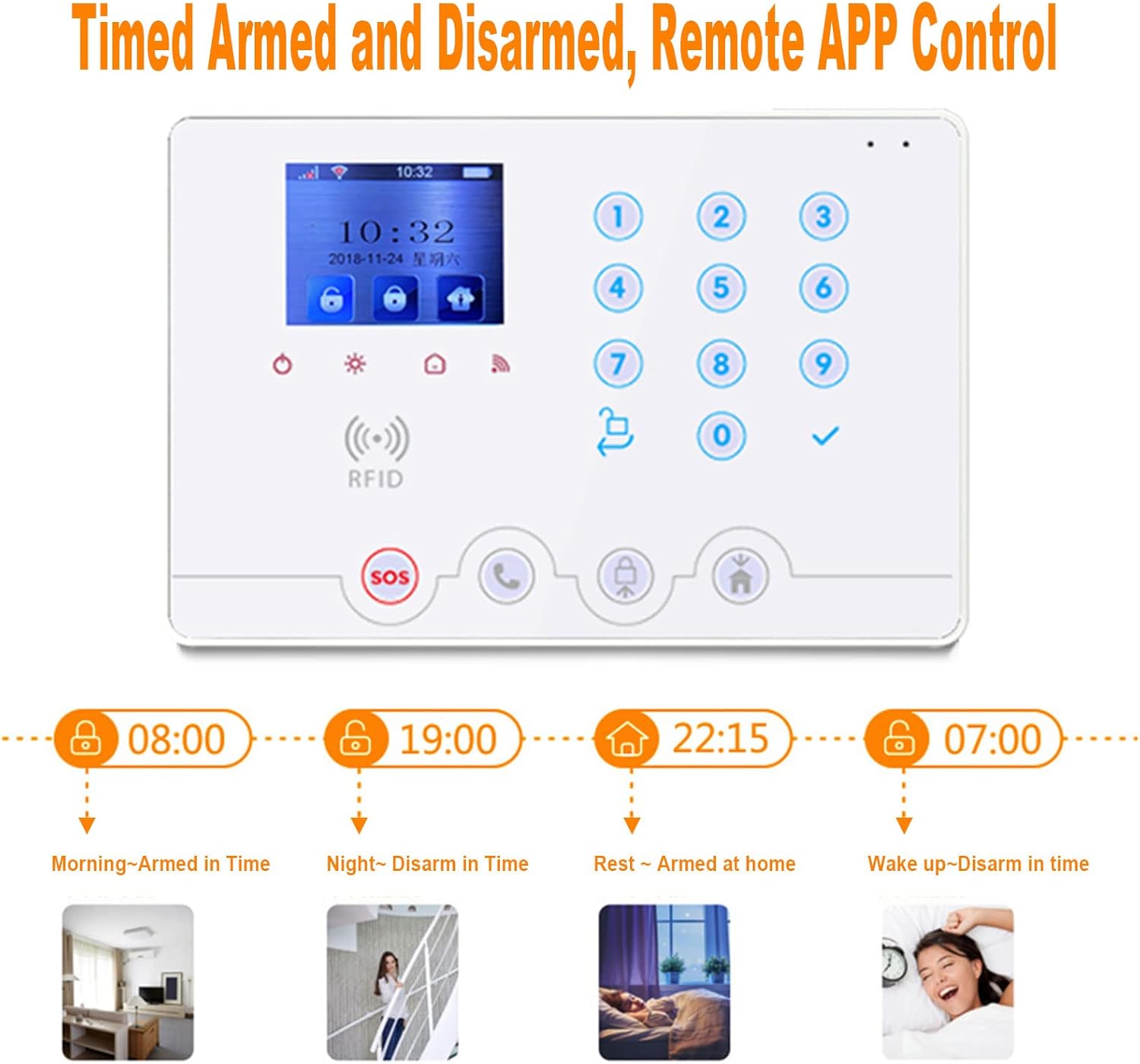
Figure 6: Illustration of the timed arm and disarm feature, allowing users to schedule security modes for different times of the day.
4.2 Receiving Alerts
When an alarm is triggered, the system will activate the 110dB siren and automatically call and/or send SMS messages to the preset phone numbers. You will also receive push notifications via the mobile app.
4.3 Monitoring and Intercom
The mobile app allows you to monitor the area around your host unit and speak into the host unit, providing two-way communication capabilities.
4.4 RFID Tag Usage
The included RFID tags can be used to quickly arm or disarm the system by swiping them over the RFID swipe area on the main control panel.

Figure 7: A user swiping an RFID tag over the main control panel for quick arming or disarming.
5. Maintenance
- Battery Check: Periodically check the battery status of all wireless sensors. The average battery life for sensors is approximately 2 years. Replace batteries as needed to ensure continuous protection.
- Cleaning: Use a soft, dry cloth to clean the main panel and sensors. Avoid using abrasive cleaners or solvents.
- System Test: Regularly test your alarm system by triggering a sensor to ensure the siren sounds and alerts are received.
6. Troubleshooting
| Problem | Possible Cause | Solution |
|---|---|---|
| System not connecting to Wi-Fi. | Incorrect Wi-Fi password, weak signal, router issues. | Verify Wi-Fi password, move panel closer to router, restart router. Ensure 2.4GHz Wi-Fi is used. |
| SIM card not sending SMS/making calls. | SIM card not activated, no credit/data, incorrect APN settings, poor cellular signal. | Ensure SIM is active and has sufficient credit/data. Check SIM card insertion. Consult your SIM provider for APN settings if needed. |
| Sensors not triggering alarm. | Sensor battery low, sensor out of range, sensor not properly linked. | Replace sensor batteries. Move sensor closer to main panel. Re-link sensor if necessary (refer to specific sensor pairing instructions in the full manual). |
| False alarms from PIR sensors. | Sensor placed near heat sources, drafts, or direct sunlight; pet movement exceeding pet-immune threshold. | Relocate PIR sensor away from environmental disturbances. Ensure pets are within the specified weight limit for pet immunity. |
7. Specifications
| Feature | Detail |
|---|---|
| Model Number | W4Q-JD-W06 |
| Dimensions (Main Panel) | 20 x 13.6 x 3.1 cm |
| Weight | 2 kg (total package) |
| Power Source | AC/DC (220 Volts) |
| Sound Level (Siren) | 110 dB |
| Connectivity | Wireless, 4G, WiFi |
| Compatible Devices | Smartphone (via Smart Life/Tuya Smart App) |
| Battery Type (Main Panel) | Lithium Polymer (backup) |
| Average Battery Life (Sensors) | 2 years |
| Material | ABS |
8. Warranty and Support
For warranty information and technical support, please refer to the documentation included with your purchase or contact the seller directly. For general inquiries, you may also visit the official WOLF-GUARD website.
Note: Some users have reported difficulties with manufacturer contact links. Please retain your purchase receipt for proof of purchase and contact the seller "Alarm security 007" on Amazon.co.uk for direct assistance.
Ask a question about this manual
Ask about setup, troubleshooting, compatibility, parts, safety, or missing instructions. Manuals+ will review the question and use this page’s manual context to help answer it.