
WOLILIWO V90S-L+
Contents
WOLILIWO 9-inch Video Intercom System User Manual
Model: V90S-L+
1. Introduction
Thank you for choosing the WOLILIWO 9-inch Wired Video Intercom System. This system is designed to enhance security and convenience for your home, office, villa, or apartment by providing clear dual-way communication, remote unlocking, and night vision capabilities. Please read this manual thoroughly before installation and operation to ensure proper use and optimal performance.
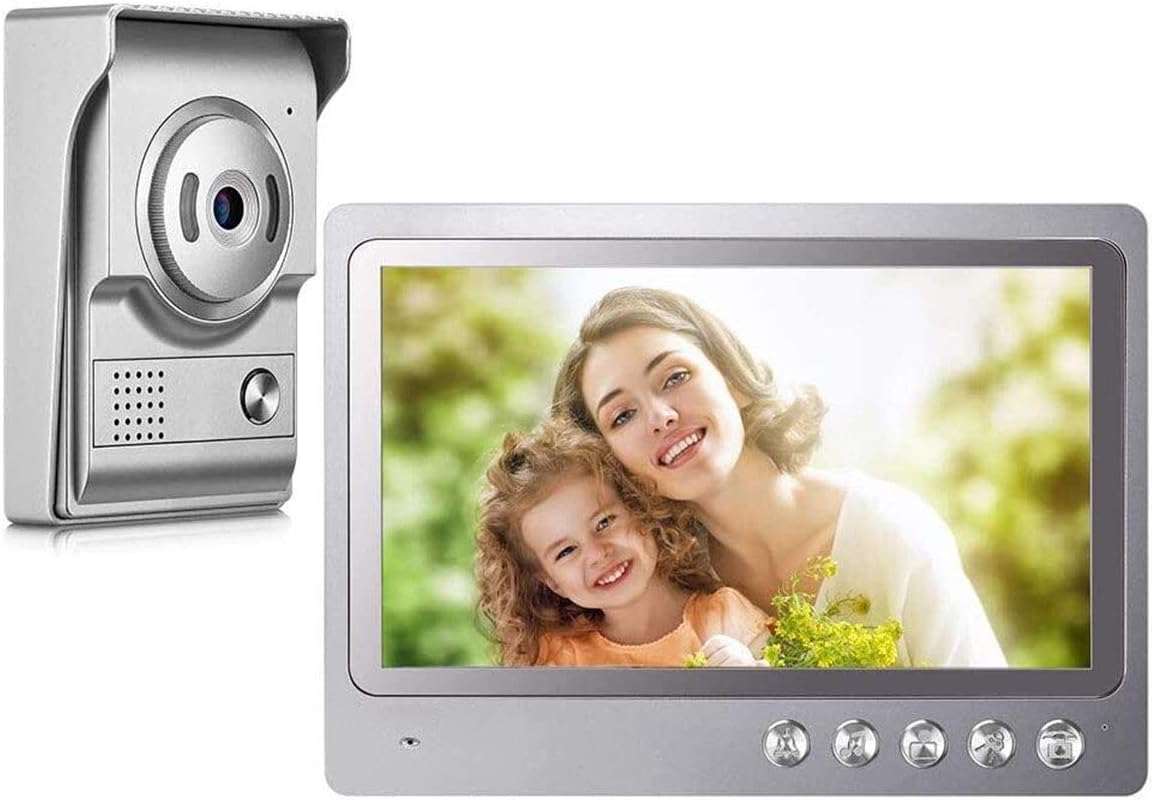
Figure 1.1: WOLILIWO 9-inch Video Intercom System components.
2. What's Included
The package typically includes the following items:
- 9-inch Indoor Monitor
- Outdoor Doorbell Unit with HD Camera
- Power Adapter (15V 1200mA)
- Rain Cover for Outdoor Unit
- Connection Terminal
- Mounting Screws and Hardware
- Standard White Test Cable (approx. 1.5 meters)

Figure 2.1: Example of two-way communication with the intercom system.
3. Key Features
- 9-inch Color Monitor: Provides a clear display of visitors at your door.
- HD Video Camera: Integrated into the doorbell unit for clear visual identification.
- Dual-Way Communication: Allows for clear audio interaction with visitors via loudspeaker and high-quality speakers.
- Wired Stability: Ensures a reliable connection and consistent performance.
- Night Vision: 700TVL IR night vision camera enables clear viewing even in low-light conditions.
- Remote Unlocking: Conveniently unlock doors directly from the indoor monitor.
- Durable Outdoor Unit: Waterproof and riot-resistant design with secure hexagonal screws to prevent tampering.
- Adjustable Settings: Intercom sound, screen brightness, and color can be adjusted on the monitor.

Figure 3.1: Indoor Monitor features and dimensions.

Figure 3.2: Outdoor Doorbell Unit features and dimensions.

Figure 3.3: Day and Night Vision capabilities of the doorbell camera.
4. Setup and Installation
The WOLILIWO Video Intercom System is designed for surface mounting and requires hole-punch wiring on the wall. It features an easy 4-wire setup. Please follow these steps carefully:
- Pre-Installation Test: Before permanent installation, use the provided standard white test cable (approx. 1.5 meters) to test the system's functionality. Ensure all components are working correctly.
- Wiring: Connect the outdoor doorbell unit to the indoor monitor using a 4-conductor cable or Cat6 cable. You may need to purchase extension cables depending on your wiring distance. The monitor requires separate power (15V 1200mA adapter included). It is recommended to install the monitor close to a power socket.
- Mounting: Securely mount the outdoor unit using the provided hexagonal screws to prevent theft. Mount the indoor monitor in a convenient location.
- Power Connection: Connect the power adapter to the indoor monitor and plug it into a power outlet.

Figure 4.1: Basic wiring diagram for the intercom system.
Video 4.1: This video demonstrates the easy connection process for the V90S L+ intercom system, including connecting the doorbell unit to the monitor and powering the system. It also shows initial testing of the doorbell and monitor functions, including volume adjustment and ringtone selection.
5. Operating Instructions
Once installed, operating your WOLILIWO Video Intercom System is straightforward:
- Receiving a Call: When a visitor presses the call button on the outdoor unit, the indoor monitor will display the camera feed and ring.
- Two-Way Communication: Press the 'Talk' button on the monitor to speak with your visitor. Press it again to end the conversation.
- Monitoring: Press the 'Monitor' button on the indoor unit to view the outdoor camera feed at any time, even without a visitor pressing the doorbell.
- Unlocking: If connected to an electronic lock, press the 'Unlock' button on the monitor to remotely open the door for your visitor.
- Volume and Ringtone Adjustment: Use the dedicated buttons on the monitor to adjust the ring volume and select from various ringtones. The intercom volume can also be adjusted.

Figure 5.1: Monitor interface showing key functions.

Figure 5.2: Adjusting ringtone and volume on the monitor.
6. Maintenance
To ensure the longevity and optimal performance of your intercom system, consider the following maintenance tips:
- Regularly clean the camera lens and monitor screen with a soft, dry cloth to remove dust and smudges.
- Ensure the outdoor unit's rain cover is clear of debris to maintain visibility.
- Check all wiring connections periodically to ensure they remain secure.
- Avoid exposing the indoor monitor to extreme temperatures or direct sunlight for prolonged periods.
7. Troubleshooting
If you encounter issues with your WOLILIWO Video Intercom System, refer to the following common problems and solutions:
| Problem | Possible Cause | Solution |
|---|---|---|
| No image on monitor when doorbell is pressed. | Loose wiring connection, power issue, camera malfunction. | Check all 4-wire connections between the doorbell and monitor. Ensure the monitor is powered. Test the system with the short test cable if possible. |
| No sound or distorted sound during intercom. | Volume too low, loose audio connection, microphone/speaker issue. | Adjust the intercom volume on the monitor. Check audio wiring connections. |
| Monitor screen turns off quickly or doesn't stay on. | Power saving settings, power supply issue. | Consult the full manual for specific monitor settings related to screen timeout. Ensure stable power supply. |
| Picture quality is blurry or unclear. | Dirty camera lens, poor lighting, monitor settings. | Clean the camera lens. Ensure adequate lighting for the outdoor unit. Adjust screen brightness and color settings on the monitor. |
| Doorbell rings on both ends (inside and outside). | This is a design feature of some intercom systems to confirm activation. | This is normal operation and not a malfunction. |
8. Specifications
| Feature | Specification |
|---|---|
| Model Number | V90S-L+ |
| Monitor Size | 9 inches |
| Video Capture Resolution | 700P |
| Connectivity Technology | Wired (RVV4 wires / CAT5 cable) |
| Power Source | Corded Electric (Input 110-240V, Output 15V 1200mA) |
| Night Vision Range | 1 Meters |
| Viewing Angle | 70 Degrees |
| Material | Aluminum alloy material + ABS plastic |
| International Protection Rating | IP44 |
| Item Dimensions (L x W x H) | 9.45 x 0.79 x 6.3 inches |
| Item Weight | 2.59 pounds |
9. Warranty and Support
WOLILIWO products come with a 1-year warranty. If you have any questions, require technical assistance, or experience any issues with your video intercom system, please do not hesitate to contact WOLILIWO customer support. Refer to the product packaging or the official WOLILIWO website for the most current contact information.
Ask a question about this manual
Ask about setup, troubleshooting, compatibility, parts, safety, or missing instructions. Manuals+ will review the question and use this page’s manual context to help answer it.