
JJC JJCJM
JJC JM-C Wireless Shutter Remote Control Instruction Manual
Model: JJCJM
Introduction
This manual provides detailed instructions for the setup, operation, and maintenance of your JJC JM-C Wireless Shutter Remote Control. Please read this manual thoroughly before using the product to ensure proper functionality and to prevent damage.
The JJC JM-C is a versatile wireless shutter remote control system designed for various Canon, Pentax, Samsung, and Contax cameras. It operates on a 433 MHz frequency, offering a control distance of up to 30 meters. The system includes a transmitter and a receiver, allowing for remote camera triggering with multiple shutter modes.
Product Overview
The JJC JM-C system consists of a transmitter and a receiver.

Image: The JJC JM-C Wireless Shutter Remote Control, showing both the transmitter (right) and the receiver (left).
Components
- Transmitter: The handheld unit used to send wireless signals to the receiver.
- Receiver: The unit that connects to the camera and receives signals from the transmitter.
- Connecting Cable: A cable to connect the receiver to the camera's remote port. (Specific cable for Canon RS-60E3 included with this model).
- Batteries: 1x 23A battery for the transmitter, 1x AAA alkaline battery for the receiver.
Transmitter and Receiver Layout
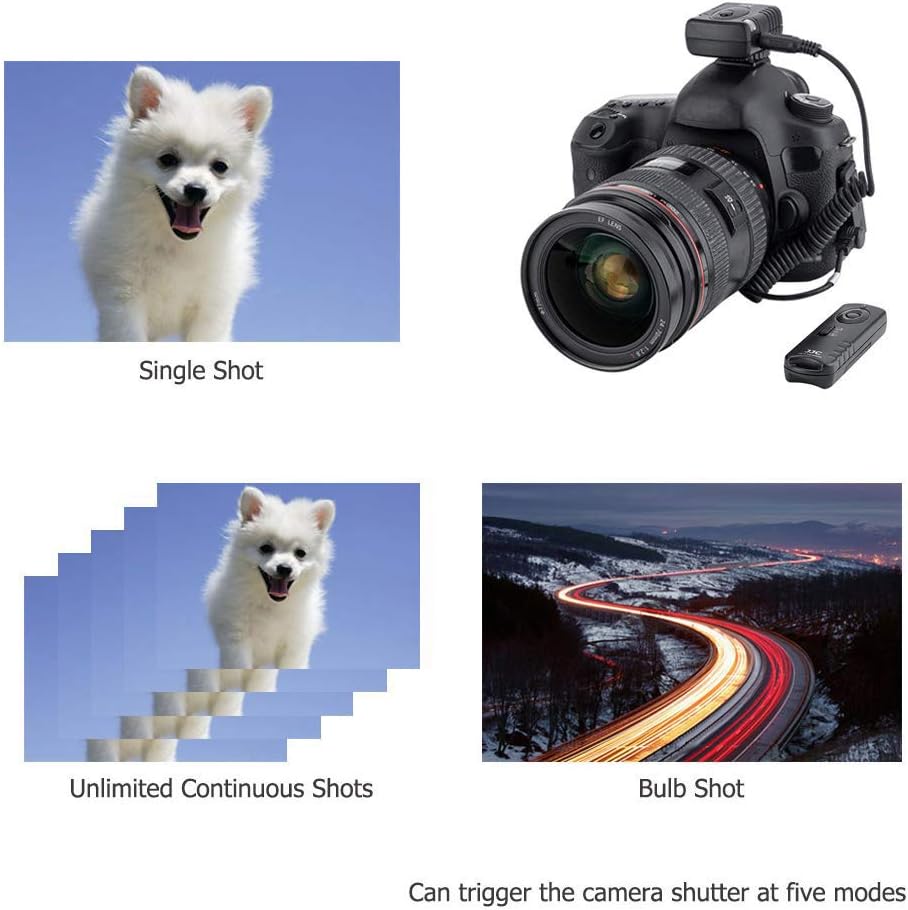
Image: Detailed diagram of the JM-C transmitter, highlighting the LED indicator, frequency switches, shutter button, battery cover, and function selector.
The transmitter features an LED indicator, frequency selection switches (1-4), a shutter button, a battery cover, and a function selector. The receiver has an ON/OFF switch and a connection port for the camera cable.
Setup
Battery Installation
- Transmitter: Open the battery cover on the back of the transmitter. Insert one 23A 12V battery, ensuring correct polarity. Close the cover securely.
- Receiver: Open the battery compartment on the receiver. Insert one AAA alkaline battery, observing correct polarity. Close the compartment.

Image: All components of the JJC JM-C kit, including the transmitter, receiver, connecting cable, and batteries.
Connecting to Camera
- Ensure your camera is turned off.
- Connect one end of the provided connecting cable (Canon RS-60E3 replacement) to the receiver's input port.
- Connect the other end of the cable to your camera's remote control terminal.
- Mount the receiver onto your camera's hot shoe or attach it to a tripod using the 1/4"-20 tripod socket on the receiver's base.
- Turn on the receiver using the ON/OFF switch.
- Turn on your camera.
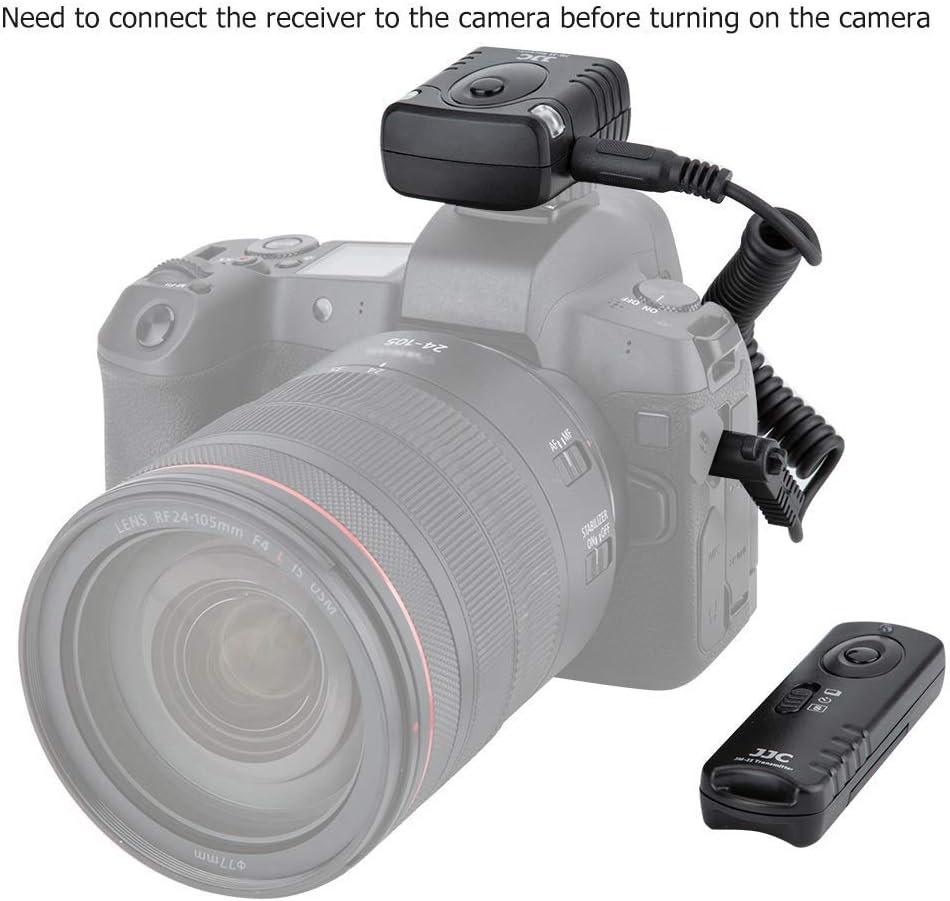
Image: The JM-C receiver connected to a camera via its cable, illustrating the proper connection before powering on the camera.
Setting Frequency Channels
Both the transmitter and receiver have frequency selection switches (1-4). For proper operation, ensure that the switches on both units are set to the same channel. This allows for multiple remote systems to operate in the same area without interference.
Operating Instructions
Shutter Modes
The JM-C remote offers five distinct shutter modes, selectable via the function selector on the transmitter:
- Single Shot: Press the shutter button fully to take one photo.
- 5-Second Delayed Shot: Activates a 5-second timer before taking a single photo.
- 3 Continuous Shots: Takes three consecutive photos with a single press.
- Unlimited Continuous Shots: Takes continuous photos as long as the shutter button is held down.
- Bulb Shot: Keeps the shutter open for as long as the shutter button is held down, ideal for long exposures.

Image: Visual representation of Single Shot, Unlimited Continuous Shots, and Bulb Shot modes, demonstrating the remote's capabilities.

Image: Visual representation of 3 Continuous Shots and 5 Seconds Delay Shot modes, further illustrating the remote's versatility.
Wireless Operation
The transmitter can trigger the receiver from a maximum distance of 30 meters (approximately 100 feet).

Image: A diagram illustrating the effective wireless range of the JM-C remote, indicating a distance of 100 feet (30 meters).
Wired Remote Functionality
The receiver unit, when connected to the camera via the cable, can also function as a wired remote switch. Press the button on the receiver halfway to focus, and fully to take a photo.
Multiple Receiver Control
One transmitter can trigger multiple receivers simultaneously, provided all receivers are set to the same frequency channel as the transmitter.
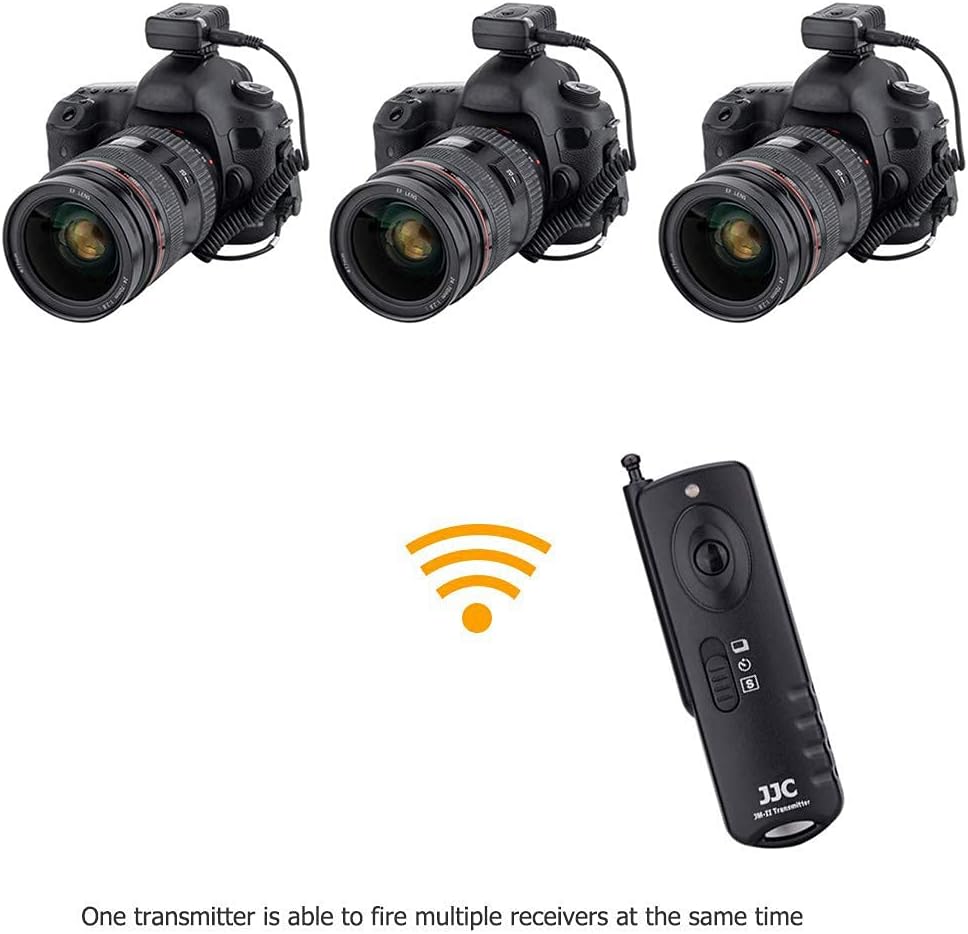
Image: An illustration demonstrating how a single JM-C transmitter can simultaneously trigger multiple cameras equipped with JM-C receivers.
Compatibility
This JM-C model is specifically designed to replace the Canon RS-60E3 remote switch and is compatible with a wide range of Canon EOS cameras. It can also be adapted for other camera brands by using different JJC shutter release cables (sold separately).
Compatible Canon EOS Cameras (with RS-60E3 replacement cable):

Image: A comprehensive table listing compatible camera models for the JJC JM-C remote, including Canon, Pentax, Samsung, and Contax.
| Brand | Models |
|---|---|
| Canon EOS | R10, R7, R, R6, RP, Ra, M5, M6, M6 Mark II, 60D, 60Da, 70D, 77D, 80D, 90D, 100D, 200D, 200D II, 250D, 300, 300D, 300V, 300X, 350D, 400D, 450D, 500D, 550D, 500N, 600D, 650D, 700D, 750D, 760D, 800D, 1000D, 1100D, 1200D, 1300D, 1500D, 3000 |
| Canon Powershot | G1X, G1X Mark II, G1X Mark III, G3 X, G5 X, G10, G11, G12, G16, SX50 HS, SX60 HS, SX70 HS |
| Canon EOS Film | 7, 7s, 30, 33, 50, 50E, 55, ELAN 7, ELAN 7N, ELAN 7NE, ELAN II, ELAN IIE, ELAN DATE |
| Pentax (with compatible JJC cable) | K-1, K-1 Mark II, K3, K-3 II, K5, K5II, K-5IIs, K7, K10D, K20D, K30, K50, K500, K100D, K100D Super, K110D, K200D, ist, ist D, ist Ds, ist DS2, ist DL, ist DL2, MZ-6, MZ-L, ZX-L, 645D, 645Z |
| Samsung (with compatible JJC cable) | GX-1L, GX-1S, GX-10, GX-20, NX5, NX10, NX100, N, N1, NX, N Digital |
| Contax (with compatible JJC cable) | LA-50 |
Maintenance
Cleaning
Wipe the units with a soft, dry cloth. Do not use harsh chemicals or abrasive cleaners. Keep the contact points of the cables clean and free of dust.
Storage
When not in use for extended periods, remove batteries from both the transmitter and receiver to prevent leakage and damage. Store the units in a cool, dry place, away from direct sunlight and extreme temperatures.
Battery Replacement
Replace batteries when the LED indicator on the transmitter becomes dim or the remote range decreases significantly. Always use fresh batteries of the specified type (23A for transmitter, AAA for receiver).
Troubleshooting
| Problem | Possible Cause | Solution |
|---|---|---|
| Remote does not trigger camera. |
|
|
| Reduced operating range. |
|
|
Specifications
- Model: JJC JM-C
- Operating Frequency: 433 MHz
- Channels: 16
- Max. Control Distance: Up to 30 meters (100 feet)
- Transmitter Power: 1x 23A 12V battery
- Receiver Power: 1x AAA alkaline battery
- Shutter Modes: Single Shot, 5-Second Delayed Shot, 3 Continuous Shots, Unlimited Continuous Shots, Bulb Shot
- Wired Remote Function: Yes (via receiver)
- Tripod Mount: 1/4"-20 socket on receiver
Warranty and Support
For warranty information and technical support, please refer to the manufacturer's official website or contact your retailer. Keep your purchase receipt as proof of purchase.
Manufacturer: Shenzhen JinJiaCheng Photography Equipment Co., Ltd.
Brand: JJC
Country of Origin: China
Ask a question about this manual
Ask about setup, troubleshooting, compatibility, parts, safety, or missing instructions. Manuals+ will review the question and use this page’s manual context to help answer it.