
1. Introduction
The Nutale Focus Smart Tracker is a compact and versatile device designed to help you keep track of your valuable items. Utilizing Bluetooth technology, it connects to your smartphone, allowing you to quickly locate misplaced belongings such as keys, wallets, phones, and even pets. Its small size and durable construction make it an ideal companion for daily use.
This manual provides comprehensive instructions on setting up, operating, and maintaining your Nutale Focus Smart Tracker to ensure optimal performance.

Figure 1.1: Nutale Focus Smart Tracker. This image shows the compact, square-shaped tracker in black, featuring a textured top surface and a small hole for attaching to keyrings or other items.
Video 1.1: Nutale Focus Product Display. This video provides a visual overview of the Nutale Focus Smart Tracker, showcasing its design and various features.
2. Setup
2.1 Initial Pairing with the Nut App
- Download the "Nut" app from your smartphone's app store.
- Ensure Bluetooth is enabled on your smartphone.
- Open the Nut app and follow the on-screen instructions to create an account or log in.
- To pair your Nutale Focus Smart Tracker, long-press the button on the device until it enters pairing mode (indicated by a sound or light cue).
- In the app, select the option to add a new device. The app will detect your tracker.
- Confirm the pairing within the app. You can then name your device (e.g., "Keys," "Wallet") and assign it to a category.
2.2 Attaching the Tracker
The Nutale Focus Smart Tracker comes with a keyring attachment for easy integration with your items. For items like wallets or remote controls, double-sided tape (not included) can be used to secure the tracker.

Figure 2.1: Versatile Attachment. This image illustrates various ways the Nutale Focus Smart Tracker can be attached to everyday items such as keys, cameras, wallets, and bags.
3. Operating Instructions
3.1 One-Touch Find Your Items
If you misplace an item with the Nutale Focus Smart Tracker attached, simply open the Nut app on your phone and select the corresponding device. Tap the "Call" button, and the tracker will emit a loud alarm, helping you pinpoint its location within Bluetooth range.

Figure 3.1: Find-it Mode. This image demonstrates how to use the Nut app's "Find-it Mode" to locate items like keys or a wallet by triggering an alarm on the tracker.
3.2 Smart Bidirectional Anti-Lost Alarm
The Nutale Focus Smart Tracker features a bidirectional anti-lost alarm. If your phone and the tracker become disconnected (i.e., move out of Bluetooth range), both your phone and the tracker will emit an alarm to notify you. This helps prevent leaving items behind.
- Typical Bluetooth range: 32-65ft indoors, 100-165ft in open spaces.

Figure 3.2: Anti-Lost Alarm in Action. This image shows the tracker on a set of keys on a door, with a phone displaying a disconnection alert, indicating the anti-lost alarm feature.

Figure 3.3: Anti-Lost Alarm Range. This diagram visually represents the effective indoor (up to 66 ft) and outdoor (up to 164 ft) range of the anti-lost alarm feature.
Video 3.1: How to use Alert Mode. This video demonstrates how to activate and utilize the alert mode feature on the Nutale Focus Smart Tracker, which notifies you when your device is out of range.
Video 3.2: Bidirectional Ring Alert. This video illustrates the bidirectional ringing feature, showing how both the tracker and your phone can alert you when they are separated.
3.3 Location Record Locator
The Nut app records the last connected location of your tracker. If an item goes missing, you can open the map within the app to view its last known position, helping you narrow down your search area.

Figure 3.4: Location Tracking. This image shows a smartphone displaying a map with a red pin indicating the last recorded location of the Nutale Focus Smart Tracker.
3.4 Sharing Functionality
You can share access to your Nutale Focus Smart Tracker with other users through the Nut app. This allows multiple individuals to track the same item, which is useful for shared belongings like car keys or family pets.
Video 3.3: How to use Sharing. This video demonstrates the process of sharing your Nutale Focus Smart Tracker's tracking capabilities with other users via the app.
4. Maintenance
4.1 Battery Replacement
The Nutale Focus Smart Tracker uses a replaceable CR2032 lithium metal battery. The app will notify you when the battery level is low. To replace the battery:
- Locate the small gap on the upper left corner of the device.
- Carefully open the upper shell at this gap using a thin tool (e.g., a guitar pick or small flathead screwdriver).
- Remove the old CR2032 battery.
- Insert a new CR2032 battery with the positive (+) pole facing up.
- Buckle the shell back into place, ensuring all four sides fit tightly.
- Long press the button to hear the boot up sound, confirming the device is powered on.

Figure 4.1: Battery Replacement Steps. This image provides a visual guide on how to open the tracker and replace the CR2032 battery.
Video 4.1: Replace the Focus Battery. This video provides a detailed demonstration of how to safely replace the battery in your Nutale Focus Smart Tracker.
4.2 Cleaning and Storage
To clean your tracker, wipe it with a soft, dry cloth. Avoid using harsh chemicals or abrasive materials. Store the device in a cool, dry place when not in use for extended periods.
5. Troubleshooting
- Device not connecting: Ensure Bluetooth is on, the device battery is not depleted, and the tracker is within range. Try restarting both the tracker and your phone.
- Alarm not sounding: Check the volume settings on your phone and ensure the tracker's sound is enabled in the app. Verify the device battery is not low.
- Inaccurate location: Location accuracy depends on Bluetooth signal strength and environmental factors. Ensure the app has location permissions enabled.
- Battery drains quickly: Ensure the device is not constantly out of range, which can cause frequent disconnections and increased battery usage.
6. Specifications
| Feature | Detail |
|---|---|
| Product Dimensions | 1.5 x 1.5 x 0.28 inches (1.57"L x 1.57"W x 0.31"Th) |
| Item Weight | 0.352 ounces |
| Model Number | F9X |
| Batteries | 1 Lithium Metal battery (CR2032) required (included) |
| Connectivity | Bluetooth |
| Color | Black |
| Material | Aluminum, Polycarbonate (PC) |
| Manufacturer | Nutale |
| Country of Origin | China |
| First Available | September 16, 2019 |
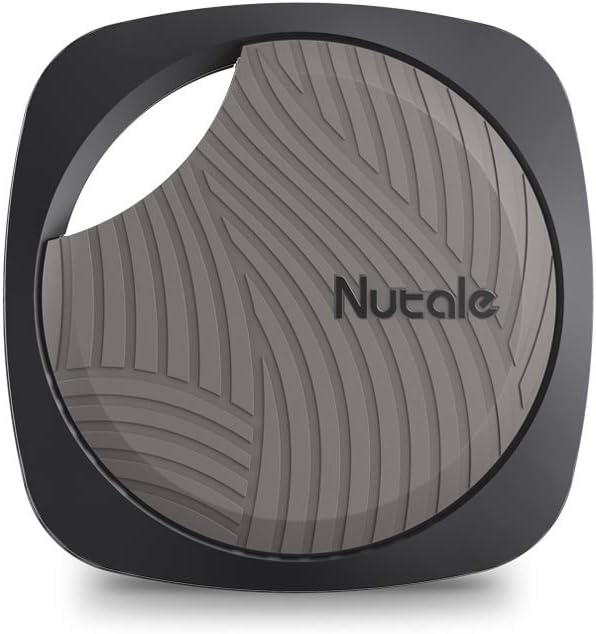
Figure 6.1: Compact Design and Sound. This image highlights the tracker's light weight (10g), precise dimensions, and superior sound volume (90dB+) compared to other devices.
7. Warranty and Support
Nutale is dedicated to providing premium products and impeccable customer care. For any inquiries, technical support, or warranty claims, please refer to the contact information provided with your product packaging or visit the official Nutale website.
Please retain your proof of purchase for warranty purposes.