
JJC SGM185II
JJC SGM185II Camera Shotgun Microphone User Manual
Model: SGM185II
Introduction
The JJC SGM185II is an ultracompact, battery-free shotgun microphone designed to significantly improve audio quality for video recording. It is compatible with most DSLR and mirrorless cameras, video cameras, cellphones, GoPro, DJI Osmo, audio recorders, tablets, and laptops equipped with a 3.5mm (1/8") TRS or TRRS audio microphone port. Its cardioid polar pattern focuses on sound directly in front of the microphone, reducing background noise for clear and crisp audio.

The JJC SGM185II Shotgun Microphone, a compact device for enhanced audio recording.
What's in the Box
Please verify that all the following items are included in your package:
- 1x Aluminum Construction Cardioid Microphone
- 1x Shock Mount
- 1x Furry Windscreen (Deadcat)
- 1x Foam Windscreen
- 1x Storage Case
- 1x 3.5mm TRS Audio Cable (for cameras, video cameras, GoPro, DJI, audio recorders)
- 1x 3.5mm TRRS Audio Cable (for select cell phones, tablets, laptops)

All components included in the JJC SGM185II microphone package: microphone, shock mount, windscreens, cables, and storage case.
Setup Guide
1. Attaching the Microphone to Your Device
The microphone comes with a shock mount that features a cold shoe adapter for easy attachment to cameras or smartphone rigs. The shock mount minimizes handling and vibration noise during recording.

The microphone's compact design, cardioid condenser, battery-free operation, cold shoe mount, and shock mount features.
Video demonstrating how to mount the JJC SGM185II microphone onto a camera's hot shoe and attach the foam windscreen.
2. Connecting to Cameras and Video Recorders (3.5mm TRS Cable)
Use the provided 3.5mm TRS (Tip-Ring-Sleeve, 3-pole) audio cable to connect the microphone to your camera, video camera, GoPro (with adapter), DJI (with adapter), or audio recorder. This cable is designed for devices with a dedicated microphone input.
- Connect one end of the 3.5mm TRS cable to the microphone's output port.
- Connect the other end of the 3.5mm TRS cable to the microphone input jack on your camera or recording device.
- Note for GoPro/DJI Action Cameras: A specific 3.5mm microphone adapter (not included) is required for these devices.

Illustration of connecting the microphone to a camera using the 3.5mm TRS audio cable.
3. Connecting to Smartphones, Tablets, and Laptops (3.5mm TRRS Cable)
Use the provided 3.5mm TRRS (Tip-Ring-Ring-Sleeve, 4-pole) audio cable for connecting the microphone to compatible smartphones, tablets, and laptops. This cable is designed for devices where the headphone and microphone share a single jack.
- Connect one end of the 3.5mm TRRS cable to the microphone's output port.
- Connect the other end of the 3.5mm TRRS cable to the headphone/microphone jack on your smartphone, tablet, or laptop.
- Note for iPhone (after iPhone 6) and Android Phones: A Lightning to 3.5mm headphone jack adapter or a USB-C to 3.5mm headphone jack adapter (not included) may be required.

Illustration of connecting the microphone to a smartphone using the 3.5mm TRRS audio cable.
4. Attaching Windscreens
The microphone includes both a foam windscreen and a furry windscreen (deadcat) to reduce wind noise, especially in outdoor environments.
- Slide the desired windscreen over the microphone capsule until it fits snugly.
- Use the foam windscreen for general indoor use or light breeze.
- Use the furry windscreen for outdoor recording in windy conditions to significantly reduce wind noise.
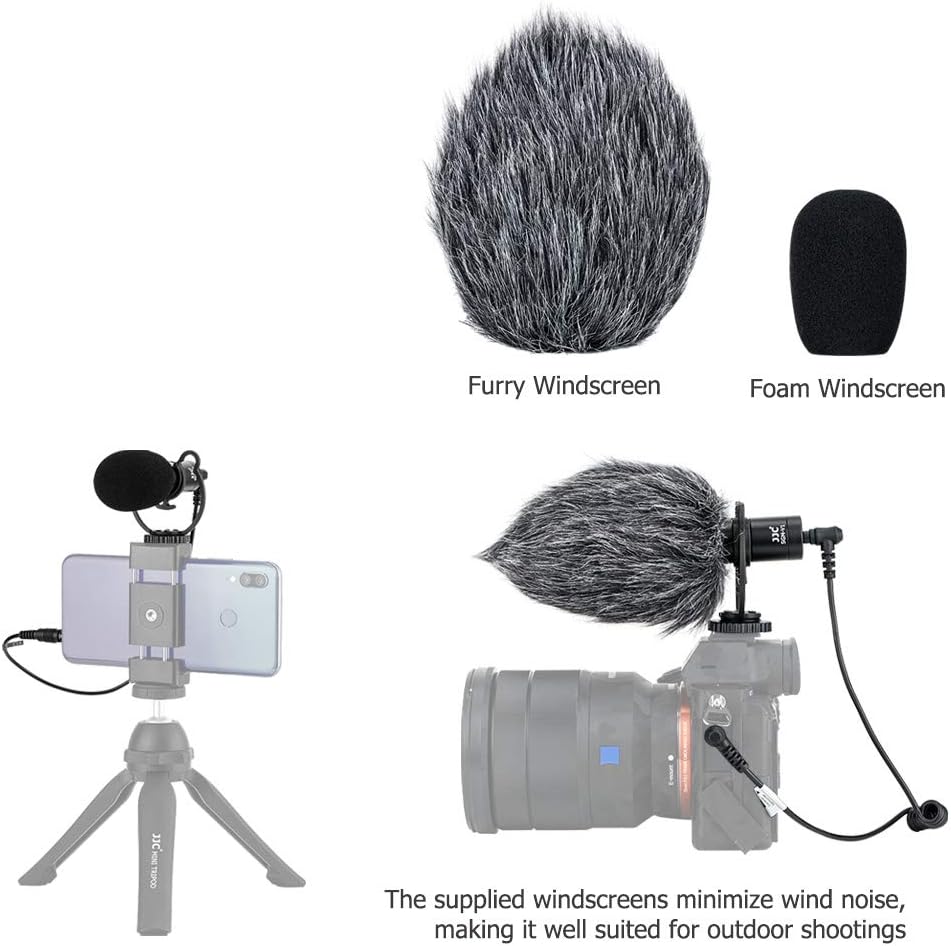
The microphone shown with both foam and furry windscreens, demonstrating their use for noise reduction.
Operating Instructions
Powering the Microphone
The JJC SGM185II microphone operates on plug-in power from your connected device. No external batteries are required for its operation. Simply connect it, and it will draw power from your camera or smartphone.
Cardioid Polar Pattern
This microphone features a cardioid polar pattern, meaning it is most sensitive to sounds coming from directly in front of it, while significantly reducing sounds from the sides and rear. This design is ideal for:
- Vlogging and Interviews: Focuses on the speaker's voice, minimizing ambient noise.
- Outdoor Events: Helps isolate desired audio from environmental distractions.
- General Video Recording: Improves clarity by reducing unwanted background sounds.
Ensure the front of the microphone (the end with the grille) is pointed directly at your sound source for optimal audio capture.
Audio Monitoring
If your recording device allows, always monitor your audio with headphones during recording to ensure proper levels and sound quality. Adjust your device's audio input levels as needed.
Maintenance
- Cleaning: Use a soft, dry cloth to clean the microphone body. Do not use liquid cleaners or solvents.
- Windscreens: The foam and furry windscreens can be gently cleaned with mild soap and water if they become dirty. Ensure they are completely dry before reattaching them to the microphone.
- Storage: When not in use, store the microphone and its accessories in the provided storage case to protect them from dust, moisture, and physical damage.
- Avoid Extreme Conditions: Do not expose the microphone to extreme temperatures, high humidity, or direct sunlight for extended periods.
Troubleshooting
No Audio or Low Audio Level
- Check Cable Connection: Ensure the correct 3.5mm cable (TRS for cameras, TRRS for smartphones/laptops) is securely connected to both the microphone and your recording device.
- Adapter Check: If using with GoPro, DJI action cameras, iPhones (after iPhone 6), or certain Android phones, confirm that the correct and functional adapter (e.g., Lightning to 3.5mm, USB-C to 3.5mm) is being used and is properly connected.
- Device Settings: Verify that your camera or smartphone's audio input settings are configured to use an external microphone. Adjust the input gain or volume if necessary.
- Microphone Orientation: Ensure the microphone is pointed directly at the sound source.
- Test with Another Device: If possible, test the microphone with a different compatible device to rule out issues with the original recording device.
Poor Audio Quality / Excessive Background Noise
- Windscreens: Ensure the appropriate windscreen (foam for light breeze, furry for strong wind) is correctly installed.
- Environment: Record in a quiet environment whenever possible. The cardioid pattern reduces, but does not eliminate, all background noise.
- Distance to Source: Position the microphone closer to the sound source for clearer audio and better isolation.
- Handling Noise: Ensure the microphone is securely mounted in its shock mount to minimize vibrations and handling noise.
Specifications
| Brand | JJC |
| Model Name | SGM185II |
| Connectivity Technology | Auxiliary |
| Connector Type | 3.5 mm Jack |
| Compatible Devices | Camera, Smartphone, Tablet |
| Color | Black |
| Polar Pattern | Cardioid (Unidirectional) |
| Audio Sensitivity | 76 dB |
| Microphone Form Factor | Shotgun |
| Power Source | No Battery Required (Plug-In Power) |
| Signal-to-Noise Ratio | 76 dB |
| Frequency Response | 35-18KHz +/-3dB |
| Dimension | 21 x 80 mm (0.82 x 3.15 inch) |
| Net Weight | 31 g (1.1 oz) |
| Enclosure Material | Aluminum |
Note: Some specifications may vary slightly based on source data.
Warranty and Support
For warranty information and technical support, please refer to the documentation included with your product or visit the official JJC website. You can also visit the JJC Store on Amazon for additional product information and contact options.
Ask a question about this manual
Ask about setup, troubleshooting, compatibility, parts, safety, or missing instructions. Manuals+ will review the question and use this page’s manual context to help answer it.