Introduction
This user manual provides detailed instructions for the operation and maintenance of your Radioddity PR-T1 PMR446 Two-Way Radio. The PR-T1 is a compact, lightweight, and license-free radio designed for both professional and personal use, offering reliable communication with 16 pre-programmed channels.

Figure 1: Radioddity PR-T1 Two-Way Radios (4-unit pack)
The image displays four black Radioddity PR-T1 two-way radios, each with an antenna, LCD screen, and control buttons, positioned on white display blocks. This illustrates the multi-unit package often available for the product.
Product Overview
Key Features
- PMR446 License-Free: Operates on PMR446 frequencies, requiring no license for use.
- 16 Pre-programmed Channels: Ready for immediate use with pre-set channels.
- Long Range Communication: Effective range up to 1.5-4 km, depending on terrain.
- Easy to Use: Simple Push-to-Talk (PTT) operation.
- Rechargeable 1500mAh Li-Ion Battery: Provides up to 12 hours of operation.
- USB Charging: Convenient 2-in-1 USB charging cable included.
- Multiple Functions: Includes FM radio, VOX (Voice Operated Exchange), voice prompt, and an integrated LED flashlight.
- 10 Call Tones: Variety of alert tones.
- Durable Design: Suitable for professional and recreational use.
Package Contents
Upon opening the package, verify that all items are present and in good condition:
- Radioddity PR-T1 Two-Way Radio Unit(s)
- 1500mAh Li-Ion Battery Pack(s)
- USB Charging Cable(s) (2-in-1)
- AC Charger(s)
- Lanyard(s)
- User Manual (this document)
Components and Controls
Familiarize yourself with the various parts and controls of your PR-T1 radio:

Figure 2: PR-T1 Radio Components
This image provides a close-up view of the Radioddity PR-T1 radio, highlighting key components such as the antenna, volume/power knob, PTT button, menu button, monitor button, FM button, up/down navigation buttons, and the USB charging port. It shows both front and side views with magnified insets of specific features.
- Antenna: For transmitting and receiving signals.
- Volume/Power Knob: Rotate to turn the radio on/off and adjust volume.
- PTT (Push-to-Talk) Button: Press and hold to transmit your voice.
- MENU Button: Accesses the radio's settings menu.
- MONI (Monitor) Button: Temporarily disables squelch to listen for weak signals.
- FM Button: Toggles the FM radio function.
- Up/Down Buttons: Navigate through menus and change channels.
- USB Charging Port: For connecting the USB charging cable.
- Accessory Jack: For connecting compatible audio accessories like earphones.
- LED Flashlight: Integrated light for illumination.
Setup
Battery Installation and Charging
The PR-T1 uses a rechargeable 1500mAh Li-Ion battery. Ensure the battery is fully charged before first use.

Figure 3: PR-T1 Battery Pack
This image shows the removable battery pack for the Radioddity PR-T1 radio, labeled "Radioddity BL-T8 Li-ion Battery". Text overlays indicate estimated battery life: 8 hours for heavy use, 12 hours for light use, and 24 hours for standby.
- Install Battery: Align the battery pack with the compartment on the back of the radio and slide it into place until it clicks securely.
- Charge Battery: Connect the USB charging cable to the radio's USB port and plug the other end into the AC charger or a compatible USB power source. The charging indicator light will show the charging status.
- Initial Charge: For optimal battery life, fully charge the battery for approximately 3-4 hours before the first use.
Powering On/Off
- To Power On: Rotate the Volume/Power knob clockwise until you hear a click and the display illuminates.
- To Power Off: Rotate the Volume/Power knob counter-clockwise until you hear a click and the display turns off.
Operating Instructions
Basic Communication
- Select Channel: Use the Up/Down buttons to select one of the 16 pre-programmed channels. Ensure all radios you wish to communicate with are on the same channel.
- Adjust Volume: Rotate the Volume/Power knob to adjust the listening volume.
- Transmit: Press and hold the PTT button firmly. Speak clearly into the microphone, holding the radio approximately 2-5 cm from your mouth. Release the PTT button to listen.
- Receive: When the PTT button is not pressed, the radio is in receive mode.
Advanced Functions
- Monitor Function (MONI): Press the MONI button to temporarily disable the squelch. This allows you to hear very weak signals or to check if a channel is clear before transmitting.
- FM Radio: Press the FM button to activate the built-in FM radio. Press it again to exit FM radio mode. The radio will automatically switch back to communication mode if a signal is detected on the current channel.
- VOX (Voice Operated Exchange): The VOX function allows you to transmit without pressing the PTT button, by simply speaking into the microphone. This feature can be enabled and adjusted via the MENU.
- LED Flashlight: The integrated LED flashlight can be activated for illumination, particularly useful in low-light conditions. Refer to the menu for activation.
- Call Tones: The radio supports 10 different call tones. These can be selected and sent to alert other users on the same channel.
Communication Range
The effective communication range of your PR-T1 radio varies significantly based on terrain, obstacles, and electromagnetic interference. The following estimates provide a general guideline:

Figure 4: Estimated Communication Range
This diagram visually represents the estimated communication range of the two-way radios in different environments: up to 6 miles between two mountain tops, 4 miles on flat open terrain, 3 miles in suburban locations and woods, and 1.5 miles in urban areas or inside buildings. This helps users understand expected performance in varied conditions.
- Up to 6 Miles: Between two mountain tops (line of sight).
- Up to 4 Miles: On flat, open terrain with minimal obstructions.
- Up to 3 Miles: In suburban locations and wooded areas.
- Up to 1.5 Miles: In urban areas or inside buildings with significant obstructions.
Maintenance
- Cleaning: Use a soft, damp cloth to clean the radio's surface. Do not use harsh chemicals or abrasive cleaners.
- Battery Care: To prolong battery life, avoid fully discharging the battery frequently. Recharge the battery when the low battery indicator appears. If storing the radio for an extended period, charge the battery to about 50% and remove it from the radio.
- Storage: Store the radio in a cool, dry place away from direct sunlight and extreme temperatures.
- Water Resistance: Note that the PR-T1 is not waterproof. Avoid exposing the radio to rain or moisture.
Troubleshooting
| Problem | Possible Cause | Solution |
|---|---|---|
| Radio does not power on. | Battery is dead or not installed correctly. | Ensure battery is properly installed. Charge the battery fully. |
| Cannot transmit or receive. | Incorrect channel selected; out of range; battery low. | Verify all radios are on the same channel. Move closer to the other radio. Recharge battery. |
| Poor audio quality or static. | Out of range; interference; low battery. | Move closer to the other radio. Avoid sources of interference. Recharge battery. |
| Battery life is shorter than expected. | Frequent heavy use; battery degradation over time. | Reduce transmission time. Ensure full charges. Consider replacing battery if very old. |
Specifications
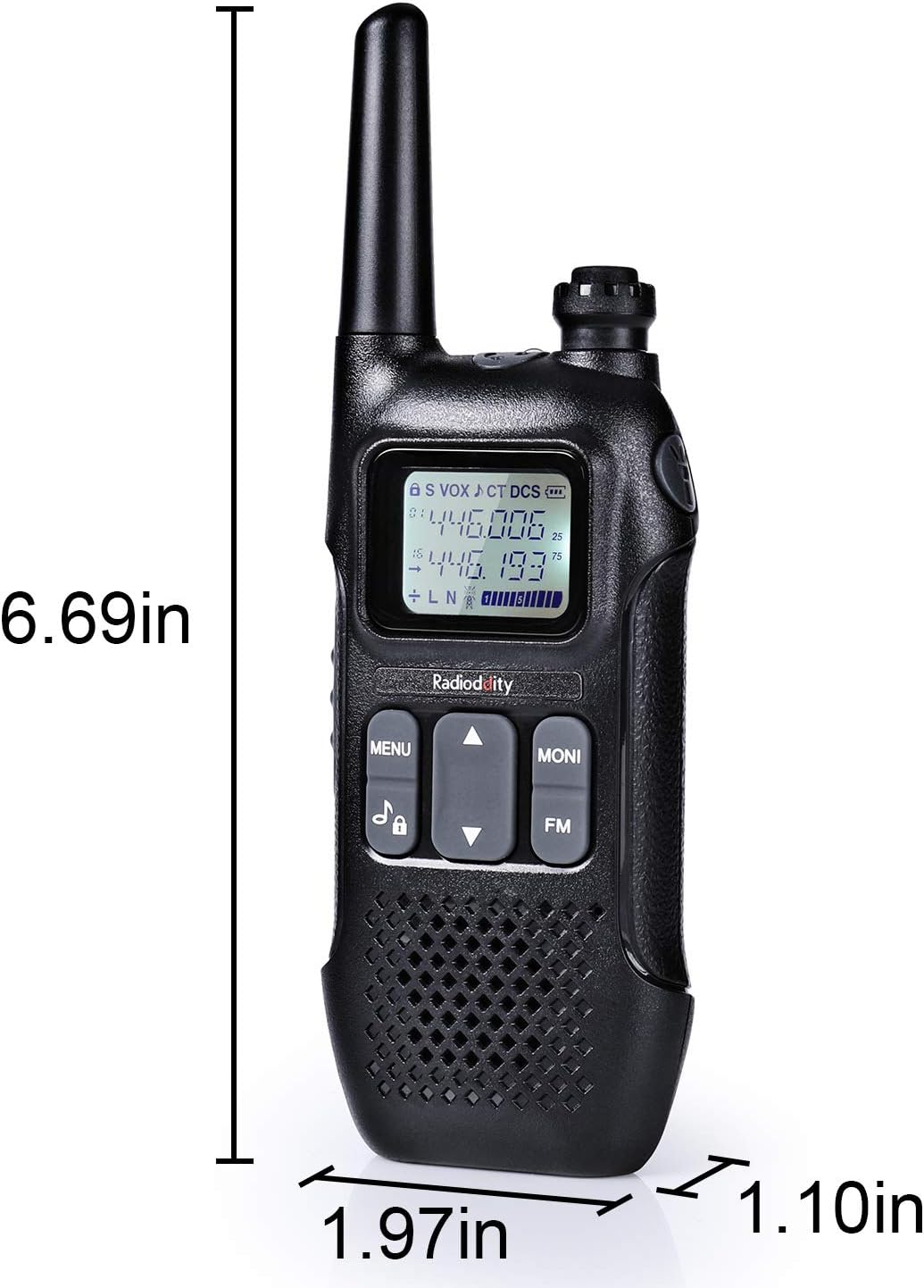
Figure 5: PR-T1 Radio Dimensions
This image displays the dimensions of the Radioddity PR-T1 two-way radio. The height is indicated as 6.69 inches, the width as 1.97 inches, and the depth as 1.10 inches, providing a clear understanding of the radio's physical size.
| Feature | Detail |
|---|---|
| Brand | Radioddity |
| Model Number | PR-T1 |
| Color | Black |
| Number of Channels | 16 |
| Frequency Range | 446.00625 MHz - 446.105 MHz (PMR446) |
| Maximum Range | Up to 4 Kilometers (terrain dependent) |
| Battery Type | Lithium-ion |
| Battery Capacity | 1500mAh |
| Special Features | FM Radio, VOX, Voice Prompt, LED Flashlight |
| Water Resistance Level | Not waterproof |
| Dimensions (Approx.) | Height: 6.69 in, Width: 1.97 in, Depth: 1.10 in |
Warranty and Support
Radioddity provides comprehensive support for its products.
- Manufacturer's Warranty: Your Radioddity PR-T1 comes with an 18-month manufacturer's warranty.
- Lifetime Support: Radioddity offers lifetime technical support for this product.
- Contact Support: For technical assistance, warranty claims, or general inquiries, please visit the official Radioddity website or contact their customer service department. Refer to the product packaging or official website for the most current contact information.


