
LEPOWER YY01A-WH
LEPOWER LED Motion Sensor Security Lights User Manual
Model: YY01A-WH | Brand: LEPOWER
Introduction
Thank you for choosing the LEPOWER LED Motion Sensor Security Light. This manual provides detailed instructions for the safe installation, operation, and maintenance of your new security light. Designed for outdoor use, this 30W, 3200LM, 5500K light features a 2-head motion detector and IP65 waterproof rating, making it ideal for garages, yards, and porches.

Figure 1: Front view of the LEPOWER LED Motion Sensor Security Light.
Safety Information
- Always turn off power at the circuit breaker before installation or servicing.
- Consult a qualified electrician if you are unsure about the installation process.
- Ensure all wiring connections are secure and comply with local electrical codes.
- Do not connect to a dimmer switch.
- This product is designed for outdoor use and is IP65 waterproof, but ensure proper sealing during installation to maintain water resistance.
- Do not look directly into the LED light source when illuminated, as it may cause eye strain or damage.
Package Contents
Please check the package to ensure all components are present:
- LEPOWER LED Motion Sensor Security Light (1 unit)
- Mounting Hardware (screws, wire nuts, gasket)
- Instruction Manual
Specifications
| Feature | Detail |
|---|---|
| Brand | LEPOWER |
| Model Number | YY01A-WH |
| Power Source | Hardwired |
| Wattage | 30 watts |
| Brightness | 3200 Lumens |
| Color Temperature | 5500K (Daylight White) |
| Motion Sensor Range | Up to 72 feet |
| Detection Angle | 180° |
| Adjustable Lighting Time | 10 seconds to 10 minutes (Max.) |
| Water Resistance | IP65 Waterproof |
| Material | Aluminum |
| Product Dimensions | 10.12"L x 4.51"W x 7.55"H |
| Certifications | ETL Certificated, FCC Listed |

Figure 2: Product dimensions for installation planning.
Setup and Installation
The LEPOWER security light is designed for easy wall mounting. Follow these general steps for installation:
- Prepare the Installation Area: Ensure the power is turned off at the circuit breaker. Choose a suitable outdoor location for wall mounting, such as a garage, porch, or yard, where the light can cover the desired area.
- Mount the Fixture: Securely attach the mounting bracket to the wall. Connect the light's wiring (live, neutral, ground) to your household wiring according to local electrical codes. Ensure a proper seal to maintain the IP65 waterproof rating.
- Adjust Light Heads and Sensor: The two LED light heads and the motion sensor head are adjustable. Position them to cover the desired detection and illumination areas.
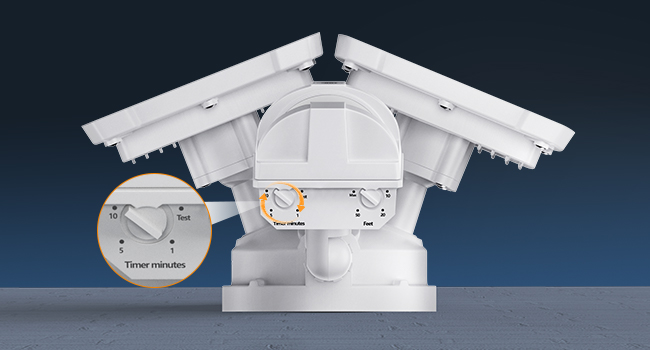
Figure 3: Illustration of the easy installation process for wall mounting.
Operating Instructions
Your LEPOWER security light is equipped with advanced features for optimal performance:
Motion Sensor Operation:
The integrated PIR motion sensor detects movement from humans, cars, or animals within a 72-foot range and a 180° detection angle. When motion is detected, the lights will activate automatically.

Figure 4: Visual representation of the motion sensor's wide detection area.
Adjusting Settings:
The motion sensor unit has stepless adjustable switches for both sensitivity (detection range) and lighting time. These dials are typically located on the underside of the sensor:
- Time Adjustment: Set the duration the light stays on after motion is detected, from 10 seconds to a maximum of 10 minutes.
- Sensitivity (Feet) Adjustment: Customize the sensing range from 0 to 72 feet.
- Test Mode: A 'Test' setting is available for initial setup to verify wiring and sensor function.
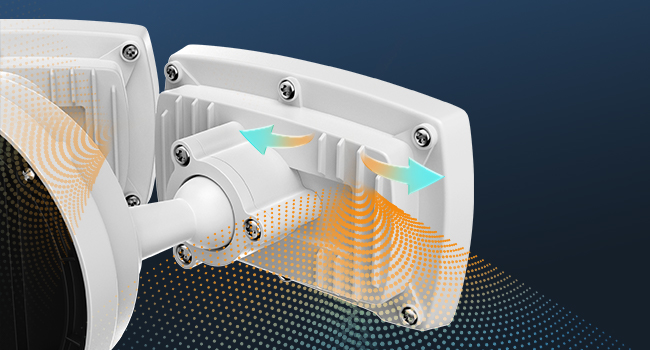
Figure 5: Detailed view of the adjustable dials for setting light duration and motion sensitivity.
Brightness and Efficiency:
The 30W LED lamp beads provide 3200 lumens of bright, 5500K daylight illumination. The optical designed filter lens ensures better light distribution and efficiency.

Figure 6: Internal components illustrating the LED bead and filter lens for optimal brightness.
Maintenance
- Cleaning: Periodically clean the light heads and motion sensor lens with a soft, damp cloth to remove dust and debris. Do not use abrasive cleaners.
- Inspection: Regularly inspect the wiring and mounting for any signs of wear, damage, or loosening. Ensure the IP65 waterproof seal remains intact.
- Heat Dissipation: The aluminum design provides excellent heat dissipation, contributing to the light's long lifespan of up to 50,000 hours. Ensure no obstructions block the heat sink areas.

Figure 7: The robust aluminum construction ensures durability and efficient heat management.

Figure 8: The IP65 waterproof rating ensures reliable operation in various weather conditions.
Troubleshooting
| Problem | Possible Cause | Solution |
|---|---|---|
| Light does not turn on. | No power, loose wiring, sensor blocked, incorrect settings. | Check circuit breaker. Verify wiring connections. Clear any obstructions from the sensor. Adjust sensitivity and time settings. |
| Light stays on continuously. | Continuous motion detected, sensor in 'Test' mode, wiring issue. | Ensure no constant motion in detection area. Switch sensor out of 'Test' mode. Recheck wiring. |
| Light flashes or flickers. | Unstable power, loose connection, faulty unit. | Check power supply stability. Tighten all connections. If problem persists, contact support. |
| Motion sensor not detecting. | Sensor sensitivity too low, sensor angle incorrect, obstructions. | Increase sensor sensitivity. Adjust sensor angle. Remove obstructions. |
Warranty and Support
This LEPOWER LED Motion Sensor Security Light comes with a 12-month warranty from the date of purchase. This warranty covers manufacturing defects and material flaws under normal use.
For technical support, warranty claims, or any questions regarding your product, please contact LEPOWER customer service through the retailer's platform or visit the official LEPOWER website for contact information.
Please retain your purchase receipt as proof of purchase for warranty purposes.
Related documentsYY01A-WH


Ask a question about this manual
Ask about setup, troubleshooting, compatibility, parts, safety, or missing instructions. Manuals+ will review the question and use this page’s manual context to help answer it.