
1. Introduction
This manual provides detailed instructions for the installation, operation, and maintenance of your LEPOWER LED Motion Sensor Security Light, Model YY02A-WH. This outdoor flood light is designed to provide bright, energy-efficient illumination with motion-sensing capabilities for enhanced security and convenience around your home, garage, yard, or porch.
2. Safety Information
- Professional Installation Recommended: For hard-wired electrical products, it is strongly recommended that installation be performed by a qualified electrician to ensure safety and compliance with local electrical codes.
- Power Disconnection: Always turn off the power at the circuit breaker before installing, servicing, or cleaning the fixture.
- Grounding: Ensure the fixture is properly grounded to prevent electrical shock.
- Outdoor Use: This fixture is rated IP65 waterproof, suitable for outdoor use and resistant to rain, sleet, and snow. However, ensure all connections are sealed properly during installation.
- Operating Voltage: This light operates on 120 Volts (AC). Verify your power supply matches this requirement.
3. Package Contents
Verify that all components are present before beginning installation:
- LEPOWER LED Motion Sensor Security Light Fixture
- User Manual
- Installation Screws
4. Product Features
- High Brightness & Energy Efficiency: Equipped with LED lamp beads, this 38W fixture produces up to 4200 lumens with a 5500K daylight color temperature. It saves over 80% on electricity compared to traditional 175W lights.
- Sensitive Motion Sensor: The integrated motion sensor detects movement from humans, cars, or animals up to 72 feet away within a 180° detection angle, providing reliable security.
- Adjustable Design: The three light heads and the motion sensor head can be independently adjusted to direct light and detection precisely where needed. The lighting time can be set from 10 seconds to a maximum of 10 minutes.
- Durable Aluminum Construction: The main body is constructed from aluminum, ensuring flexibility, durability, and excellent heat dissipation for a long lifespan.
- IP65 Waterproof Rating: Designed to withstand severe weather conditions, including rainstorms, sleet, and snow, making it ideal for various outdoor applications.
5. Specifications
| Brand | LEPOWER |
| Model Name | LED motion sensor security light |
| Item Model Number | YY02A-WH |
| Color | White |
| Material | Aluminum |
| Product Dimensions | 14.05"L x 5.38"W x 8.24"H |
| Indoor/Outdoor Usage | Outdoor |
| Power Source | Corded Electric (No Battery Powered) |
| Light Source Type | LED |
| Voltage | 120 Volts (AC) |
| Wattage | 38 watts |
| Brightness | 4200 Lumen |
| Color Temperature | 5500 Kelvin |
| Water Resistance Level | IP65 Waterproof |
| Certification | FCC Listed & ETL Listed |
6. Installation
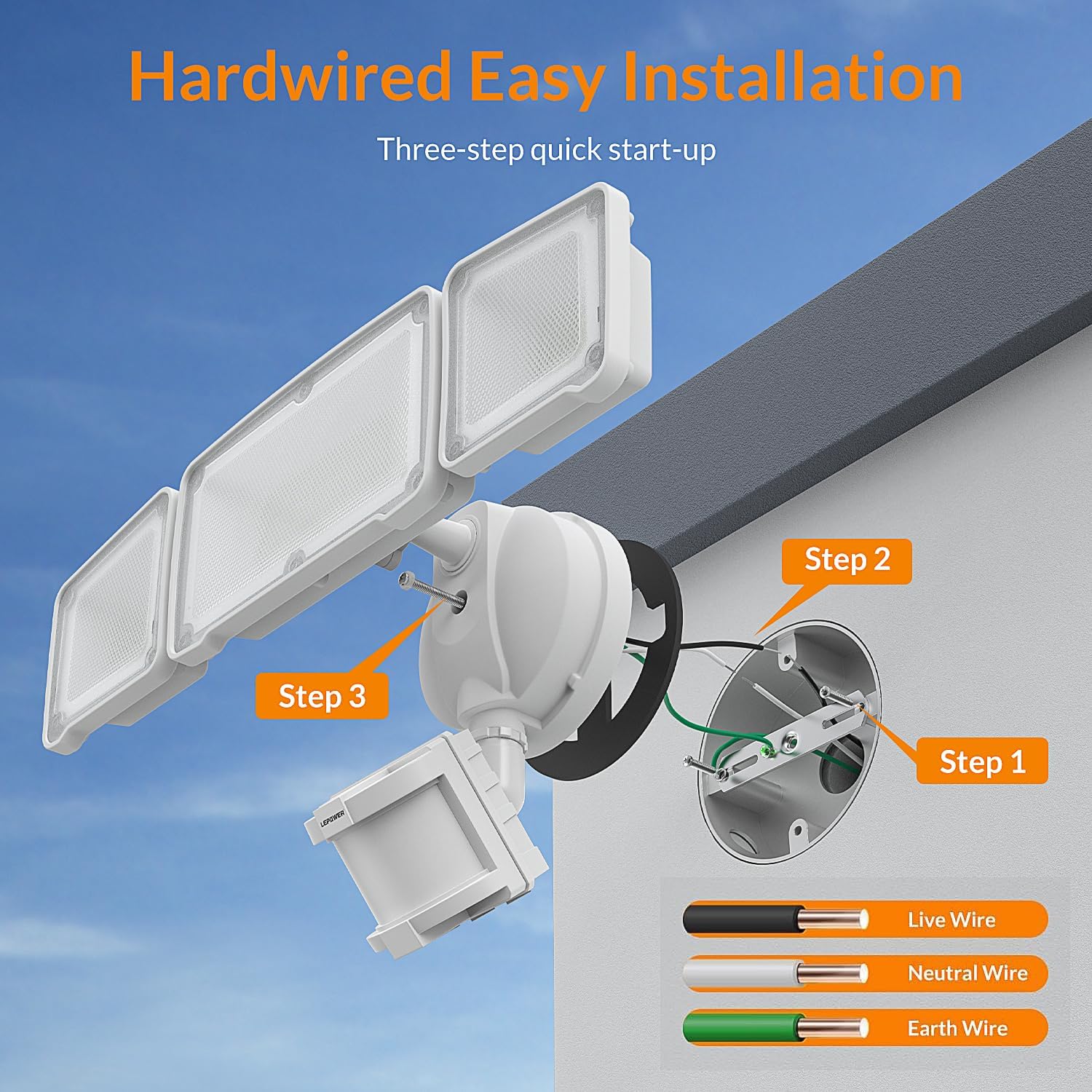
The LEPOWER LED Motion Sensor Security Light is designed for hard-wired installation. It is recommended to install the light at a height of 7.2 to 10.5 feet above the ground for optimal performance.
Installation Steps:
- Prepare the Mounting Surface: Ensure the electrical box is securely mounted and the power is turned off at the circuit breaker.
- Attach Crossbar: Secure the provided crossbar to your electrical junction box.
- Wiring Connections: Connect the wires from the fixture to your household wiring. Typically, the black wire from the fixture connects to the live wire (black), the white wire to the neutral wire (white), and the green wire to the ground wire (green or bare copper). Use wire nuts to secure connections.
- Mount the Fixture: Carefully align the fixture with the crossbar and secure it with the provided screws. Ensure the EVA gasket is properly positioned between the fixture and the mounting surface to prevent water seepage.
- Adjust Light Heads and Sensor: Once mounted, adjust the three light heads and the motion sensor to cover your desired areas.
The motion sensor head should face downwards for wall mount installations or horizontally for eave mount installations, as shown in the diagrams below, to ensure proper detection.



Installation Video:
7. Operation
After successful installation and power restoration, the light will enter a test mode or begin operation based on the sensor settings.
Adjusting the Motion Sensor:
The motion sensor has two adjustable dials:
- Timer Minutes: This dial controls how long the light remains on after motion is detected. Settings range from 10 seconds (Test mode) to 10 minutes.
- Feet: This dial adjusts the sensitivity and detection range of the motion sensor, from approximately 10 feet up to a maximum of 72 feet.
Adjust the light heads by manually tilting them to illuminate the desired areas. The motion sensor can also be tilted to optimize its detection area.


Operation Video:
8. Maintenance
Regular maintenance ensures optimal performance and longevity of your security light.
- Cleaning: Periodically clean the light heads and motion sensor lens with a soft, damp cloth to remove dirt, dust, or debris that may obstruct light output or sensor function. Do not use abrasive cleaners or solvents.
- Inspection: Annually inspect the wiring and mounting for any signs of wear, damage, or loose connections. Ensure the EVA gasket remains intact and provides a watertight seal.
- LED Lifespan: The LED lamp beads are designed for long-term use and do not require replacement.
9. Troubleshooting
If you encounter issues with your LEPOWER LED Motion Sensor Security Light, refer to the following common troubleshooting steps:
- Light Not Turning On:
- Check if the power is on at the circuit breaker.
- Verify all wiring connections are secure and correct.
- Ensure the motion sensor is not obstructed and its sensitivity settings are appropriate for the environment.
- Confirm it is dark enough for the light to activate (the sensor has a daylight/night detection feature).
- Light Stays On Continuously:
- Check the 'Timer Minutes' dial on the motion sensor; it might be set to a longer duration or in a continuous mode if available.
- Ensure there are no constant heat sources or movements within the sensor's detection range that could be continuously triggering it.
- The sensor might be faulty; contact customer support if other steps do not resolve the issue.
- Motion Sensor Too Sensitive/Not Sensitive Enough:
- Adjust the 'Feet' dial on the motion sensor to increase or decrease its detection range.
- Reposition the motion sensor head to optimize its field of view, avoiding areas with unwanted triggers (e.g., passing traffic, swaying trees).
10. Warranty and Support
This LEPOWER LED Motion Sensor Security Light comes with a 1-year warranty from the date of purchase. This warranty covers defects in materials and workmanship under normal use.
For warranty claims, technical support, or any questions regarding your product, please contact LEPOWER customer service. Keep your purchase receipt as proof of purchase.