Introduction
This user manual provides essential information for the proper setup, operation, and maintenance of your Leggett & Platt Adjustable Bed Replacement Remote. Please read this manual thoroughly before use to ensure correct functionality and to prevent damage.
Important Note: This remote is designed to replace specific Leggett & Platt adjustable bed remotes. It is crucial to match the buttons and shape of your old remote exactly. If you are unsure about compatibility, please contact the manufacturer with your bed's serial number.
Product Overview

Figure 1: Original Silver Remote (Example of older model)
This image displays an older model of the Leggett & Platt adjustable bed remote, featuring a silver casing and six distinct buttons for head and foot adjustments, a light function, and simultaneous head/foot movement.
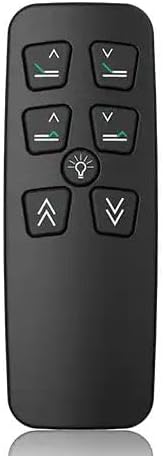
Figure 2: New Black Version Remote (Series 100 or T120)
This image shows the new black version of the Leggett & Platt adjustable bed remote, compatible with Series 100 or T120 models. It features a sleek black design with six clearly marked buttons for controlling bed positions and a light.
The replacement remote is designed to replicate the functionality of your original Leggett & Platt adjustable bed remote. It typically features buttons for adjusting the head and foot sections of the bed, a light control, and a button for simultaneous head and foot movement.
Setup and Pairing Instructions
Follow these steps carefully to pair your new replacement remote with your adjustable bed base. The process is generally quick and straightforward.
- Locate the Pairing Button: On your adjustable bed base, locate the pairing button. This button is usually found on the control box attached to the underside of the bed frame or near the power cord connection. It may be labeled "Pair," "Sync," or have a small icon.
- Press the Pairing Button: Press and hold the pairing button on the bed base for approximately 3-5 seconds until a light on the control box begins to flash or you hear a beep. This indicates the base is in pairing mode.
- Pair the Remote: Within 10 seconds of the base entering pairing mode, press and hold any button on your new replacement remote (e.g., the "Head Up" button) for 3-5 seconds.
- Confirmation: The light on the control box should stop flashing and become solid, or you may hear another beep, indicating successful pairing. Release the button on the remote.
- Test Functionality: Test all buttons on the remote to ensure proper operation of the head, foot, and other functions of your adjustable bed.
If pairing is unsuccessful, repeat the steps. Ensure the remote has a working battery. The remote typically comes with a battery pre-installed; do not attempt to open the battery compartment unless specifically instructed by the manufacturer.
Operating Instructions
Once paired, your remote is ready for use. The buttons on the remote control various functions of your adjustable bed.
- Head Up/Down: Use the HEAD UP (up arrow) and HEAD DOWN (down arrow) buttons to raise or lower the head section of your bed.
- Foot Up/Down: Use the FOOT UP (up arrow) and FOOT DOWN (down arrow) buttons to raise or lower the foot section of your bed.
- Light: Press the LIGHT (light bulb icon) button to turn the under-bed light on or off (if your bed base supports this feature).
- Both Up/Down: Press the BOTH UP (double up arrow) and BOTH DOWN (double down arrow) buttons to simultaneously raise or lower both the head and foot sections.
For optimal performance, ensure there are no obstructions under the bed base that could impede movement.
Maintenance
Proper care will extend the life of your remote control.
- Cleaning: Wipe the remote with a soft, dry cloth. Do not use liquid cleaners or abrasive materials.
- Battery Replacement: If the remote's response becomes sluggish or it stops working, the battery may need replacement. Refer to the specific instructions provided with your remote for battery type and replacement procedure. (Note: Some remotes, particularly older models, may not have user-replaceable batteries.)
- Storage: Store the remote in a dry place, away from extreme temperatures and direct sunlight.
Troubleshooting
| Problem | Possible Cause | Solution |
|---|---|---|
| Remote not responding |
|
|
| Bed moves erratically or not fully |
|
|
| Remote does not match old remote | Incorrect model purchased | Verify the model number and button layout against your original remote. Contact the seller for exchange or return if incorrect. |
If you continue to experience issues after attempting these troubleshooting steps, please contact customer support.
Specifications
- Model: Series 100 or T120 (Replacement Remote)
- Compatible Devices: Leggett & Platt Adjustable Bed Bases (Must match original remote's button layout and shape)
- Max Number of Supported Devices: 1 (per remote)
- Color: Black (New Version)
- Special Feature: Ergonomic design
- Power Source: Battery (type may vary, typically pre-installed)
Warranty Information
This product is typically covered by a limited warranty from the manufacturer or seller against defects in materials and workmanship. Warranty periods and terms may vary. Please retain your proof of purchase for warranty claims.
For specific warranty details, refer to the documentation included with your purchase or contact the seller directly. Damage resulting from misuse, accidents, or unauthorized modifications is generally not covered.
Customer Support
If you require further assistance or have questions not covered in this manual, please contact the seller or manufacturer directly. When contacting support, please have your product model number and, if possible, your bed base serial number ready.
Contact Information: Refer to the packaging or purchase documentation for the most current contact details.
You can also visit the product page on Amazon for additional information and customer reviews.


