
AMD 7252
AMD EPYC (2nd Gen) 7252 Octa-core Processor
User Instruction Manual
1. Product Overview
The AMD EPYC 7252 is a 2nd Generation Octa-core processor designed for demanding data center workloads, cloud computing, software-defined infrastructure, high-performance computing, and big data analytics. It delivers robust performance and efficiency, setting new standards for x86 server processors.

Figure 1: Top view of the AMD EPYC 7252 Processor, showcasing the integrated heat spreader with AMD EPYC branding.
2. Setup and Installation
Proper installation of the AMD EPYC 7252 processor is crucial for system stability and performance. This processor utilizes the LGA 4094 socket (SP3). Always refer to your motherboard's specific manual for detailed installation instructions.
2.1 Pre-Installation Checklist
- Ensure your motherboard supports the AMD EPYC 7252 processor and the SP3 socket type.
- Verify that your motherboard's BIOS/UEFI firmware is updated to support 2nd Gen EPYC processors.
- Gather necessary tools: thermal paste, CPU cooler compatible with SP3 socket, and anti-static wrist strap.
- Work in a clean, static-free environment.
2.2 Installation Steps
- Prepare the Motherboard: Open the CPU socket retention mechanism on the motherboard.
- Handle the Processor: Carefully remove the processor from its packaging. Hold it by the edges to avoid touching the contact pads.
- Align and Insert: Align the triangular marker on the processor with the corresponding marker on the socket. Gently lower the processor straight down into the socket. Do not force it.
- Secure the Processor: Close the socket retention mechanism to secure the processor in place.
- Apply Thermal Paste: Apply a small amount of high-quality thermal paste to the center of the processor's integrated heat spreader (IHS). Refer to the thermal paste manufacturer's instructions for application method.
- Install CPU Cooler: Mount the compatible SP3 CPU cooler according to its manufacturer's instructions. Ensure proper contact and pressure for optimal thermal transfer.
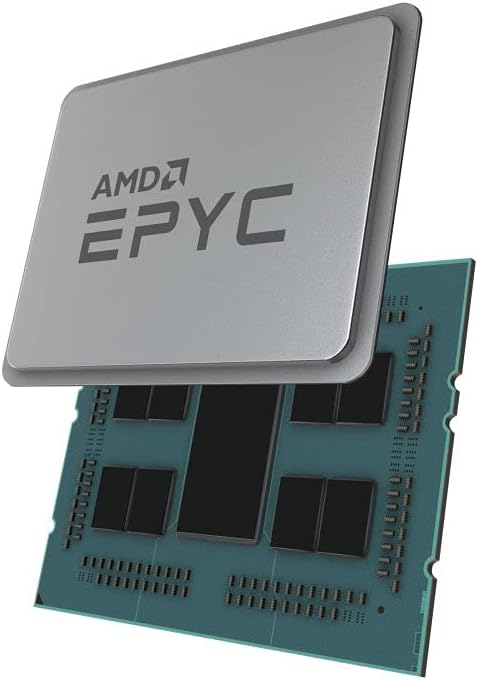
Figure 2: Exploded view of an AMD EPYC processor, illustrating the internal chiplet design beneath the integrated heat spreader. This view is for informational purposes and not part of user installation.
3. Operating Guidelines
Once installed, the AMD EPYC 7252 processor operates as the central processing unit of your server or workstation. Its 8 cores and 3.10 GHz base clock speed are designed to handle complex computational tasks efficiently.
3.1 System Performance
- The processor dynamically adjusts its clock speed based on workload and thermal conditions (Precision Boost 2).
- Ensure adequate system cooling and power supply to maintain optimal performance, especially under sustained heavy loads.
- Operating system and application performance will benefit from sufficient RAM and fast storage solutions.
3.2 Software and Drivers
While processors typically do not require specific drivers in the same way as graphics cards, ensuring your operating system and motherboard chipset drivers are up-to-date is essential for optimal compatibility and performance. Visit the AMD official website for the latest chipset drivers and software utilities.
4. Maintenance
Processors generally require minimal direct maintenance. However, maintaining the overall system environment is key to the longevity and stable operation of your AMD EPYC 7252.
- Dust Management: Regularly clean dust from inside the computer case, especially from CPU cooler fins and fans. Dust accumulation can impede airflow and lead to overheating.
- Thermal Paste: The thermal paste applied during installation typically lasts for several years. If you notice consistently high temperatures, consider reapplying thermal paste after carefully cleaning the old paste from the CPU and cooler.
- Environmental Conditions: Operate the system in a well-ventilated area with stable room temperature. Avoid extreme temperatures or humidity.
5. Troubleshooting
If you encounter issues with your system after installing the AMD EPYC 7252 processor, consider the following common troubleshooting steps:
- No Boot/No Display:
- Ensure the processor is correctly seated in the socket and the retention mechanism is fully closed.
- Verify all power cables (24-pin ATX, 8-pin EPS) are securely connected to the motherboard.
- Check RAM modules are properly seated in their slots.
- Confirm the CPU cooler is correctly installed and its fan is spinning.
- Reset CMOS (Clear Complementary Metal-Oxide-Semiconductor) on the motherboard.
- System Instability/Crashes:
- Monitor CPU temperatures using system monitoring software. Overheating can cause instability.
- Ensure adequate airflow within the computer case.
- Run memory diagnostic tools to check for RAM issues.
- Update motherboard BIOS/UEFI to the latest version.
- Poor Performance:
- Check CPU utilization in Task Manager (Windows) or system monitor (Linux).
- Ensure power settings in the operating system are set to "High Performance" or equivalent.
- Verify that the CPU cooler is making good contact and thermal paste is properly applied.
If issues persist, consult the motherboard manufacturer's support resources or AMD's official support channels.
6. Specifications
| Feature | Detail |
|---|---|
| Model | AMD EPYC 7252 |
| Cores/Threads | 8 Cores / 16 Threads |
| Base Clock Speed | 3.10 GHz |
| Socket Type | LGA 4094 (SP3) |
| Processor Generation | 2nd Gen AMD EPYC |
| Item Weight | 1.21 pounds (approx.) |
| Product Dimensions | 5 x 5 x 3 inches (packaging) |
| Package Quantity | 1 |
6.1 Key Features
- Designed for Cloud Computing, Software Defined Infrastructure, High Performance Computing, and Big Data Analytics.
- Part of the AMD EPYC™ Family of Processors, known for performance in modern data center workloads.
7. Warranty and Support
7.1 Warranty Information
Specific warranty terms and conditions for the AMD EPYC 7252 processor are provided by AMD. Please refer to the official AMD website or the documentation included with your retail package for the most accurate and up-to-date warranty details. Warranty coverage typically applies to manufacturing defects and does not cover damage due to improper installation, misuse, or accidents.
7.2 Technical Support
For technical assistance, driver downloads, and further product information, please visit the official AMD support website:
You may also find helpful resources and community forums on the AMD website.
Related documents7252


Ask a question about this manual
Ask about setup, troubleshooting, compatibility, parts, safety, or missing instructions. Manuals+ will review the question and use this page’s manual context to help answer it.