
Introduction
Welcome to the user manual for your KREAFUNK Aglow Bluetooth Speaker. This device combines a high-quality Bluetooth speaker with a versatile LED light, an alarm clock function, and a hands-free calling microphone. Designed for portability and functionality, the Aglow speaker enhances your audio experience while providing ambient lighting and practical features. Please read this manual carefully to ensure proper use and maintenance of your device.
Product Overview

Front view of the KREAFUNK Aglow speaker, showcasing its sleek design with a dark speaker grille and a white light diffuser, complete with a brown leather strap.

The KREAFUNK Aglow speaker with its integrated LED light illuminated, demonstrating its function as an ambient light source.

Top view of the KREAFUNK Aglow speaker, detailing the control buttons for power, volume, light, and alarm functions.
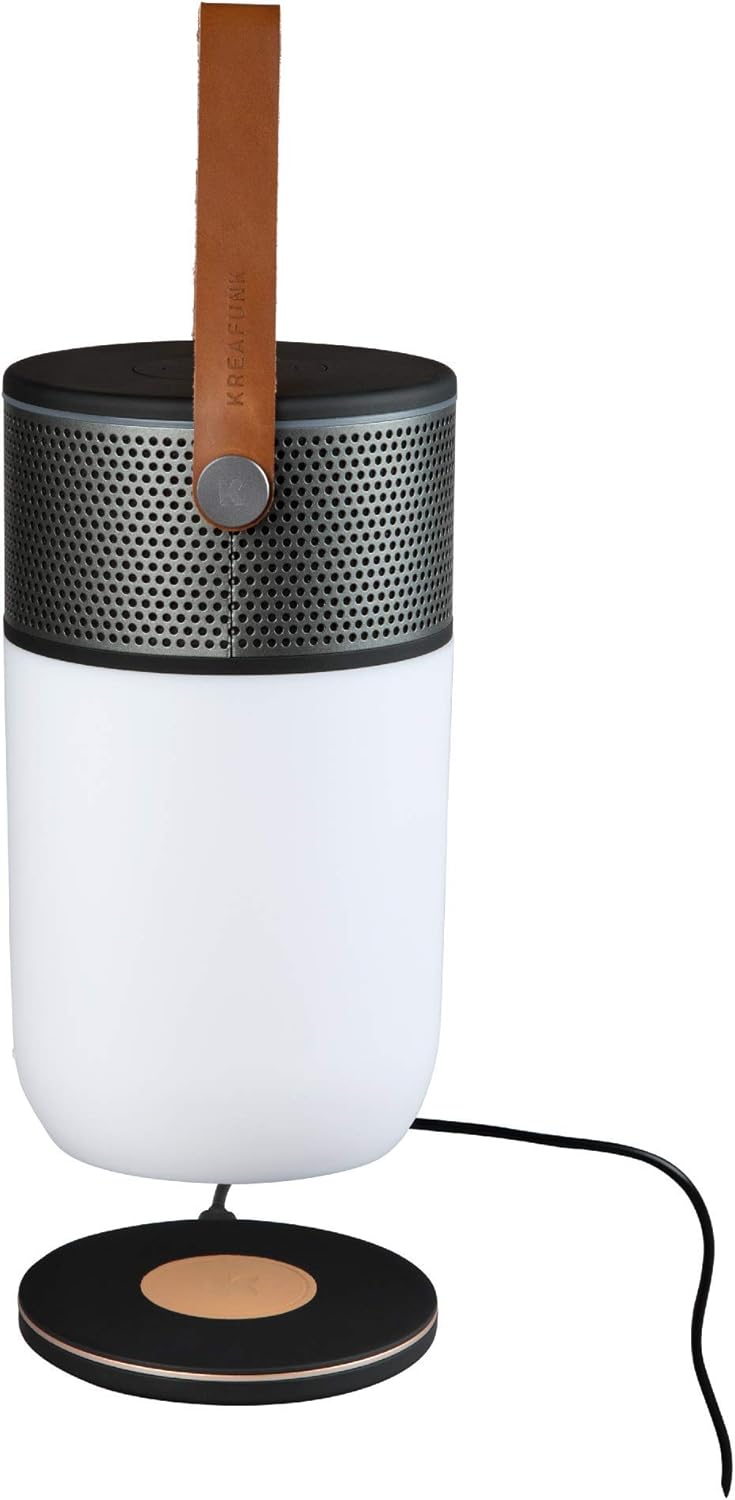
The KREAFUNK Aglow speaker placed on a wireless charging pad, illustrating its Qi-enabled charging capability.
Key Features:
- Bluetooth 4.2 Connectivity: Seamless wireless audio streaming.
- Integrated LED Light: Dimmable and color-controlled via app, functions as a flashlight or ambient light.
- Alarm Clock Function: Wake up to light and sound, controllable via app.
- True Wireless Stereo (TWS): Pair two Aglow speakers for an immersive stereo sound experience.
- Hands-free Calling: Built-in microphone for convenient phone calls.
- IP65 Water Resistance: Protected against dust and low-pressure water jets.
- Long Battery Life: Up to 10 hours of music playback or 20 hours of light.
- Qi Wireless Charging: Supports wireless charging for convenience.
Setup
1. Charging the Device
Before first use, fully charge your KREAFUNK Aglow speaker.
- Via USB Cable: Connect the included USB cable to the speaker's charging port and to a USB power adapter (not included) or a computer USB port.
- Via Wireless Charging: Place the Aglow speaker on a Qi-compatible wireless charging pad. Ensure the speaker is centered on the pad for optimal charging.
The charging indicator light will show the charging status. A full charge provides approximately 10 hours of music playback or 20 hours of light.
2. Powering On/Off
- To Power On: Press and hold the power button (usually located on the top panel) until you hear an audible prompt or see the indicator light illuminate.
- To Power Off: Press and hold the power button again until the device powers down.
Operating Instructions
1. Bluetooth Pairing
- Ensure the Aglow speaker is powered on and in pairing mode (indicated by a blinking LED light). If not, press and hold the Bluetooth button.
- On your mobile device, navigate to the Bluetooth settings.
- Select "KREAFUNK Aglow" from the list of available devices.
- Once paired, the speaker will provide an audible confirmation, and the LED indicator will stop blinking.
The speaker will automatically attempt to reconnect to the last paired device when powered on.
2. Music Playback
- Play/Pause: Press the Play/Pause button on the speaker or control from your connected device.
- Volume Control: Use the '+' and '-' buttons on the speaker or your connected device to adjust volume.
- Skip Track: Use the forward/backward buttons on the speaker to skip tracks.
- Line-In Connection: For non-Bluetooth devices, connect using the included Line-In cable to the AUX port.
3. LED Light Control
- Turn Light On/Off: Press the light button on the speaker.
- Adjust Brightness (Dimming): Press and hold the light button to cycle through brightness levels.
- Color Control: Use the dedicated KREAFUNK app to change LED light colors and modes.
4. Alarm Clock Function
The alarm clock function is primarily controlled via the KREAFUNK mobile application.
- Download and install the KREAFUNK app from your device's app store.
- Connect your Aglow speaker to the app via Bluetooth.
- Follow the in-app instructions to set alarms, customize alarm sounds, and configure light-based wake-up routines.
5. True Wireless Stereo (TWS) Pairing
To achieve true stereo sound, you can pair two KREAFUNK Aglow speakers together.
- Ensure both Aglow speakers are powered on and not connected to any other Bluetooth device.
- On one speaker (this will be the primary speaker), press and hold the TWS pairing button (refer to the button layout diagram in the app or quick start guide).
- The primary speaker will search for the secondary speaker.
- Once connected, both speakers will provide an audible confirmation, and their LED indicators will synchronize.
- Now, connect your mobile device to the primary speaker via Bluetooth as described in "Bluetooth Pairing". Audio will play through both speakers in stereo.
6. Hands-free Calling
- Answer Call: When a call comes in, press the Play/Pause button to answer.
- End Call: During a call, press the Play/Pause button to end the call.
- Reject Call: Press and hold the Play/Pause button to reject an incoming call.
- Redial Last Number: Double-press the Play/Pause button to redial the last number.
Maintenance
- Cleaning: Wipe the speaker with a soft, damp cloth. Do not use abrasive cleaners or solvents.
- Storage: Store the speaker in a cool, dry place when not in use for extended periods.
- Battery Care: To prolong battery life, avoid fully discharging the battery frequently. Charge the device regularly, even if not in use.
- Water Resistance: While IP65 rated, avoid submerging the speaker in water. Ensure all ports are securely closed before exposure to water.
Troubleshooting
| Problem | Possible Cause | Solution |
|---|---|---|
| Speaker does not power on. | Low battery. | Charge the speaker fully. |
| Cannot pair via Bluetooth. | Speaker not in pairing mode; device too far; previously paired device connected. | Ensure speaker is in pairing mode. Move device closer. Disconnect from other devices. |
| No sound. | Volume too low; incorrect input source; speaker not connected. | Increase volume. Check if connected via Bluetooth or Line-In. Re-pair if necessary. |
| LED light not working. | Light function off; low battery. | Press the light button. Charge the speaker. |
| TWS pairing fails. | Speakers too far apart; one speaker already paired to a device. | Ensure speakers are close. Disconnect both speakers from any other Bluetooth devices before TWS pairing. |
Specifications
| Brand | KREAFUNK |
| Model Number | Kfcd33 |
| Model Name | 18068 |
| Dimensions | 18 x 18 x 27 cm (7.1 x 7.1 x 10.6 inches) |
| Weight | 1.11 Kilograms (2.45 lbs) |
| Speaker Output | 5W x 2 |
| Connectivity Technology | Bluetooth 4.2 |
| Audio Output Mode | Stereo |
| Battery Capacity | 4400 mAh Lithium battery |
| Playback Time | Up to 10 hours (music) |
| Light Duration | Up to 20 hours (light only) |
| Water Resistance | IP65 |
| Material | Metal |
| Special Features | Waterproof, Bluetooth, Alarm Clock, Flashlight, Hands-free Calling, TWS, Qi Wireless Charging |
What's in the Box
- 1 x KREAFUNK aGLOW Multifunctional BT-Speaker (Black/Gun Metal)
- 1 x USB Charging Cable
- 1 x Line-In Cable

The KREAFUNK Aglow speaker shown alongside its product packaging, indicating the contents of the box.
Warranty and Support
For warranty information and customer support, please refer to the official KREAFUNK website or contact your retailer. Keep your proof of purchase for warranty claims.
For further assistance or technical inquiries, please visit the KREAFUNK Store on Amazon or their official support channels.