
1. Introduction
This manual provides instructions for the proper setup, operation, and maintenance of your Hotsmtbang RC-762M replacement remote control. This remote is designed to be compatible with various Onkyo DVD Home Theater Systems, including models HT-R538, HT-S3305, HT-S3305B, HT-S3400, and HT-RC230. Please read this manual thoroughly before use to ensure optimal performance and longevity of your device.
2. Safety Information
- Do not mix old and new batteries.
- Do not mix alkaline, standard (carbon-zinc), or rechargeable (nickel-cadmium) batteries.
- Always remove exhausted batteries promptly to prevent leakage and damage to the remote control.
- If the remote control will not be used for an extended period, remove the batteries to prevent potential damage from battery leakage.
- Keep batteries out of reach of children.
3. Package Contents
Please check the package contents upon receipt. The package should contain the following items:
- 1 x Hotsmtbang RC-762M Replacement Remote Control
Note: Batteries are not included and must be purchased separately. No additional instructions are included in the package as this manual serves that purpose.
4. Setup: Battery Installation
The Hotsmtbang RC-762M remote control requires two (2) AA alkaline batteries for operation. Follow these steps to install the batteries:
- Locate the battery compartment on the back of the remote control.
- Press down on the tab and slide the battery compartment cover downwards to remove it.
- Insert two new AA alkaline batteries into the compartment, ensuring that the positive (+) and negative (-) terminals align correctly with the markings inside the compartment.
- Slide the battery compartment cover back into place until it clicks securely.
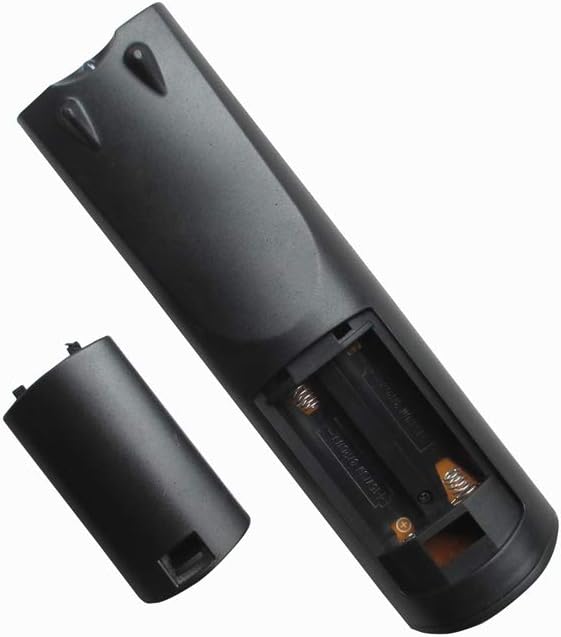
Image: Rear view of the remote control with the battery cover open, revealing the battery slots.

Image: Rear view of the remote control with the battery cover closed.
Once batteries are installed, the remote control is ready for use. No programming is required.
5. Operating Instructions
This replacement remote control is pre-programmed and requires no additional setup or code entry. Simply point the remote control towards your Onkyo DVD Home Theater System and press the desired function button.

Image: Front view of the remote control.
- Ensure there are no obstructions between the remote control and the Onkyo system's infrared receiver.
- Operate the remote within a reasonable distance from the Onkyo system.
6. Maintenance
- Cleaning: Wipe the remote control with a soft, dry cloth. Do not use liquid cleaners or abrasive materials.
- Battery Replacement: Replace batteries when the remote control's response becomes sluggish or stops working. Always replace both batteries at the same time.
- Storage: Store the remote control in a cool, dry place away from direct sunlight and extreme temperatures.
7. Troubleshooting
| Problem | Possible Cause | Solution |
|---|---|---|
| Remote control is not working. |
|
|
| Buttons are unresponsive or sticky. | Dirt or debris under buttons. | Clean the remote control with a soft, dry cloth. Avoid liquids. |
8. Specifications
| Feature | Detail |
|---|---|
| Brand | Hotsmtbang |
| Model Number | RC-762M |
| Compatible Devices | Onkyo Home Theater Systems (HT-R538, HT-S3305, HT-S3305B, HT-S3400, HT-RC230) |
| Controller Type | Button Control |
| Special Feature | No Programming Required |
| Number of Batteries | 2 |
| Battery Type | AA Alkaline |
9. Warranty and Support
Specific warranty information for this Hotsmtbang replacement remote control is not provided within the product details. For any warranty claims, technical support, or further inquiries, please contact the seller or retailer from whom you purchased the product directly. They will be able to provide the most accurate and up-to-date information regarding your purchase.
