
xingzhihua SAM-918
Contents
SAM-918 Universal Remote Control User Manual
Model: SAM-918 | Brand: xingzhihua
Introduction
This manual provides instructions for the SAM-918 Universal Remote Control, designed as a replacement for various Samsung TV models, including those compatible with AA59-00581A and AA59-00638A remote controls. This remote is preprogrammed and requires no complex setup; it functions out of the box once batteries are installed. It supports LCD and LED TV functions, including dedicated buttons for Netflix and Amazon streaming services.
Important Note: While designed for broad compatibility, it is crucial to verify that this remote's button layout and functions align with your original remote control or TV model for optimal performance. This remote is not universally compatible with all TV brands or models.
Package Contents
- 1 x SAM-918 Universal Remote Control
- (Batteries are not included)
Setup and Battery Installation
The SAM-918 remote control is preprogrammed and does not require any manual setup or code entry. Simply install the batteries, and it will be ready for use.
Battery Installation:
- Locate the battery compartment cover on the back of the remote control.
- Slide the cover downwards or press the latch (if present) to open the compartment.
- Insert two (2) AAA batteries, ensuring the positive (+) and negative (-) terminals align correctly with the markings inside the compartment.
- Slide the battery compartment cover back into place until it clicks securely.
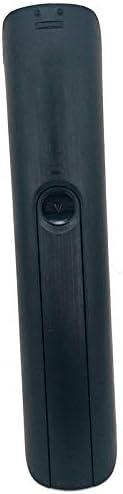
Image: Back of the SAM-918 remote control, illustrating the battery compartment location.
Operating Instructions
The SAM-918 remote control provides direct access to common TV functions and dedicated streaming service buttons. Ensure there is a clear line of sight between the remote and your TV's infrared sensor.

Image: Front view of the SAM-918 remote control, displaying all functional buttons.
Key Button Functions:
- Power (●): Turns the TV on or off.
- Source: Cycles through input sources (HDMI, AV, TV, etc.).
- Number Pad (0-9): Direct channel selection.
- Volume (+/-): Adjusts the TV volume.
- Channel (P +/-): Changes TV channels.
- Mute: Mutes or unmutes the TV audio.
- Menu/Tools: Accesses the TV's main menu or quick settings.
- Navigation Buttons (Up, Down, Left, Right, Enter): Used to navigate menus and select options.
- Return/Exit: Goes back to the previous screen or exits the current menu.
- Netflix: Direct access button for the Netflix streaming application.
- Amazon: Direct access button for the Amazon Prime Video streaming application.
- Color Buttons (Red, Green, Yellow, Blue): Functionality varies by TV model and application; often used for specific menu options or interactive features.
Maintenance
To ensure the longevity and proper functioning of your SAM-918 remote control, follow these maintenance guidelines:
- Cleaning: Wipe the remote control with a soft, dry cloth. For stubborn dirt, slightly dampen the cloth with water or a mild, non-abrasive cleaner. Do not use harsh chemicals or immerse the remote in water.
- Battery Replacement: Replace batteries when the remote's response becomes sluggish or stops working. Always replace both batteries at the same time with new AAA batteries. Do not mix old and new batteries, or different types of batteries.
- Storage: If the remote will not be used for an extended period, remove the batteries to prevent leakage and potential damage to the remote. Store in a cool, dry place.
- Avoid Drops: Protect the remote from physical impact, as drops can damage internal components.
Troubleshooting
If you experience issues with your SAM-918 remote control, try the following troubleshooting steps:
- Remote Not Responding:
- Check if the batteries are inserted correctly with the correct polarity (+/-).
- Replace the batteries with fresh AAA batteries.
- Ensure there are no obstructions between the remote control and the TV's infrared sensor.
- Point the remote directly at the TV's sensor.
- Certain Buttons Not Working:
- This remote is designed to be compatible with specific Samsung models. Some advanced or unique functions of your original remote might not be replicated.
- Ensure the TV is powered on and not in a menu or mode that restricts button functionality.
- Remote Works Intermittently:
- This often indicates low battery power. Replace the batteries.
- Check for strong light sources (like direct sunlight or bright fluorescent lights) that might interfere with the infrared signal.
Specifications
| Feature | Detail |
|---|---|
| Model | SAM-918 |
| Brand | xingzhihua |
| Compatible with | Samsung TV models (e.g., AA59-00581A, AA59-00638A) |
| Connectivity Technology | Infrared (IR) |
| Power Source | 2 x AAA Batteries (not included) |
| Max Number of Supported Devices | 1 (Television) |
| Special Feature | Universal (for specified Samsung models), Preprogrammed |
| Item Weight | 3.17 ounces (approx. 90 grams) |
| Package Dimensions | 9.06 x 1.77 x 0.79 inches (approx. 23 x 4.5 x 2 cm) |
Warranty and Support
This product is designed for reliable performance. For any issues not covered in the troubleshooting section, please refer to the retailer or manufacturer's support channels. Specific warranty details may vary by region and point of purchase.
Documents and downloads
Ask a question about this manual
Ask about setup, troubleshooting, compatibility, parts, safety, or missing instructions. Manuals+ will review the question and use this page’s manual context to help answer it.