
1. Product Overview
The Sony SEL85F18 is an affordable 85mm F1.8 full-frame E-mount mid-telephoto prime lens designed for capturing beautiful portraits. This compact and lightweight lens is compatible with both full-frame and APS-C cameras. Its 9-blade fast F1.8 aperture creates stunning background defocus effects, while the dust and moisture-resistant design ensures robust reliability in various shooting conditions.
Key Features:
- Wide F1.8 Maximum Aperture: Enables beautiful defocusing effects for stunning portraits.
- 9-Blade Circular Aperture: Creates smooth, round, and aesthetically pleasing bokeh.
- ED Glass Element: Ensures corner-to-corner sharpness and reduces chromatic aberration.
- Double Linear Motor System: Provides fast, quiet, and precise autofocusing, ideal for both stills and video.
- Direct Control: Features a customizable focus hold button and an AF/MF switch for intuitive operation.
- Dust and Moisture Resistant Design: Offers enhanced durability and reliability in challenging environments.
2. Setup Guide
Follow these steps to properly attach and prepare your Sony SEL85F18 lens for use.
What's in the Box:
- Sony SEL85F18 85mm F/1.8 Lens
- Front Lens Cap
- Rear Lens Cap
- Lens Hood
Attaching the Lens:
- Ensure your camera is turned off.
- Remove the rear lens cap from the SEL85F18 lens and the body cap from your camera.
- Align the white index dot on the lens barrel with the white index dot on your camera's E-mount.
- Insert the lens into the camera mount and rotate it clockwise until it clicks into place. Do not force the lens.
- Remove the front lens cap.
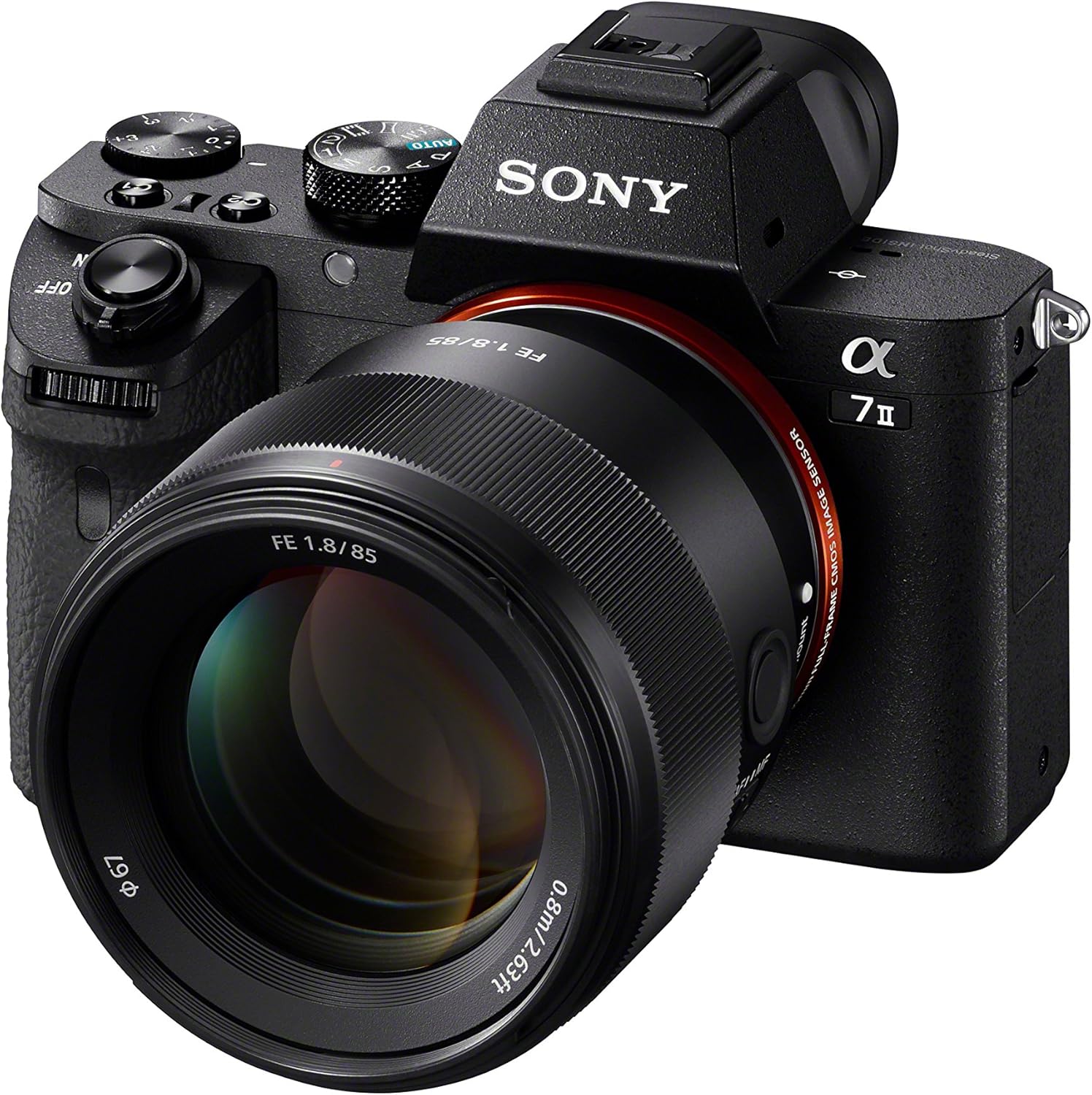
Figure 2.1: The Sony SEL85F18 lens securely attached to a Sony Alpha camera body.

Figure 2.2: Rear view of the Sony SEL85F18 lens, highlighting the E-mount for attachment to compatible cameras.
3. Operating Instructions
Familiarize yourself with the controls and functions of your SEL85F18 lens to maximize its performance.
Autofocus (AF) and Manual Focus (MF) Switch:
Located on the side of the lens, this switch allows you to quickly toggle between autofocus and manual focus modes. In AF mode, the camera will automatically focus on your subject. In MF mode, you can manually adjust the focus ring to achieve precise focus.
Focus Hold Button:
The customizable focus hold button can be assigned various functions through your camera's menu. By default, it locks the focus when pressed, allowing you to recompose your shot without losing focus on your subject.

Figure 3.1: Side view of the Sony SEL85F18 lens, indicating the AF/MF switch and the customizable focus hold button.
Aperture Control (F1.8):
The wide F1.8 maximum aperture is ideal for low-light conditions and creating a shallow depth of field with beautiful bokeh. Adjust the aperture through your camera's settings to control the amount of light entering the lens and the depth of field.
Sample Images and Video Demonstrations:
Observe the capabilities of the Sony SEL85F18 lens through these examples.

Figure 3.2: A portrait photograph demonstrating the creamy bokeh and sharp subject isolation achievable with the SEL85F18 lens.

Figure 3.3: An outdoor portrait showcasing the lens's ability to render a sharp subject against a beautifully blurred background.
Video 3.1: A quick review of the Sony SEL85F18 lens, demonstrating its physical features, autofocus capabilities, and the portrait effect achieved with its wide aperture. This video is provided by a seller.
Video 3.2: An honest review of the Sony SEL85F18 lens, highlighting its performance as a portrait lens and showcasing various sample photos. This video is provided by a seller.
4. Maintenance and Care
Proper maintenance ensures the longevity and optimal performance of your lens.
Cleaning the Lens:
- Use a soft, lint-free cloth or a lens brush to gently remove dust and debris from the lens surface.
- For stubborn smudges, apply a small amount of lens cleaning solution to a microfiber cloth and wipe gently in a circular motion.
- Avoid touching the lens elements directly with your fingers.
Storage:
- Always attach the front and rear lens caps when the lens is not in use.
- Store the lens in a dry, cool place, away from direct sunlight and extreme temperatures.
- If storing for an extended period, consider using a dehumidifying agent to prevent mold growth.
Dust and Moisture Resistance:
The SEL85F18 features a dust and moisture-resistant design. While this provides protection against light rain or dusty conditions, it is not waterproof. Avoid exposing the lens to heavy rain or submerging it in water.
5. Troubleshooting
If you encounter any issues with your Sony SEL85F18 lens, refer to the following common troubleshooting tips.
Lens Not Focusing:
- Ensure the AF/MF switch on the lens is set to the desired mode (AF for autofocus, MF for manual focus).
- Check your camera's focus mode settings to ensure they are compatible with the lens setting.
- Clean the lens contacts on both the lens and the camera body with a clean, dry cloth.
- Restart your camera.
Images Appear Soft or Blurry:
- Verify that the lens is properly focused on your subject.
- Check your camera's shutter speed to ensure it is fast enough to prevent motion blur, especially in low light or with moving subjects.
- Ensure the lens elements are clean and free from smudges or dust.
- If using a very wide aperture (e.g., F1.8), the depth of field will be very shallow, requiring precise focus.
Lens Not Recognized by Camera:
- Ensure the lens is securely attached to the camera body and has clicked into place.
- Turn the camera off, detach the lens, reattach it, and turn the camera back on.
- Check for any firmware updates for both your camera and lens.
6. Technical Specifications
| Specification | Detail |
|---|---|
| Product Dimensions | 4.49 x 3.82 x 4.49 inches |
| Item Weight | 10.4 ounces |
| Item Model Number | SEL85F18/2 |
| Brand | Sony |
| Focal Length Description | 85mm |
| Lens Type | Telephoto |
| Compatible Mountings | Sony E |
| Manufacturer | SONY |
| Date First Available | September 3, 2019 |
7. Warranty and Support
Warranty Information:
This product is covered by Sony's standard manufacturer's warranty. For specific details regarding your warranty period and coverage, please refer to the warranty card included with your product or visit the official Sony support website. Protection plans are also available for extended coverage.
Customer Support:
For technical assistance, service, or any inquiries regarding your Sony SEL85F18 lens, please contact Sony Customer Support. You can find contact information and additional resources on the official Sony website: www.sony.com/electronics/support