1. Safety Information
Please read and understand all safety instructions before assembling or using your Goplus Gaming Massage Office Chair. Retain this manual for future reference.
- This chair has a maximum weight capacity of 330 lbs (150 kg) and is recommended for adult use. Do not exceed this weight limit.
- Inspect the chair for any damage or defects before each use. Do not use a damaged chair.
- Always ensure the chair is on a stable, level surface to prevent tipping.
- Keep hands and fingers clear of moving parts during adjustment to prevent injury.
- Do not stand on the chair or use it as a step stool.
- Keep children and pets away from the chair during assembly and adjustment.
2. Product Features
The Goplus Gaming Massage Office Chair is designed for comfort and versatility, featuring:
- Lumbar Massaging Cushion: Equipped with motors for relaxing massage, powered via USB. Includes a power bank pocket for convenience.
- Ergonomic Design: Provides comfortable and spacious seating, with detachable head and lumbar cushions for enhanced support.
- High-Quality Materials: Constructed with durable PU leather for breathability and softness, suitable for all seasons. Features a sturdy steel structure.
- Adjustable Backrest: Reclines from 90° to 180° for various activities like working, reading, watching, or resting.
- Adjustable Armrests: Flexible armrests provide support in different positions.
- Sturdy & Mobile Structure: Five-claw steel base ensures stability and high load-bearing capacity. Smooth-rolling casters allow easy movement.
- Height Adjustment: Seat height is adjustable from 19 to 23 inches.

Figure 1: Goplus Gaming Massage Office Chair (Red)

Figure 2: Chair Dimensions and Weight Capacity (Max 330 lbs)
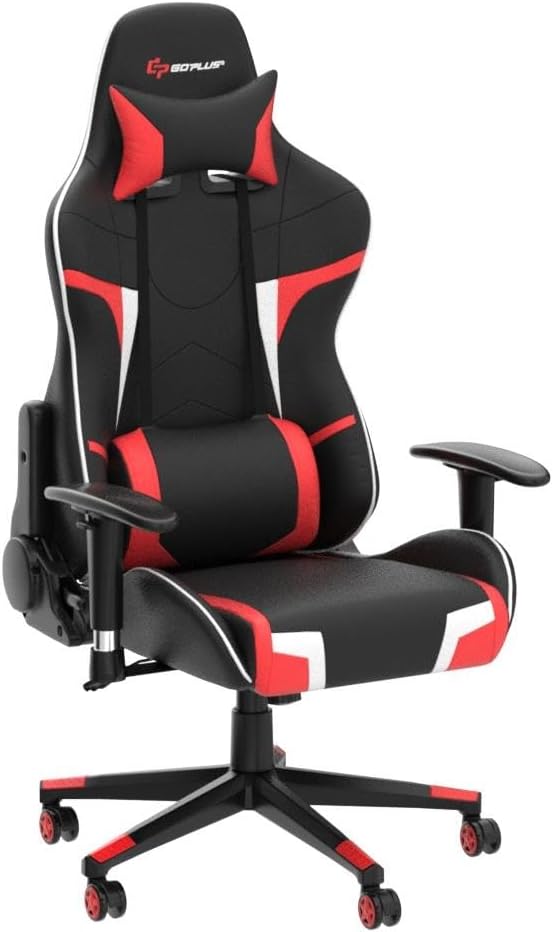
Figure 3: Lumbar Massage Cushion with USB Power Bank Pocket

Figure 4: Angle Adjustable Backrest (90°-180°)

Figure 5: Seat Height and Armrest Adjustments
3. Setup and Assembly
Follow these steps to assemble your Goplus Gaming Massage Office Chair. It is recommended to assemble the chair on a soft, clean surface to prevent damage.
- Attach Casters to Base: Insert the five casters into the holes at the end of each leg of the chair base. Push firmly until they click into place.
- Install Gas Lift: Place the gas lift cylinder into the center hole of the assembled chair base. Cover it with the telescopic cover.
- Attach Armrests to Seat: Secure the armrests to the underside of the seat cushion using the provided screws and Allen wrench. Ensure they are firmly tightened.
- Mount Mechanism to Seat: Attach the seat mechanism to the underside of the seat cushion, aligning the 'FRONT' arrow on the mechanism with the front of the seat. Secure with screws.
- Connect Backrest to Seat: Align the backrest with the metal brackets on the seat. Secure with screws on both sides. Attach the plastic covers over the brackets.
- Place Assembled Seat onto Gas Lift: Carefully place the assembled seat and backrest onto the gas lift cylinder, ensuring it is centered and stable.
- Attach Cushions: Secure the lumbar massage cushion and headrest pillow using their adjustable straps. The lumbar cushion's USB cable can be connected to a power bank stored in the side pocket.
Video 1: Goplus Gaming Chair Overview. This video demonstrates various features and adjustments of the Goplus Gaming Chair, including its mobility, adjustable components, and ergonomic design. It provides a visual guide to the chair's functionality.
4. Operating Instructions
4.1. Seat Height Adjustment
To adjust the seat height, locate the lever on the right side, beneath the seat. Pull the lever upwards while lifting your weight off the seat to raise it. To lower the seat, pull the lever upwards while remaining seated.
4.2. Backrest Recline
To recline the backrest, pull the lever on the left side of the seat upwards and lean back to your desired angle (between 90° and 180°). Release the lever to lock the backrest in position. To return to an upright position, pull the lever and lean forward slightly.
4.3. Armrest Adjustment
The armrests can be adjusted for height. Press the button on the side of each armrest and move it up or down to your preferred height. Release the button to lock it.
4.4. Lumbar Massage Function
The lumbar cushion features a massage function. Connect the USB cable from the cushion to a power bank (not included) stored in the dedicated pocket under the seat. Use the integrated controller to turn the massage on/off and select desired settings.
Video 2: Goplus Massage Gaming Chair Demonstration. This video highlights the massage capabilities of the Goplus Gaming Chair, showing how to activate and use the lumbar massage feature for enhanced comfort during extended use.
5. Maintenance
Proper maintenance will extend the life and appearance of your chair.
- Cleaning: To clean the chair, use a damp cloth and mild detergent. Gently wipe the surface, then wipe dry with a clean cloth. Avoid using abrasive cleaners, solvents, or harsh chemicals, as these can damage the PU leather.
- Regular Inspection: Periodically check all screws and bolts to ensure they are tight. Retighten if necessary.
- Caster Care: Keep casters free of debris (hair, dust, etc.) to ensure smooth rolling.
6. Troubleshooting
If you encounter any issues with your chair, refer to the following common solutions:
- Chair is Wobbly: Ensure all assembly screws are securely tightened. Check that the casters are fully inserted into the base.
- Seat Height Not Adjusting: Verify that the gas lift lever is functioning correctly and that the gas lift cylinder is properly seated in the base and mechanism.
- Backrest Not Reclining/Locking: Check the recline lever mechanism for any obstructions or loose connections. Ensure the lever is fully engaged to lock the backrest.
- Massage Function Not Working: Confirm the USB cable is securely connected to a working power bank. Check the power bank's charge level and the massage controller for proper operation.
- Casters Not Rolling Smoothly: Remove any hair or debris that may be caught in the casters.
If problems persist, please contact Goplus customer support for further assistance.
7. Product Specifications
| Feature | Specification |
|---|---|
| Brand | Goplus |
| Model Name | hw66185gr-1_2 |
| Color | Red |
| Product Dimensions | 29"D x 29"W x 54"H |
| Material | Faux Leather, Sponge (Fill Material) |
| Maximum Weight Recommendation | 330 Pounds (150 kg) |
| Back Style | Solid Back |
| Special Feature | Adjustable, Flexible, Massage Lumbar Cushion |
| Reclining Position Count | 2 (90° to 180°) |
| Furniture Base Movement | Swivel |
| Recommended Uses | Gaming, Relaxing, Office |
8. Warranty and Support
Goplus is committed to providing high-quality products. For any warranty claims, technical support, or inquiries regarding your Goplus Gaming Massage Office Chair, please refer to the contact information provided at the point of purchase or visit the official Goplus website.
Please retain your proof of purchase for warranty purposes.


