
1. Introduction
Thank you for choosing the LEPOWER LED Motion Sensor Security Light. This manual provides essential information for the safe installation, operation, and maintenance of your new security light. Please read it thoroughly before installation and retain it for future reference.
2. Safety Instructions
- WARNING: Risk of Electric Shock. Disconnect power at the fuse or circuit breaker before installation or servicing.
- This product must be installed in accordance with the applicable installation code by a person familiar with the construction and operation of the product and the hazards involved.
- Grounding is required to ensure personal safety.
- Do not install this fixture on surfaces that are unstable or prone to vibration.
- Ensure all connections are secure and properly insulated.
- Do not look directly into the LED light source when illuminated.
3. Package Contents
Verify that all components are present before beginning installation:
- LEPOWER LED Motion Sensor Security Light (1)
- Mounting Hardware (Screws, Wire Nuts, Gasket)
- Instruction Manual (1)
4. Product Features
- High Brightness & Energy Efficiency: 38W, 4200 Lumens, 5500K daylight white light. Saves over 80% energy compared to traditional 175W lights.
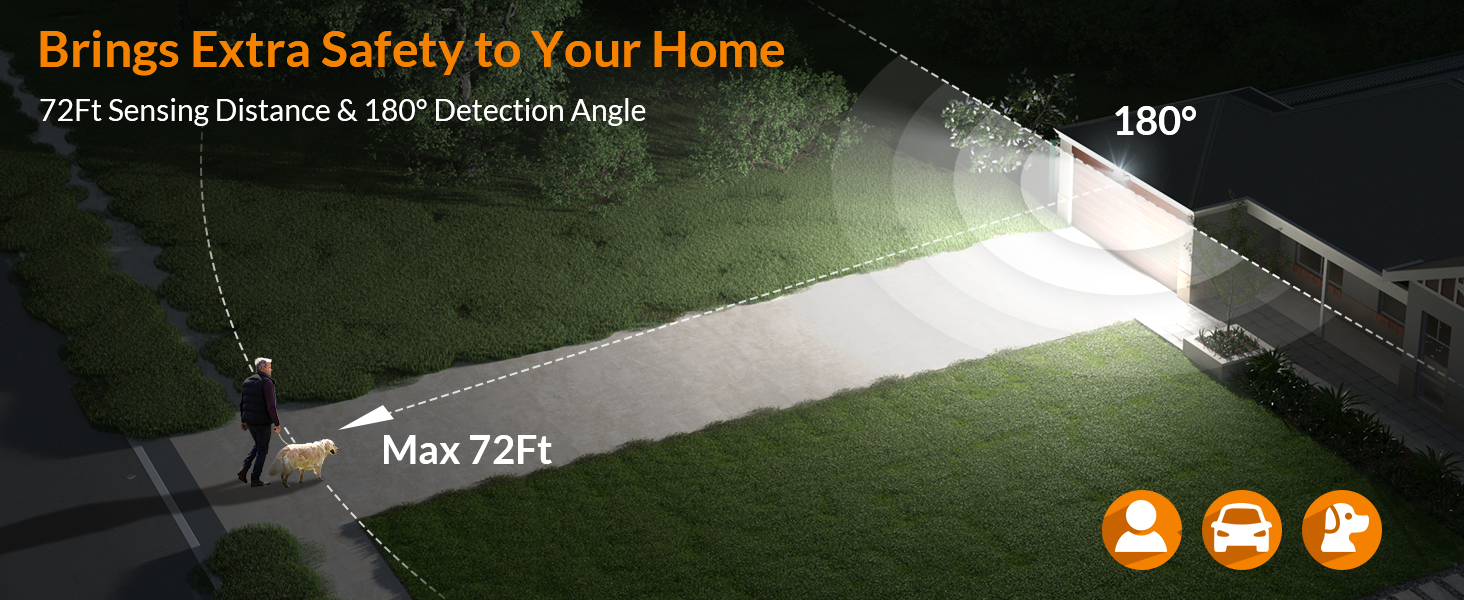
- Advanced Motion Sensor: Detects motion up to 72 feet within a 180° detection angle. Adjustable lighting duration from 10 seconds to 10 minutes.
- Adjustable Design: Three independent light heads and the motion sensor head can be adjusted to direct light and detection precisely where needed.
- Durable Construction: Full metal (aluminum) body ensures flexibility, durability, and excellent heat dissipation.
- Weatherproof: IP65 rated for outdoor use, protecting against rain and harsh weather conditions.
5. Specifications
| Model Number | YY02A-BL |
| Power Consumption | 38 Watts |
| Brightness | 4200 Lumens |
| Color Temperature | 5500K (Daylight White) |
| Voltage | 120V (DC) |
| Motion Sensor Range | Up to 72 feet |
| Detection Angle | 180° |
| Lighting Duration | 10 seconds to 10 minutes (adjustable) |
| Material | Metal (Aluminum) |
| Water Resistance | IP65 (Waterproof) |
| Dimensions (L x W x H) | 14" x 8.27" x 5.2" |
| Weight | 1.71 pounds |
6. Installation Guide
This security light is designed for wall mounting and requires hardwiring to an electrical junction box (not included). Professional installation is recommended if you are not familiar with electrical wiring.
6.1 Preparation
- Turn off power at the circuit breaker or fuse box before starting.
- Ensure the mounting surface is stable and can support the fixture's weight.
- Gather necessary tools: ladder, screwdriver (flathead and Phillips), pliers, wire stripper, electrical tape, voltage detector.
6.2 Mounting Steps
- Step 1: Attach Mounting Bracket. Secure the mounting bracket to your existing 4-inch junction box using the provided screws. Ensure the bracket is firmly attached.
- Step 2: Wire Connections. Connect the household wires to the fixture wires using the provided wire nuts. Match colors: Black to Black (Live), White to White (Neutral), Green/Bare Copper to Green (Ground). Ensure all connections are tight and insulated with electrical tape if necessary.
- Step 3: Secure Fixture. Align the fixture with the mounting bracket and secure it with the center screw. Ensure the gasket is properly seated to maintain weather resistance.

6.3 Adjusting Light Heads and Sensor
The three light heads and the motion sensor can be independently adjusted to cover your desired area. Gently pivot each component to the required angle. Do not force adjustments beyond their natural range of motion.

7. Operating Instructions
After installation, restore power to the fixture. The motion sensor has adjustable settings for optimal performance.
7.1 Sensor Adjustments
Locate the adjustment dials on the underside of the motion sensor. These typically control 'TIME' (lighting duration) and 'SENS' (sensitivity/detection range).
- TIME: Adjusts how long the light stays on after motion is detected. Settings usually range from 10 seconds to 10 minutes. Turn the dial clockwise to increase the duration, counter-clockwise to decrease.
- SENS: Adjusts the motion sensor's sensitivity and detection range. Turn the dial clockwise for higher sensitivity and longer range (up to 72 feet), and counter-clockwise for lower sensitivity and shorter range.
- TEST Mode: Some models include a 'TEST' setting on the TIME dial. In this mode, the light will turn on for a short period (e.g., 5-10 seconds) each time motion is detected, regardless of ambient light. This is useful for testing the sensor's coverage area.

8. Maintenance
Regular maintenance ensures optimal performance and longevity of your security light.
- Cleaning: Periodically clean the light heads and motion sensor lens with a soft, damp cloth. Do not use abrasive cleaners or solvents, as they may damage the finish or sensor.
- Inspection: Annually inspect the wiring and mounting for any signs of wear, damage, or loosening. Ensure the fixture remains securely attached to the wall.
- LEDs: The integrated LED lights are designed for long life and are not user-replaceable.

9. Troubleshooting
If you experience issues with your LEPOWER LED Motion Sensor Security Light, refer to the following common problems and solutions:
| Problem | Possible Cause & Solution |
|---|---|
| Light does not turn on. |
|
| Light stays on continuously. |
|
| Light turns on for no apparent reason. |
|
| Detection range is too short. |
|
10. Warranty Information
This LEPOWER product is covered by a 1-year limited warranty from the date of purchase. This warranty covers defects in materials and workmanship under normal use. It does not cover damage resulting from improper installation, accident, misuse, abuse, or unauthorized modifications.
11. Customer Support
If you have any questions, require technical assistance, or need to claim warranty service, please contact LEPOWER customer support through the retailer where the product was purchased or visit the official LEPOWER website for contact information.


